EasyManua.ls Logo

Vicovation Vico-Opia 2 Premium - Main Settings; Video Settings; Function Settings

Vicovation Vico-Opia 2 Premium
57 pages
Print Icon
To Next Page IconTo Next Page
To Previous Page IconTo Previous Page
Loading...
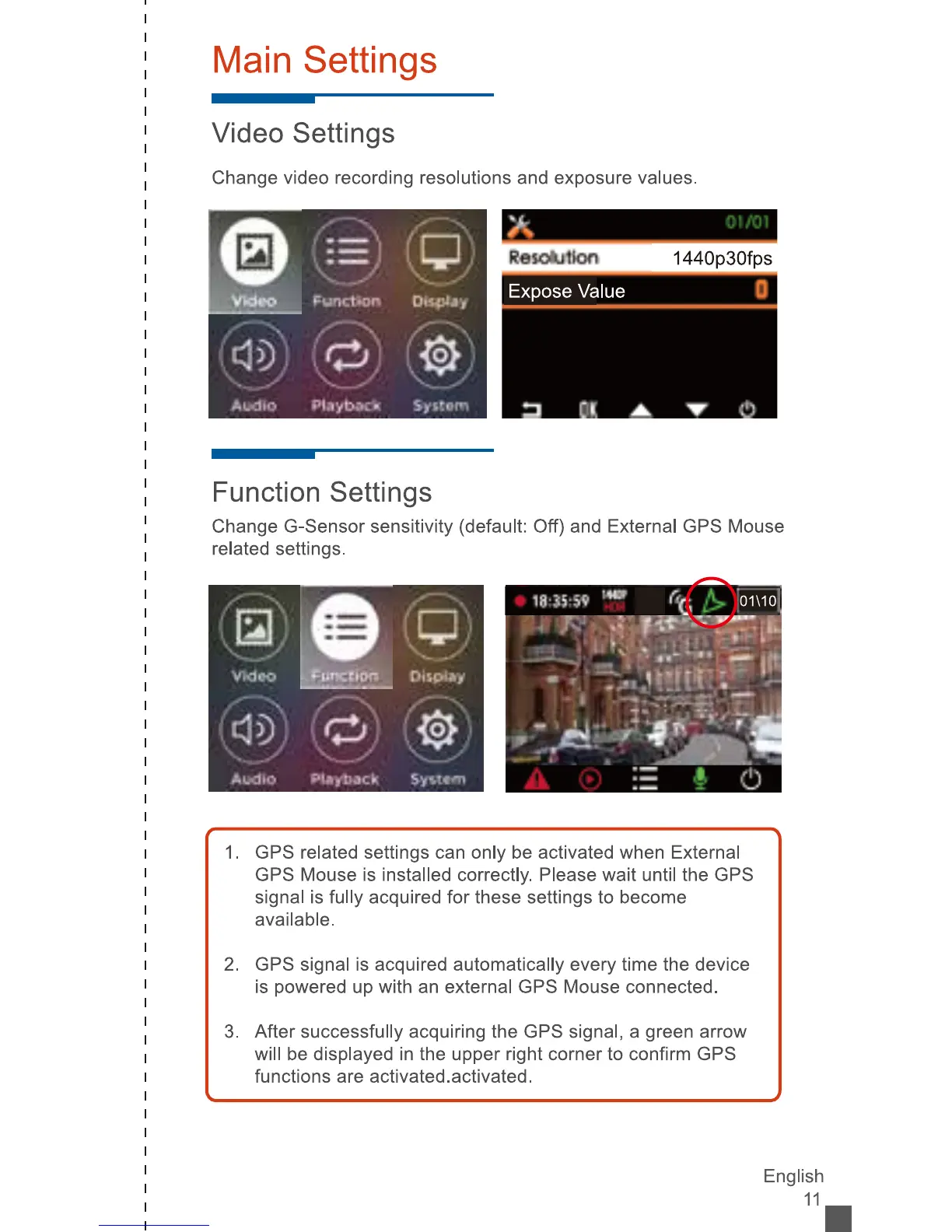
Main
Settings
Video
Settings
Change
video
recording
resolutions
and
exposure
values.
ÿ
I*
Vklpp
Punctiarÿ
DI*pJiy
Resoiulkrii
1440p30fps
Expose
Value
°l
Audio
PMybKft
Syitom
Function
Settings
Change
G-Sensor
sensitivity
(default:
Off)
and
External
GPS
Mouse
related
settings.
s
@
a
VKJoo
[ÿjjiccipn
Display
®)
s
®
1.
GPS
related
settings
can
only
be
activated
when
External
GPS
Mouse
is
installed
correctly.
Please
wait
until
the
GPS
signal
is
fully
acquired
for
these
settings
to
become
available.
2.
GPS
signal
is
acquired
automatically
every
time
the
device
is
powered
up
with
an
external
GPS
Mouse
connected.
3.
After
successfully
acquiring
the
GPS
signal,
a
green
arrow
will
be
displayed
in
the
upper
right
corner
to
confirm
GPS
functions
are
activated.activated.
English
11.