5
Need Help? Watch the video at www.victortech.com/High-Rise
Step 3: Attach Desk Surface to Tower
1 2 3 4 - 5
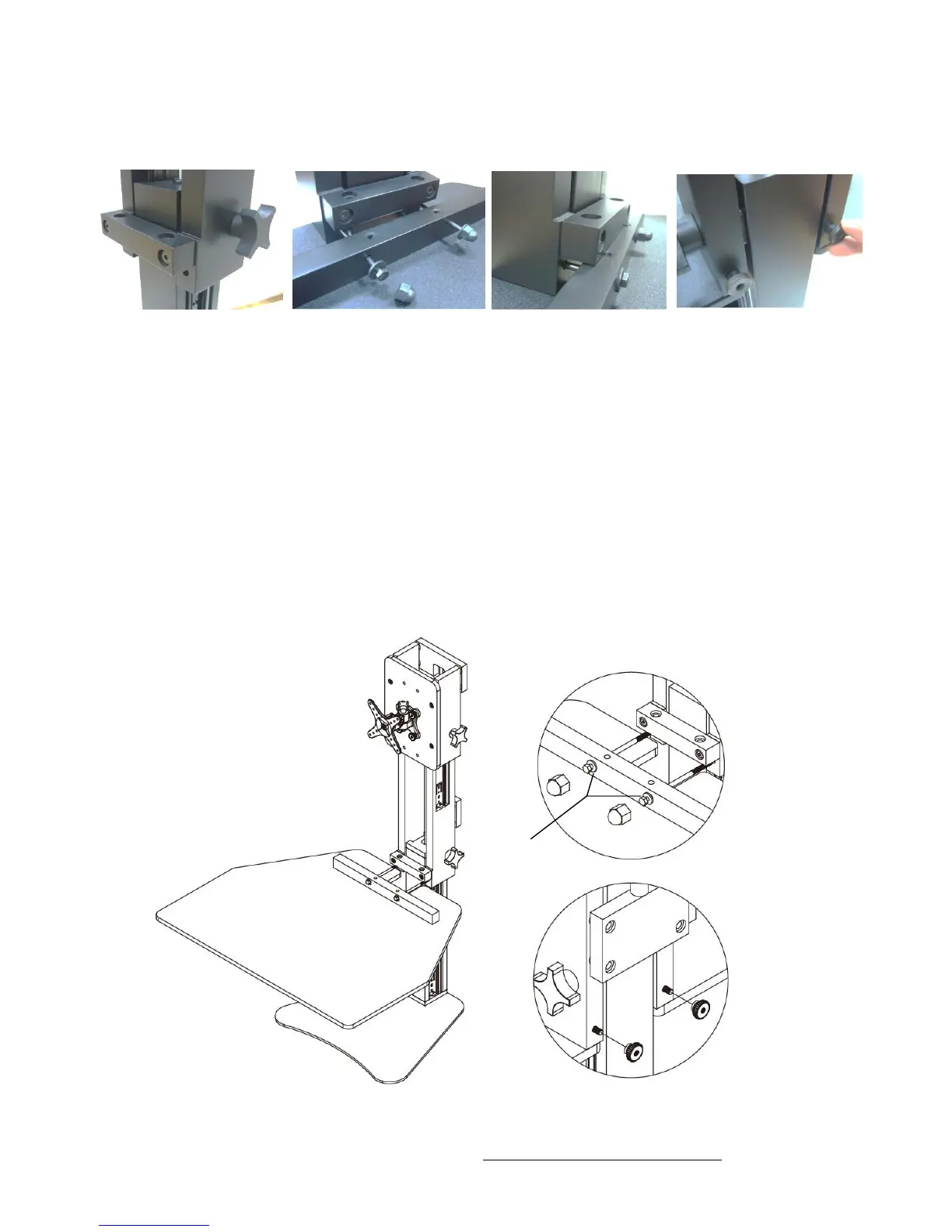
Attach the Desk Surface to the Tower.
1. Rotate the lower knob counter clockwise to loosen the Tower and allow it to rise.
2. Place the Washer on the Long Bolt and insert the Long Bolt through the Cross Bar
on the Desk Surface.
3. Guide the two Long Bolts through the holes on the Tower.
* Hint – moving the desk surface up and down while you are feeding the two
bolts through will assist you in this step. You can also lightly tap the bolts
through the Tower using a hammer.
4. Place a Thumb Nut onto each of the bolts on the other side of the Tower.
5. Turn the Thumb Nuts clockwise to secure tightly.
6. Add black Caps to the Long Bolts if desired.



 To Next Page