7
Need Help? Watch the video at www.victortech.com/High-Rise
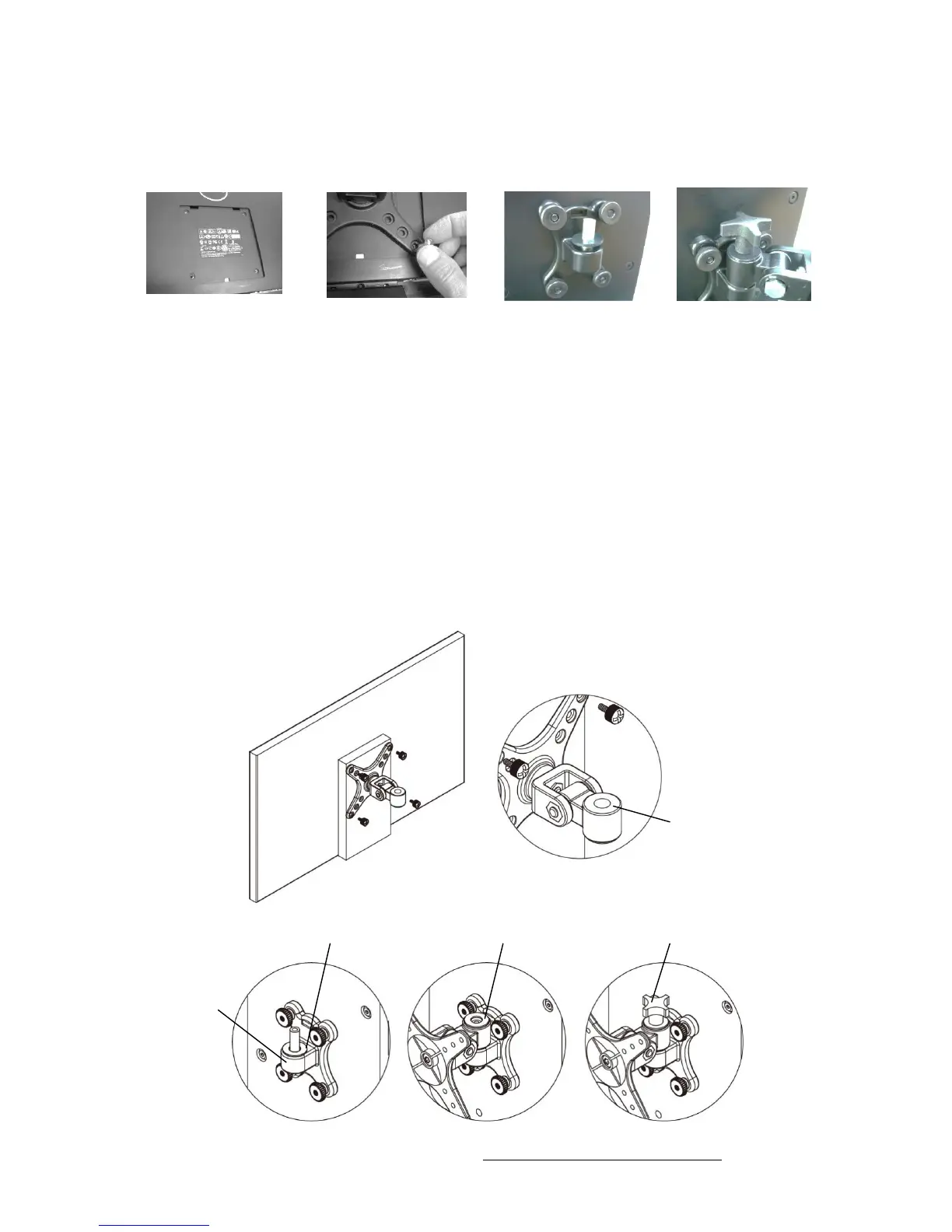
Step 5: Attach Monitor Bracket to Monitor& Tower
1 2 - 4 5 6
1. The DC300 comes with a VESA bracket designed to fit most monitors. Your
monitor is compatible if there are four screw holes in the center of the back of the
monitor.
2. Place the monitor with the screen facing down on a soft surface that will not
scratch the monitor.
3. Align the monitor bracket over the four screw holes.
TIP: The topside has a smaller opening hole than the bottom.
4. Use the four provided Thumb Screws to secure the monitor bracket to the
computer monitor.
5. Place a Large Spacer on the post of the monitor holder attached to the Tower.
6. Lift the monitor, and carefully place the monitor on to the post.
7. Place a second Large Spacer over the posthole and insert the Tightening Knob.
Turn the knob clockwise very tightly with your fingers. This will secure the monitor
in place.



 To Next Page