EasyManua.ls Logo

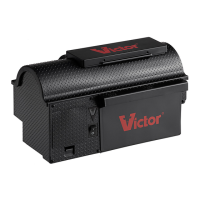
Victor Multi-Kill M260 - User Manual

Victor Multi-Kill M260
4 pages
Print Icon
To Next Page IconTo Next Page
Loading...
www.victor-rodent-control.co.uk
Victor® Multi-Kill
Electronic Mouse Trap Instructions
Thank you for your purchase of the Multi-Kill® Electronic Mousetrap, the world’s most advanced
mouse trap. This device was developed by Victor®, your trusted rodent control expert for over 100
years.
1
Make certain the power switch is depressed to the OFF” (O) position.
2
Open the kill chamber door. Insert a small amount of peanut butter
(the size of a pea) against the back wall of the kill chamber.
Be sure to never place peanut butter or any other material directly on
the metal plates as this will not allow a proper connection between the
mouse and the plate.
Question and Answer IconNeed help?

Do you have a question about the Victor Multi-Kill M260 and is the answer not in the manual?

Summary

Victor Multi-Kill Electronic Mouse Trap Instructions

Set Power to OFF

Ensure the power switch is in the "OFF" (O) position before proceeding with setup.

Add Bait to Kill Chamber

Insert a small amount of bait against the back wall of the kill chamber, avoiding metal plates.

Install Batteries Correctly

Open the battery compartment, remove plastic from the (4) C batteries, reinsert them properly, and close the lid.

Strategic Trap Placement

Place the trap with stairs oriented against a wall in an area showing mouse activity.

Activate the Trap

Depress the power switch to "ON" (1); a flashing green light confirms operation.

Empty Captured Rodents

Turn the trap OFF, open the receptacle, and dispose of any caught mice.

Indicator Light Status Guide

Interpret Light Signals

Understand the meaning of various light blink patterns for trap status, including power, kill, and low battery.

Victor Multi-Kill M260 Specifications

General IconGeneral
BrandVictor
ModelMulti-Kill M260
CategoryComputer Accessories
LanguageEnglish

Related product manuals