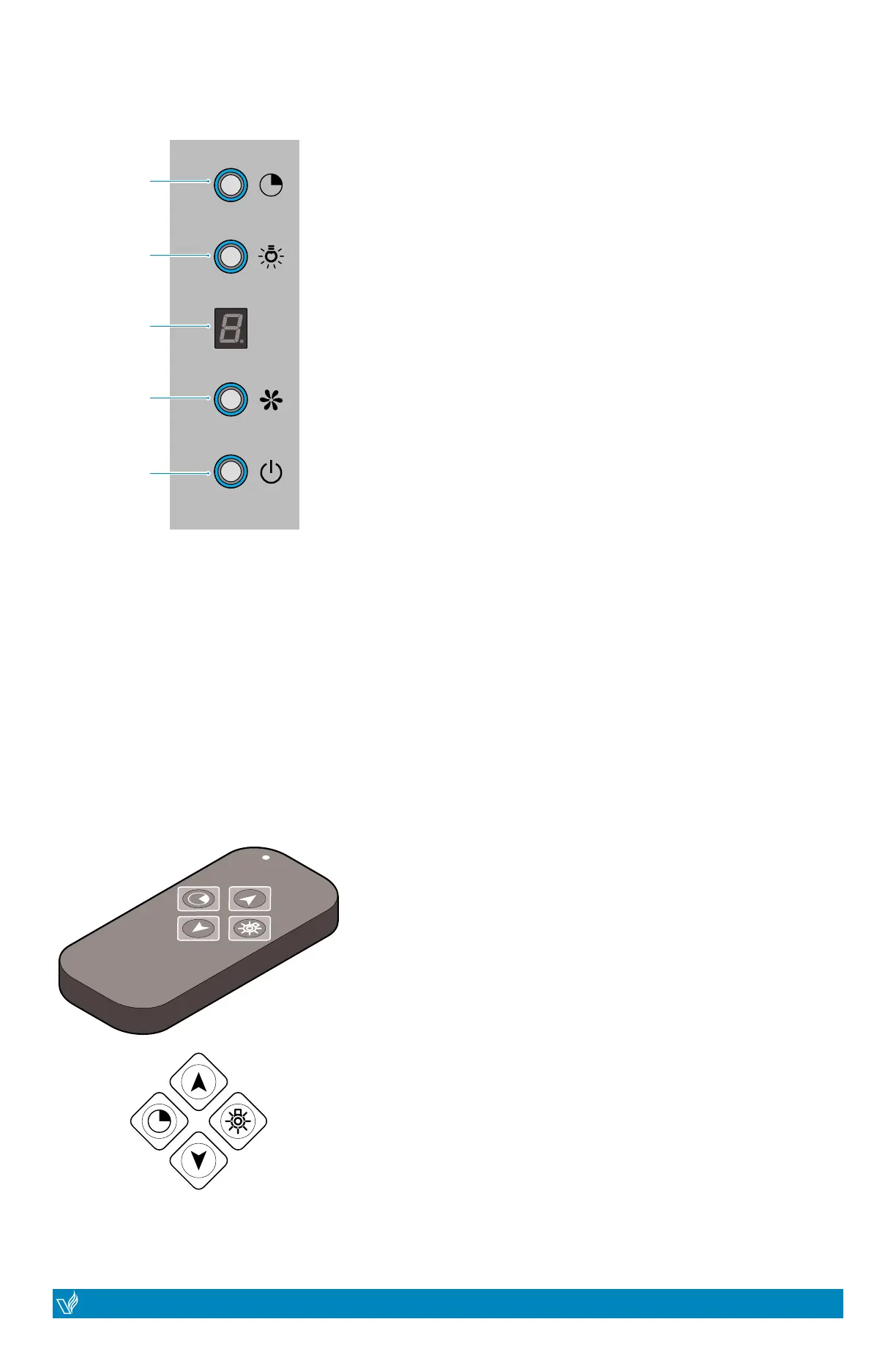
Timer
Lights
LED Display
Fan Blower
Power
On / Off
REMOTE CONTROL
Timer:
Motor On/O:
CONTROL PANEL
Connecting the remote control
Resetting your connection to the remote control (clear code)
Lights On/O:
• To operate the timer, rst turn on the range hood from
the remote contro by poressing the up-arrowl. Next, use
the remote control and press the timer button. This will
activate the 9 minute timer. The range hood will continue
to operate for 9 minutes before shutting o. The timer
can also be controlled directly from the electronic switch
on the range hood.
• To turn on the fan of the range hood yo Speed 1, click
the up-arrow on the remote control. The unit has 3
speeds. Click the up-arrow to increase speed, or click
the down-arrow to decrease the speed. The motor can
also be controlled directly from the electronic switch on
the range hood.
1. Press the “Power” button to turn ON and OFF the range
hood unit.
2. Press the “Fan Blower” button to change the fan speed to
low/med/high. The LED Display will indicate as 1, 2, 3
3. Press “Light” button to turn ON and OFF the lights. The Light
button works independently from the “Power” button.
4. When the range hood unit is turned on, you may use the
“Timer” button. When pressed/activated there will be 9
minutes to count down for the unit to turn o the fan blower
and the lights. The LED Display will show the designated
9 minutes and count down in increments of a minute (i.e.
9...8...7...6...). You may press the timer button again to
disable the timer.
1. Press the Power button for 5 seconds. The indicators light begin ashing
from one button to another, and the unit is in connection mode. Press
any button on the remote control to conrm the connection.
1. Press the Power button for 5 seconds and the indicators light begin
ashing from one button to another, and the unit is in connection mode.
2. Press the Power button again for 5 seconds and the previous code will
be cleared. Repeat “Connecting the remote control” instructions.
• To turn on the lights of the range hood, click the light
button on the remote control. The unit has 4 LED lights
(not dimmable). The lights can also be controlled directly
from the electronic switch on the range hood.
*The remote control may slightly vary
VICTORY range hoods
| JUPITER
14
VICTORY range hoods
JUPITER |
15
RANGE HOOD OPERATIONS


 To Next Page