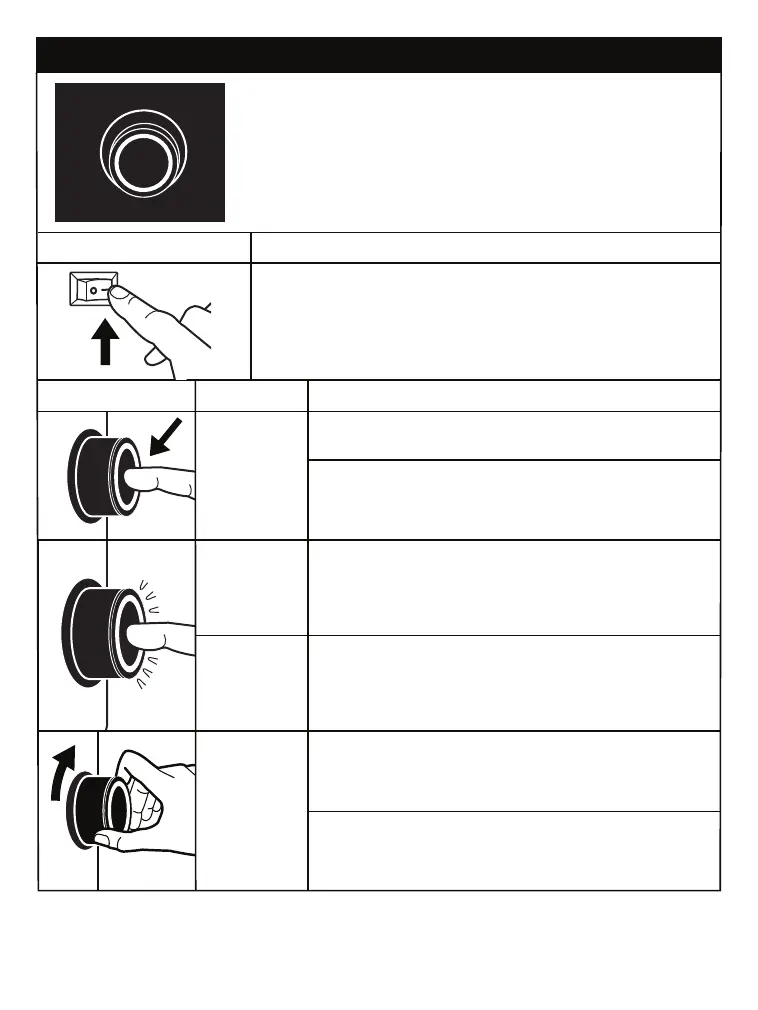
POWER ON/OFF: Flip Switch to Power ON or OFF the Unit.
OPERATION
QUICK START GUIDE
FUNCTION KNOB - BASIC OPERATION
FUNCTION KNOB - TO CYCLE THROUGH FEATURES
POWER: Press and hold for 1-2 seconds to turn the unit ON or OFF.
VOLUME: Rotate to raise or lower volume.
ANALOG MODE (AUX-IN/ RCA-IN): Press to play a connected auxiliary device.
BLUETOOTH: Press to pair the unit with a Bluetooth device (smartphone).
FUNCTION & VOICE PROMPT
LOWER VOLUME: Rotate dial COUNTER-CLOCKWISE.
Dial will brighten when in use.
RAISE VOLUME: Rotate dial CLOCKWISE.
Dial will brighten when in use.
Unit will chime when MAX volume is reached.
Press for: ANALOG (RCA / AUX):
If an audio device is connected via RCA / AUX-In Cords
The device will stay solid White and will be ready for use.
Press for: BLUETOOTH: “Bluetooth”
Dial will FLASH when searching.
When connected, prompt will say “Connected” & dial will turn SOLID.
POWER ON: Press and hold for 1-2 seconds.
POWER OFF: Press and hold for 1-2 seconds.
When powering back ON, the unit will return
on the last used function mode.
RING COLOR
WHITE
WHITE
WHITE
BLUE
OPERATION
FUNCTION


 To Next Page