SETTING THE TIME
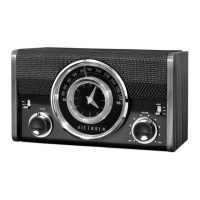
1. Push in and rotate the CLOCK knob counter-clockwise to adjust the clock time.
(The minute pointer will vary with the adjustment of the hour pointer).
2. Once you have set the time successfully, release the knob.
NOTE: Once the power cord is connected or batteries are installed, the clock will work.
SETTING THE ALARM
1. Slide the ON/OFF switch to ON to activate the alarm.
2. Rotate the ALARM knob to set the alarm time.
3. When the alarm sounds, slide the alarm switch to OFF to turn off the alarm.
SNOOZE FEATURE
1. To snooze the alarm, touch the SNOOZE/DIMMER button. The alarm will snooze for approximately
five (5) minutes.
2. To cancel the snooze feature and alarm sound, slide the ON/OFF alarm switch to OFF.
CHARGING AN EXTERNAL DEVICE
1. Connect the AC plug to a wall outlet.
2. Plug a USB cable (not included) into the USB port of the speaker. Plug the other end of the USB
cable into a Smartphone or an external device.
3. The unit will charge the device automatically.
NOTE: Charging function only works in Bluetooth mode or when the unit is OFF.
DIMMER FEATURE
Lightly touch the SNOOZE/DIMMER button to cycle through the three (3) brightness settings.


 To Next Page