5
.
Photo beam setting
6. O/S/C Terminal
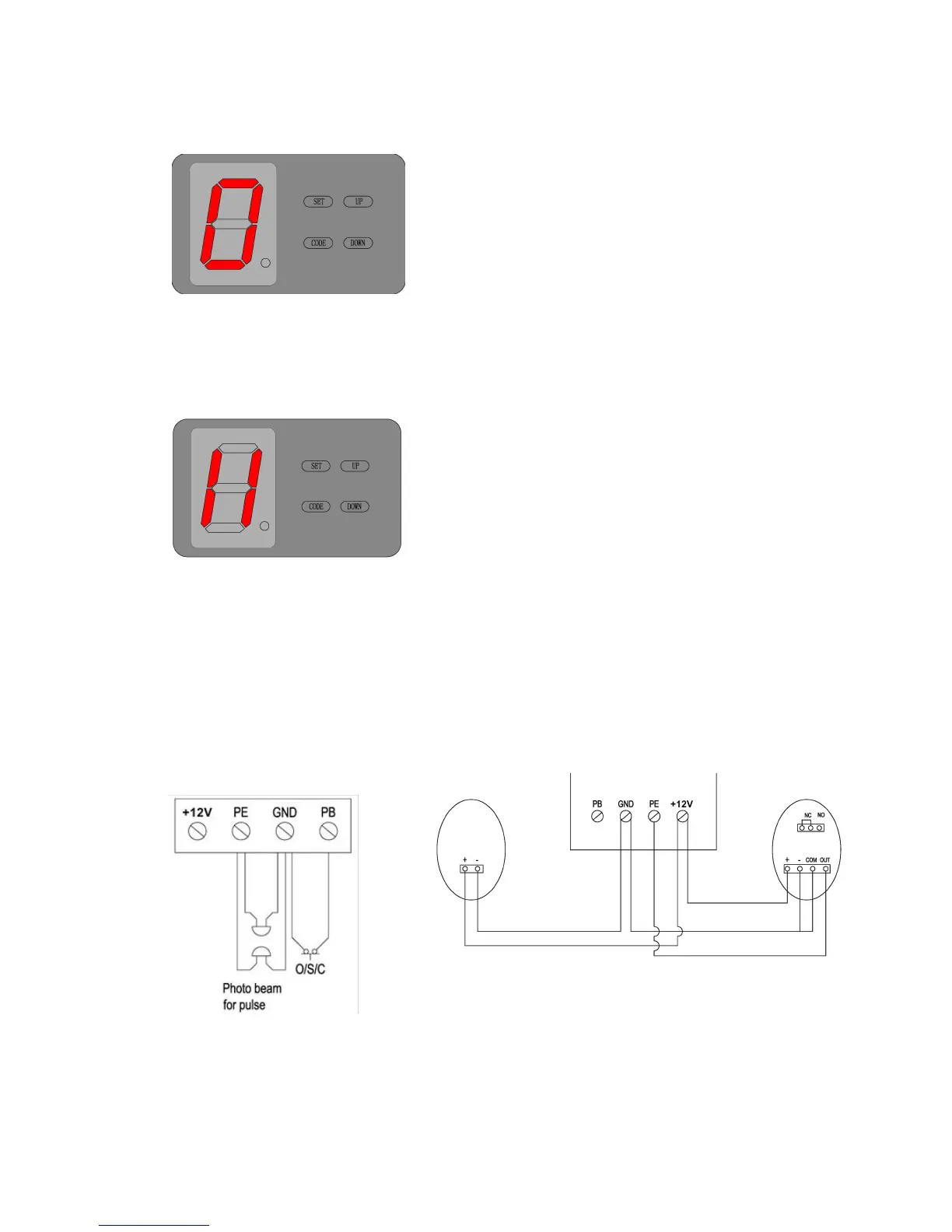
FIG. 14 FIG.15
Press ‘UP’ button and hold on until the LED displays ‘0’.
Press ‘UP’ button once, the auto-close time will increase 1
level, total 1-9 levels, the maximum time level is 9 (every
one level is equal to about 1 minute). Press ‘DOWN’ button
the auto-close time decrease 1 level. The display number
will be a cycle of 0~9. The auto-close function will be
turned off when LED displays ‘0’. Press ‘SET’ button to
confirm. When the auto-close function is activated, the full
opened door will auto-close after the set time.
Press ‘DOWN’ button and hold on until the LED
displays’11’, press ‘UP’ button the LED displays ‘H’, photo
beam function is available. Press ‘DOWN’ button the LED
displays ‘11’ to cancel this function. When setting is
finished, press ‘SET’ to confirm. When need to activate
photo beam function, the photo beam need to be
connected first. When connecting pulsed quantity control
infrared sensor, wiring as FIG. 14. When infrared sensor is
controlled by switch value, wiring as FIG. 15 Notice: If photo
beam function is activated, while the photo beam is not
Connecting a touch off switch to this terminal, you can use
the switch inside the garage to control the open/stop/close
of the door when maintaining or the transmitter is lost (FIG.
16).



 To Next Page