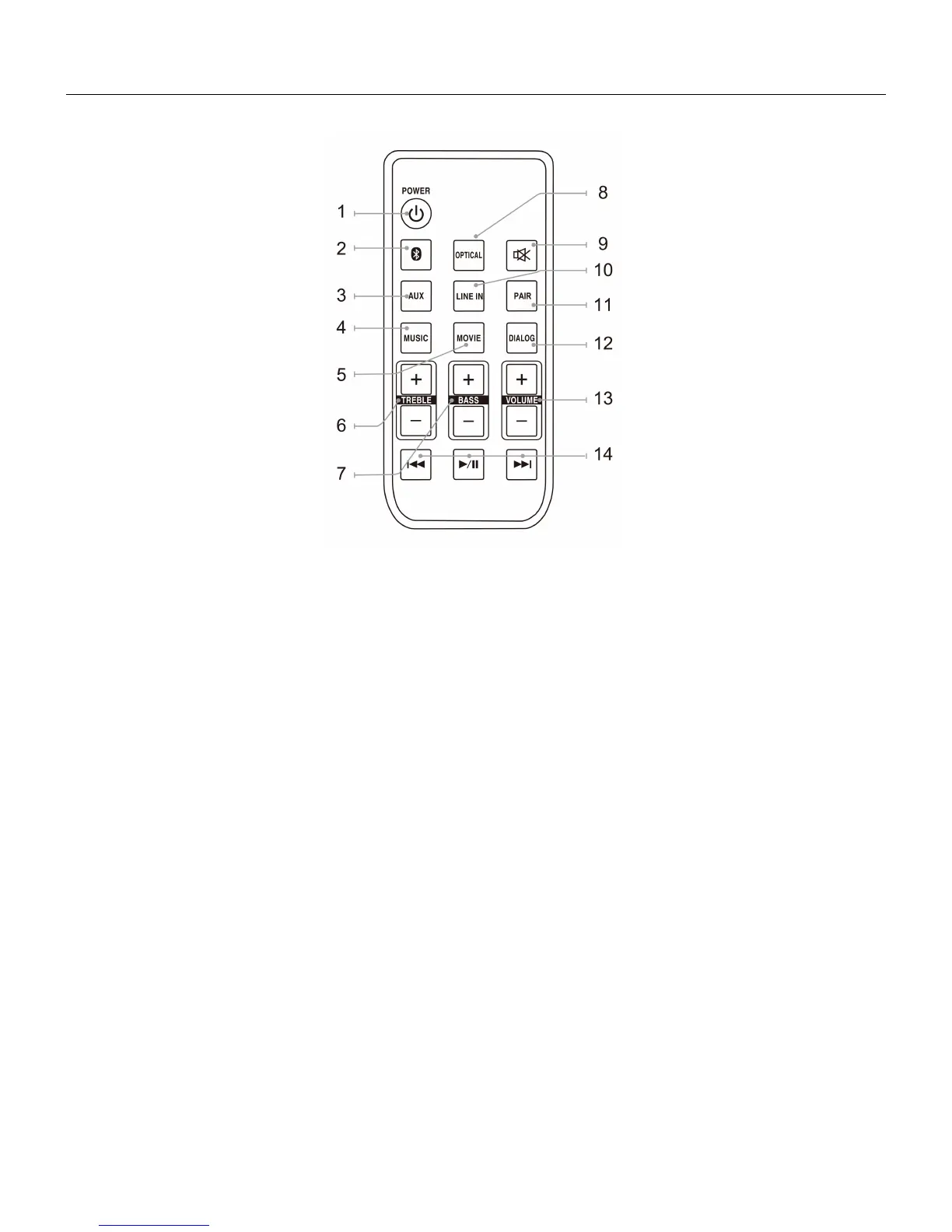
REMOTE CONTROL – LOCATION OF CONTROLS
1. POWER: Press to turn the unit ON or OFF
2. BT: Press to switch to Bluetooth Mode.
3. AUX: Press to switch to AUX Mode.
4. MUSIC: Press to switch to the EQ setting optimized for music.
5. MOVIE: Press to switch to the EQ setting optimized for movie sound.
6. TREBLE: Press to adjust the treble up or down.
7. BASS: Press to adjust the bass up or down
8. OPTICAL: Press to switch to Optical mode.
9. MUTE: Press to mute the volume.
10. LINE IN: Press to switch to Line In mode.
11. PAIR: Press to switch to Pair mode.
12. DIALOG: Press to switch to the EQ setting optimized for dialogue.
13. VOLUME: Press to adjust the volume.
14. SKIP: In Bluetooth mode, press to skip forward or back one track.
/PLAY/PAUSE: In Bluetooth mode, press to play or pause a track.



 To Next Page