8
2. W PANEL PROGRAMMING
INSTALLATION MANUAL
W & WIP Alarm panel
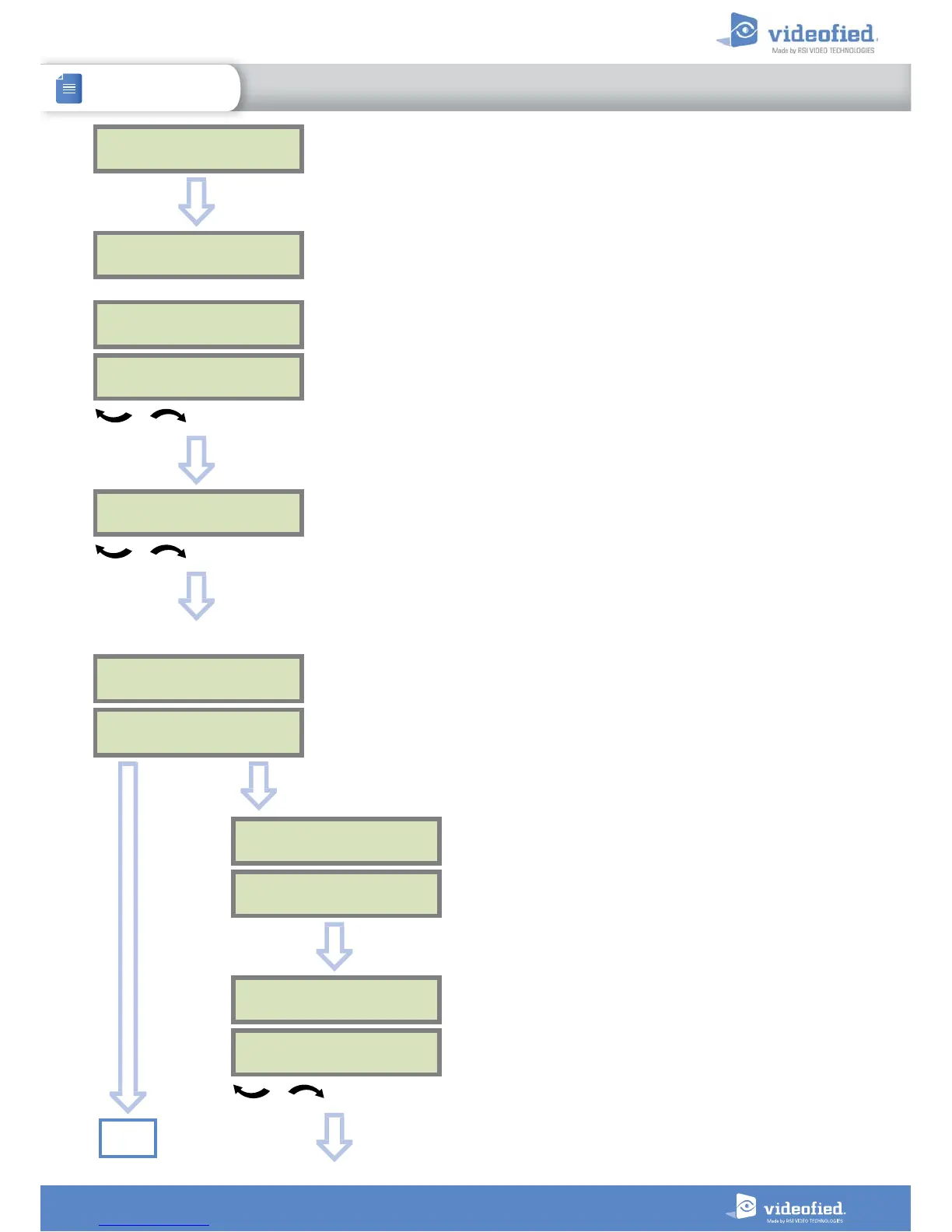
You may name the installer code using the alphanumeric
keypad.
If using automatic setting (called installer default list),
enter the name of the list.
Warning : If the wrong installer list name is used, it
cannot be set later, the system must be defaulted.
Leaving the name blank by pressing
ESC NO
, it will be
named ‘ACCESS 1’ by default.
CODE NAME :
OK or YES
ACCESS 1
REGISTERED
Wait
ADJUSTING
DATE AND TIME
DATE (YEAR):
15/ /
To set the year
OK or YES
DATE (MONTH):
15/01/
To set the month
OK or YES
You may proceed in the same way for :
Day, Hour and Minutes
15/01/19 10:47
ENTRY COMPLETE !
CONNECTED TO
MONITOR. STATION?
OK or YES
Use the alphanumeric keypad to enter in a 4-8 digit account
number provided by the Central Station
ACCOUNT NUMBER :
ACCOUNT NUMBER :
567001
OK or YES
PERIODIC TEST
PERIODIC TEST :
24 HOURS
To select periodicity
OK or YES
Test Periodicity: 1 hour, 12 hours, 24 hours, 48 hours, 7 days
or no tests.
We suggest a 24 hours periodic test call.
ESC
NO
Go to
page 10


 To Next Page