Rev AA Poor Print Quality 7-5
Videojet 1710 Operator Manual
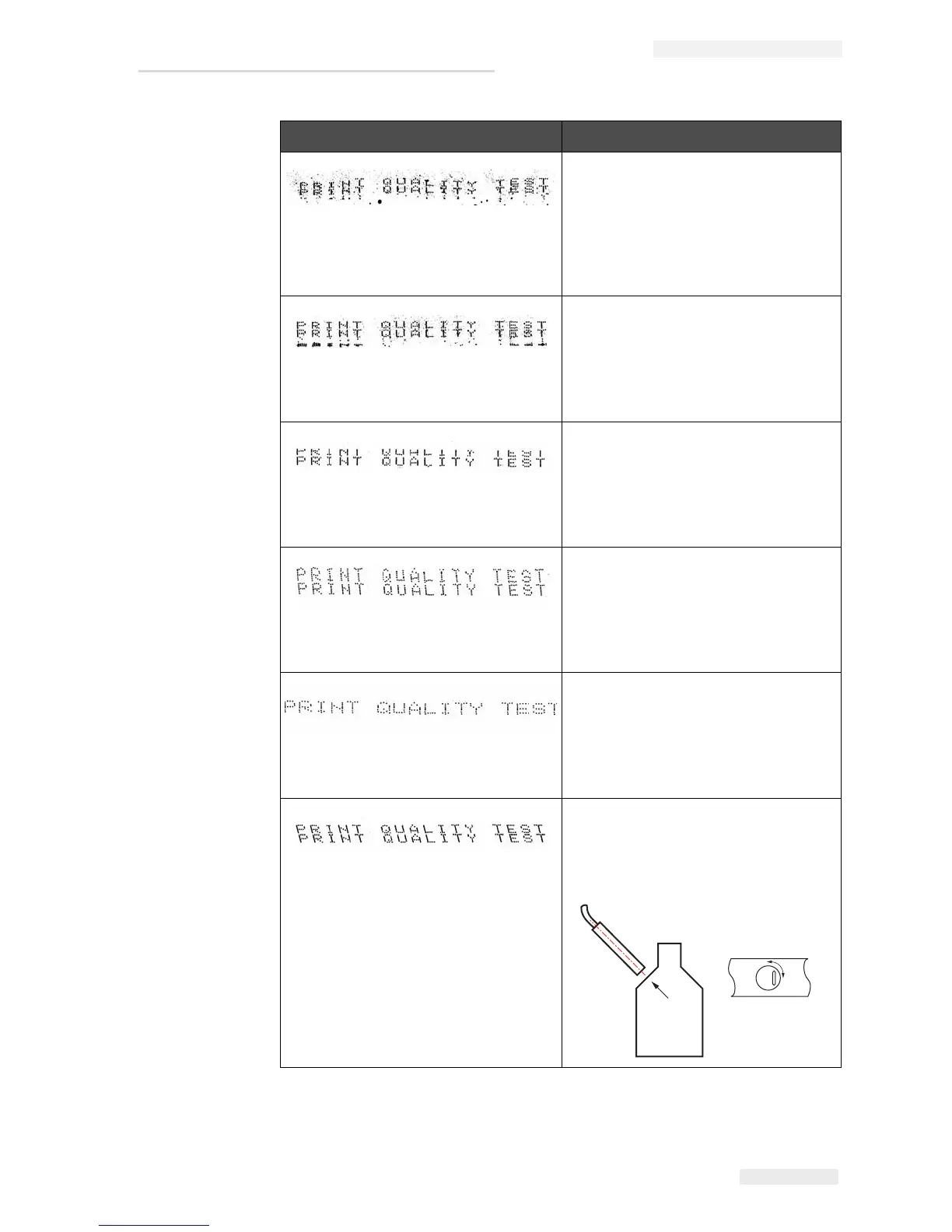
Phasing error. The correct placement
of drop is not good. You see a good
amount of splashing in the area
around.
Clean and completely dry the
printhead. Make sure there is enough
time available between prints to
phase.
Incorrect modulation, too many
satellites, charging process not
correct.
Backflush nozzle and check for
correct breakup.
Pressure too high, drops not deflected
correctly, drops “run in” to one
another, small print.
Check for jet alignment. Refer to the
service manual for more information.
Pressure too low, the drops are over-
deflected or incorrectly positioned.
Possible loss of most deflected drops.
Check for jet alignment. Refer to the
service manual for more information.
Printhead too far from the substrate.
The drops are affected by air currents
and are spaced too far apart vertically.
Decrease the distance from the
substrate, or select a more correct
font.
The Printhead slot not vertical to the
substrate travel.
The face of the of the printhead must
be at 90 degrees angle to the surface
of the substrate and the slot must be
vertical to the substrate movement.
Refer to the figure below.
Sample and Cause Remedy
Table 7-2: Samples of Bad Printing (Continued)


 To Next Page