Rev AA Menu Description 5-13
Videojet 1710 Operator Manual
Fill Ink Core This function is used to fill an empty ink core
module by adding ink from the Ink cartridge.
Usually this function is used during
commissioning or ink core module replacement.
Flush Ink
Core
Flushing of the ink core will take place. Flush
Ink core is performed if the printer is shipped
into another location or going for some storage.
Follow the screen prompts.
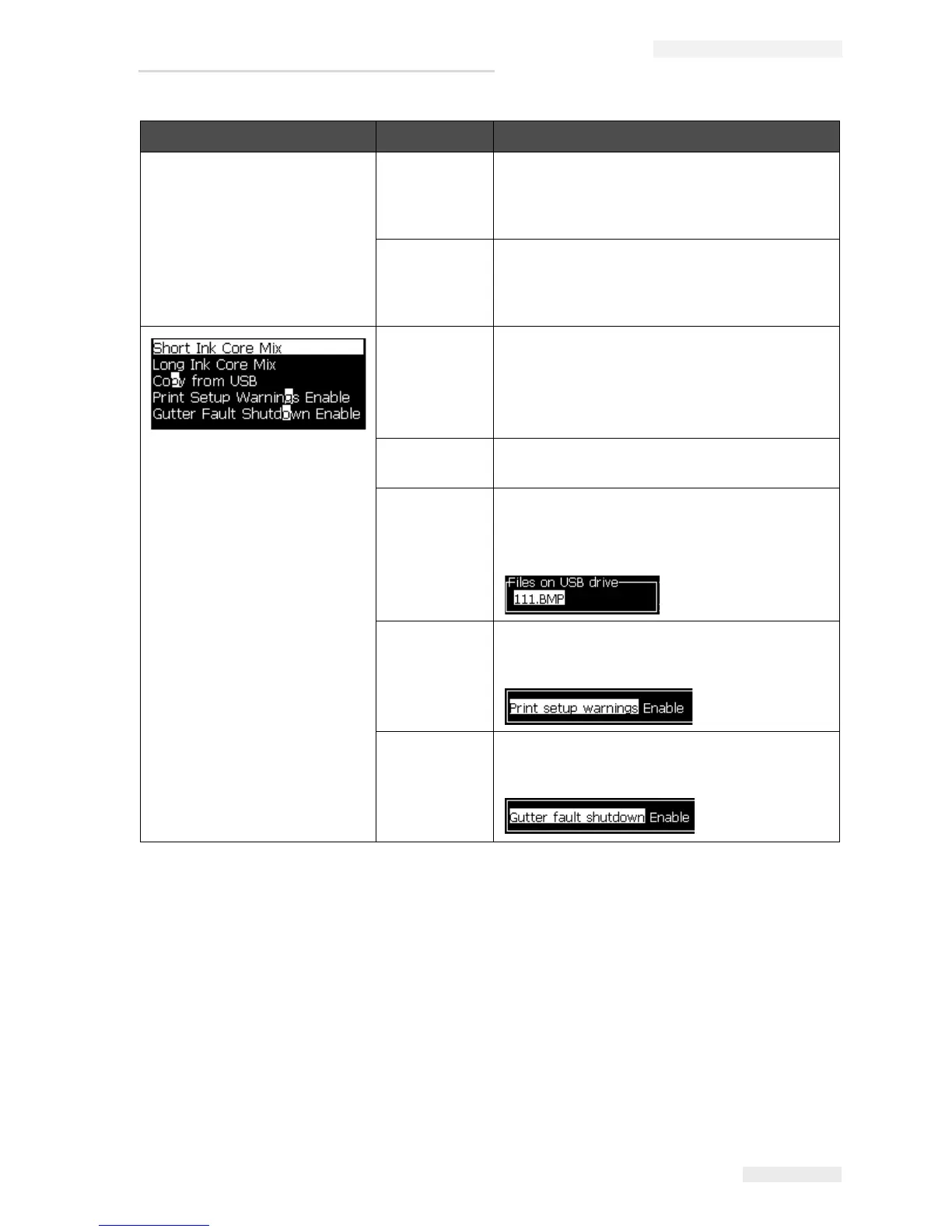
Short Ink
Core Mix
The short ink core mix sequence is triggered
when selected
Long Ink Core
Mix
The long ink core mix sequence is triggered
when selected
Copy from
USB
This function is used to copy files from a USB
stick that is plugged into the machine. It can be
used to update software/firmware, add new
rasters and fonts.
Print Setup
Warnings
Enable
This function allows the warnings that appear
on the screen as icons to be disabled and
enabled.
Gutter Fault
Shutdown
Enable
Opens the Machine Control dialog box. You can
toggle the Gutter fault between Enable and
Disable.
System Menu Command Function
Table 5-8: System Menu and Commands (Continued)



 To Next Page