Rev AA Menu Description 5-17
Videojet 1710 Operator Manual
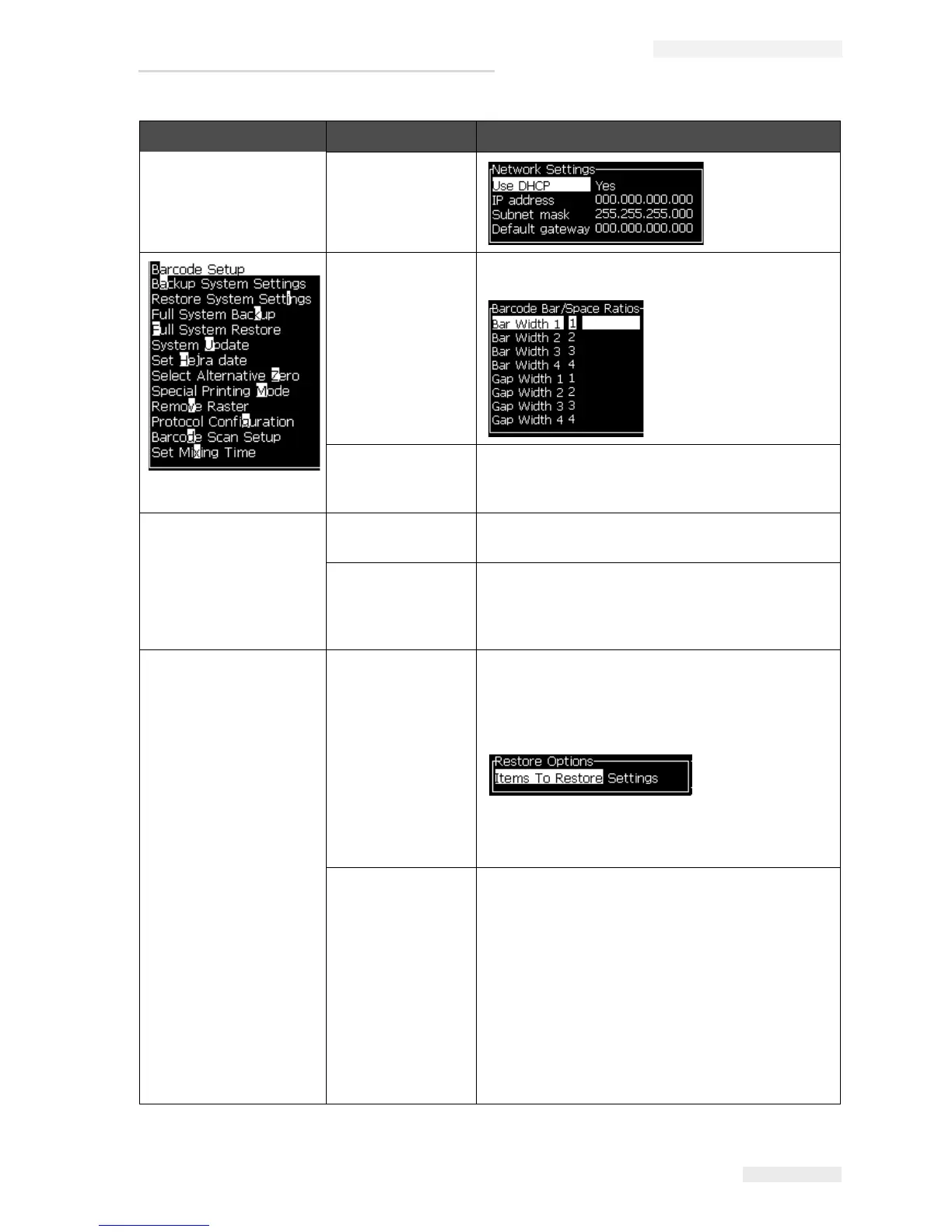
Network Settings
Barcode Setup Opens the Barcode Bar/Space Ratios menu. Up to
four bar widths and four space widths can be set.
Backup System
Settings
Parameters set during the calibration process are
saved to memory, overwriting any previously
saved parameters.
Restore System
Settings
Previously saved parameters and settings are
read from memory, undoing any recent changes.
Full System
Backup
Backs up all programmable printer data, including
job and configuration information, to a USB stick.
Note: You can perform a full system backup after
you have set up the system.
Full System
Restore
Restores programmable (you can select from the
Restore Options menu) printer information,
including job and configuration information, from a
USB stick, although the printer prompts the user to
select which files to recover.
Note: For example, when a CBS has failed, you
can run a full system restore to recover the lost
settings.
System Update Updates messages, fonts, rasters on printer.
System update allows files to be added to the
printer without replacing existing files (.cadd file)
Note: You can perform a software upgrade to
upgrade only the required settings and selected
elements. The options are:
•All
•Fonts
• Application - software version
• Messages - move all the messages
• Settings - HV calibration, viscosity
•Rasters
Configure Menu Commands Function
Table 5-9: Configure Menu and Commands (Continued)



 To Next Page