Visit our website at www.VideoSecu.com © 2016 VideoSecu.com
2
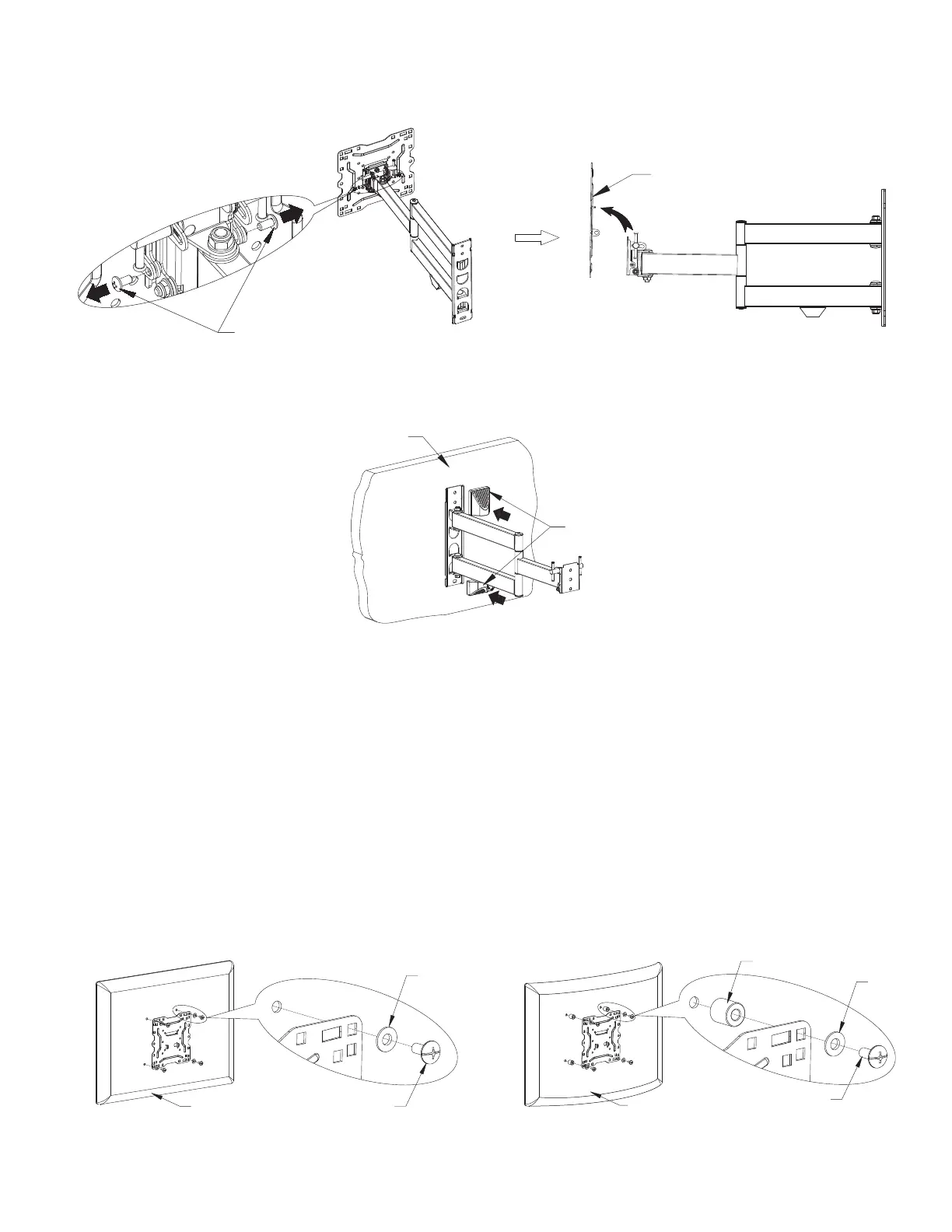
Separate the TV plate from the mount by remove the two screws at the side.
Screws
Step 4. Remove the TV Plate from the Bracket
TV plate
Step 6. Attach TV plate to the TV or Monitor
6-1. Many TVs come with screws already in the wall mounting holes, you can use them. The hardware pack
also includes the most common size screws. Hands thread screws into the threaded inserts on the back
of your TV to determine the correct screw size and length. Some TVs may require specific hardware,
which is not provided. In such case, contact the TV manufacture to identify correct size and purchase
them from your local hardware store.
6-2. Using screws and washers attach the TV plate to the back of the TV If your TV has a flat back, use shorter
screws. For TV with cured back or recessed screw holes, using plastic sleeve spacer and long screws as
needed. Use spacer and long screws also can increase the space between TV plate and the TV, for
cables and better air circulation.
t
Flat
washer
Plastic sleeve
M4~M8 Screw
Back of the TV
FOR TV WITH FLAT BACK
FOR TV WITH CURVED BACK
Flat
washer
M4~M8 ScrewBack of the TV
Step 5. Insert the plastic covers
Insert the two plastic covers on the wall plate.
Plastic covers
WALL
Note: The flat washers are only used for M4 or M5 screw.


 To Next Page