Need help?
Do you have a question about the Videotron Helix and is the answer not in the manual?
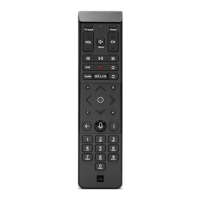
Navigates to the next input source on your television.
Indicates microphone activity and device status via LED indicators.
Allows starting live recording or scheduling recordings from the program guide.
Facilitates skipping through guides and fast-forwarding/rewinding content.
Provides access to search, settings, On Demand, recordings, and applications.
Used for screen navigation and selection, including directional arrows and a central button.
Returns the user to the previous screen or menu.
Activates voice command features for hands-free operation.
Displays detailed information about the currently viewed TV program.
Powers on the TV and selects the correct HDMI input source for the device.
Detaches the protective plastic tab from the back of the voice remote.
Guides the user through pairing the remote with the TV terminal and sound system.
Instructions on how to activate and utilize voice commands for various functions.
Steps to successfully pair the voice remote with an additional Helix TV terminal.
 General
| Voice Control | Yes |
|---|---|
| Power Source | Battery |
| Battery | 2 x AA |
| Backlight | No |
| Connectivity Technology | Bluetooth |
| Compatibility | Videotron Helix TV |

 To Next Page