11
10
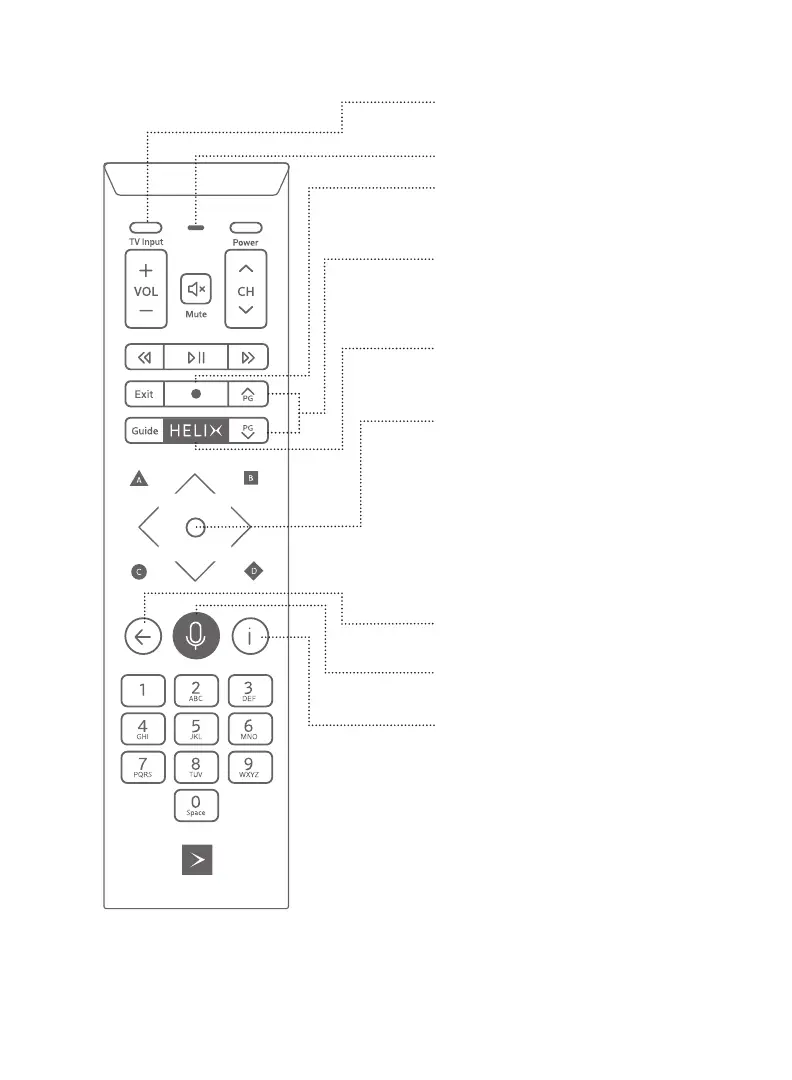
1. TV input
Goes to the next input of your TV.
2. Micro/LED status
3. Record
Starts recording the show that’s playing or
lets you schedule a recording in the Guide.
4. Page Up/Page Down
Lets you skip ahead in the Guide and skip
forward/back when watching recordings
or On Demand content.
5. HELIX menu
Access to search, settings, On Demand
content, your recordings, apps and Guide.
6. Navigation pad
Middle button: selects an item on the screen.
Arrows: used to navigate the screen.
A: Displays the Help menu
B: Displays accessibility settings
C: Launches the Sports application
D: Deletes a recording or a group of
recordings
7. Back arrow
Returns to previous screen.
8. Microphone button
Activates voice command.
9. Info
Displays detailed information about the
TV program.
Learn more about the voice remote:
videotron.com/en/support/helix/equipments/
voice-remote/
Your voice remote


 To Next Page