13
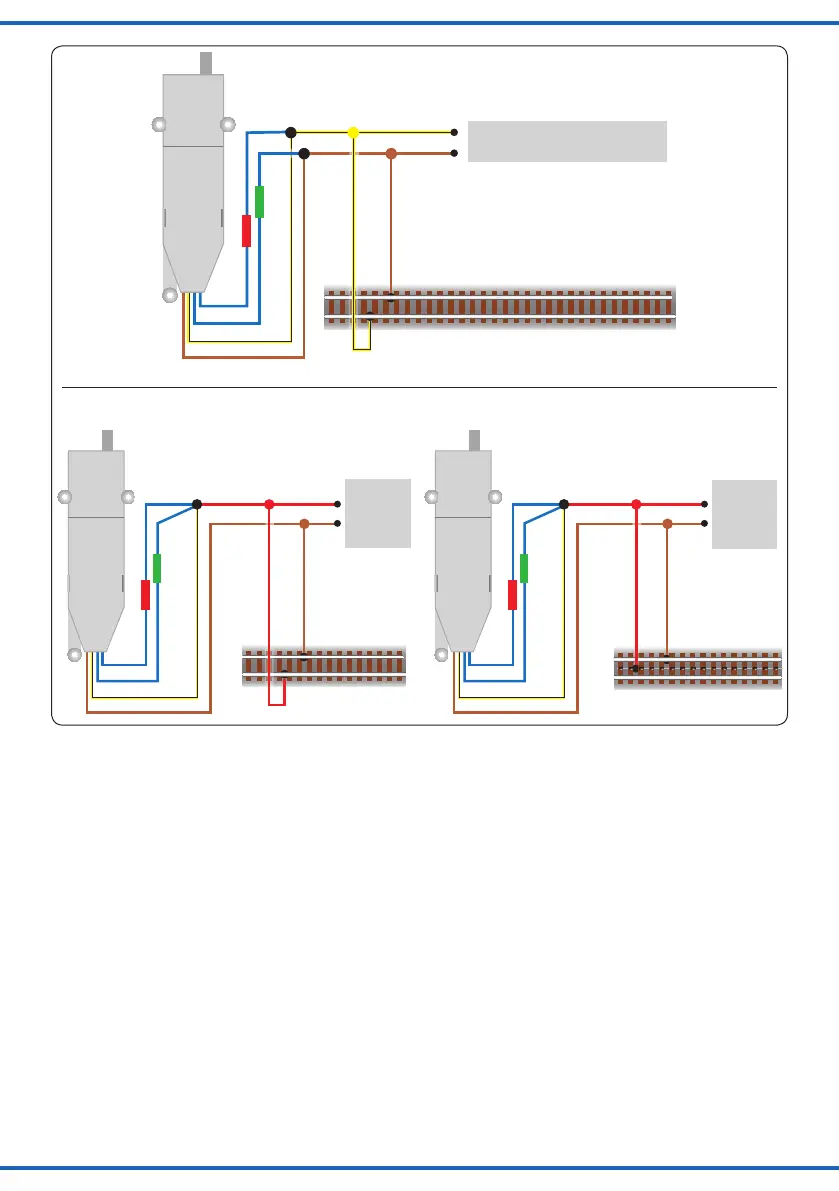
Mot. / DCC
4554
gelb
braun
Digitalzentrale
braun
/ yellow
brown
Digital command station
brown
Fig. 14
Abb. 14
DCC
4554
rot
braun
Digital-
zentrale
braun
gelb
/ red
brown
Digital
command
station
brown
yellow
MM
4554
rot
braun
braun
gelb
Digital-
zentrale
/ red
brown
brown
yellow
Digital
command
station
Fig. 14.1
Abb. 14.1
Damit ist der Weichenantrieb unter der neuen Adres-
se betriebsbereit. Falls Sie die Adresse künftig ändern
möchten, wiederholen Sie die Prozedur einfach.
CV-Programmierung:
Sie können den Weichenantrieb in DCC auch direkt über
das Hauptgleis (POM = Programming on the main) kon-
gurieren, sofern Ihre Digitalzentrale diese Funktion unter-
stützt. Dazu sendet die Zentrale per POM an die bekann-
te Decoderadresse die neuen Daten für die CVs 1 und 9.
Beachten Sie die Anleitung zu Ihrer Zentrale.
Einrichtung mit Motorola-Zentralen
Damit Sie den Weichenantrieb digital ansteuern können,
müssen Sie diesem zunächst eine Digitaladresse zuwei-
sen. Zur Steuerung im Märklin-Motorola-System gehen
Sie wie folgt vor:
1. Schalten Sie das Digitalsystem aus, z. B. Not-Aus.
Es darf keine Spannung mehr am Gleis anliegen.
2. Verbinden Sie nur die grün markierte Steuerleitung
und die Stromversorgungsleitungen des Weichenan-
triebs (braun und gelb, s. Abb. 15) mit dem Gleis.
3. Schalten Sie das Digitalsystem ein.
The switch motor is now ready to be used with the new
digital address. Whether you want to change the address,
you just have to repeat the described procedure.
Programming via CV:
Itispossibletocong.theswitchmotorviathetrack
signal (POM = programming on the main), if your digital
command station supports this feature. Therefore the
command station sends the new data in CVs 1 and 9 to
the old address. Observe the information in the manual of
your digital command station.
Cong. with Motorola central units
To use the switch motor in a digital environment, you
havetoassignadigitaladdressatrst.Tocontrolthe
switch motor with a Motorola-system, observe the fol-
lowing instructions:
1. Switch off the digital system (e. g. emergency off).
There must not be any power at the rails.
2. Connect only the blue wire with the green marker and
the power supply wires of the switch motor (brown
andyellow,seeg.15)totherails.
3. Switch on the digital system.
Anschluss nach Adressprogrammierung für invertierte Stellrichtung!
Connection after programming the address - use for reverse switching direction!


 To Next Page
 Loading...