19
Programming the Water Softener
CYCLE TIMES
Use these features to change the following softener
operations:
=Backwash time
=Second backwash (On/Off)
=Second backwash time
=Fast rinse time
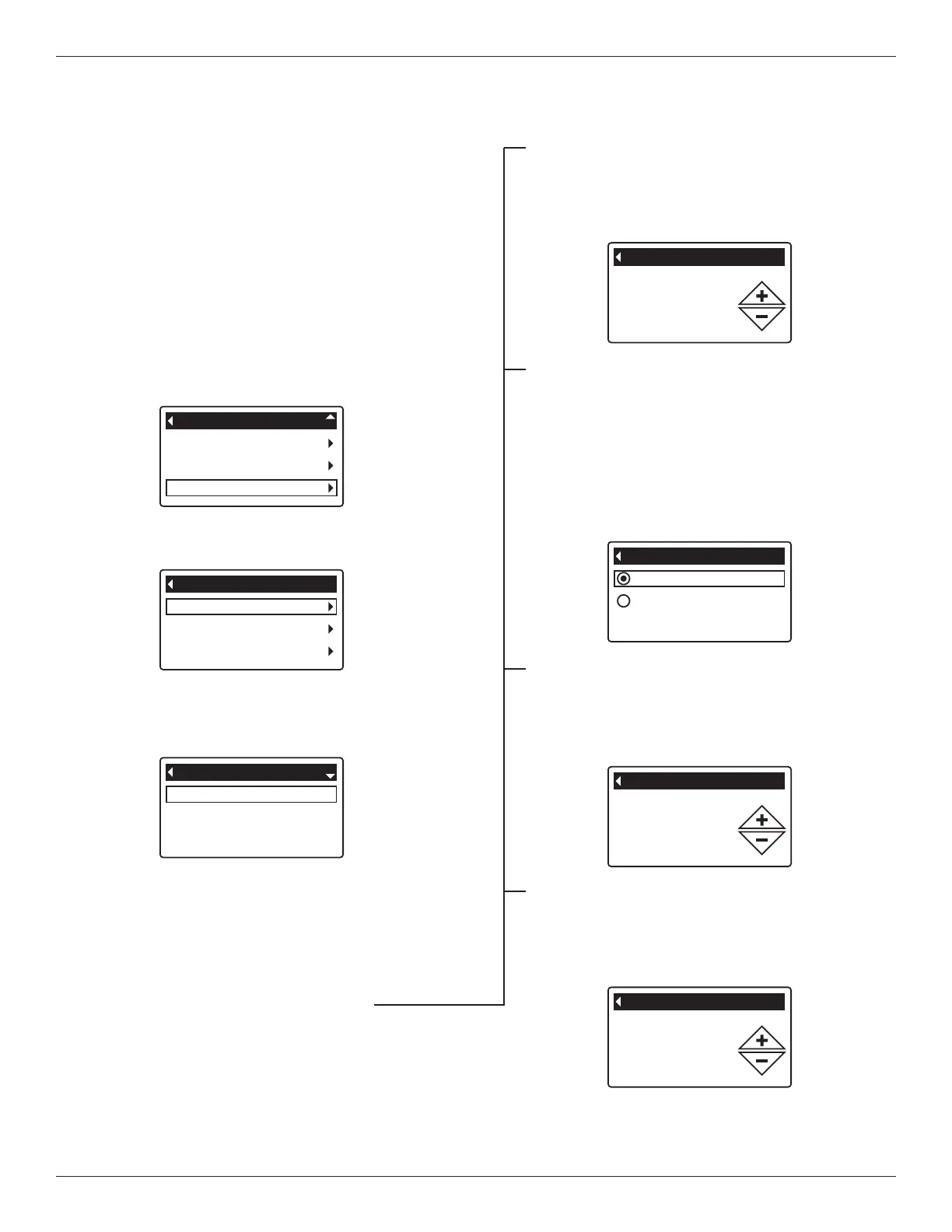
To display these screens:
1. From any of the rolling status screens, press the OK /
MENU button to display the Main menu.
2. Press the DOWN q button to scroll through the
menu options until Advanced settings is highlighted
(See Figure 64).
Backwash time
2nd backwash (On/Off)
2nd backwash time
Cycle times
FIG. 66
FIG. 67
6. Press the DOWN q button to scroll through the
menu options until the desired option is highlighted
(See list at the top of this column).
7. Press the OK / MENU button to display the desired
information screen (See Figures 67-70).
8. See the right column on this page for specific
instructions on each cycle time screen.
9. Press the OK / MENU button. The display will go
back to the Cycle times menu (Figure 66).
10. Press the LEFT t button three times to return to
the rolling status screens.
8
a. Backwash time: Press the UP p or DOWN q
b
uttons to change the backwash time. Hold the
button down to rapidly advance. The backwash
time can be set as high as 30 minutes* (See
Figure 67).
Cycle times
Special features
Troubleshooting
Advanced settings
FIG. 65
4. Make sure Cycle times is highlighted.
5. Press the OK / MENU button to display the Cycle
times menu (See Figure 66).
User preferences
System information
Advanced settings
Main menu
FIG. 64
3. Press the OK / MENU button to display the Advanced
settings menu (See Figure 65).
Off
On
2nd backwash (On/Off)
FIG. 68
8b. Second backwash (On/Off): If the desired
option already has a black dot next to it (See
Figure 68), go to Step 9. Otherwise, press the
DOWN q or UP p buttons to scroll to the other
option, then press OK / MENU to choose it.
Setting this feature On adds a second back-
wash and rinse at the beginning of the recharge
cycle. Default is Off. Set this feature On if your
water supply contains a lot of sediment or iron.
2nd backwash time
2 minutes
FIG. 69
8c. Second backwash time: Press the UP p or
DOWN q buttons to change the second back-
wash time. Hold the button down to rapidly
advance. The time can be set as high as 30
minutes (See Figure 69).
FIG. 70
8d. Fast rinse time: Press the UP p or DOWN q
buttons to change the fast rinse time. Hold the
button down to rapidly advance. The fast rinse
time can be set as high as 30 minutes* (See
Figure 70).
*Reducing the backwash and fast rinse times below a
softener model’s default settings can result in salty water
after recharges.



 To Next Page