V. Convergence vertical convergence of horizontal R.G.B line
Tilt rotates the entire screen image.
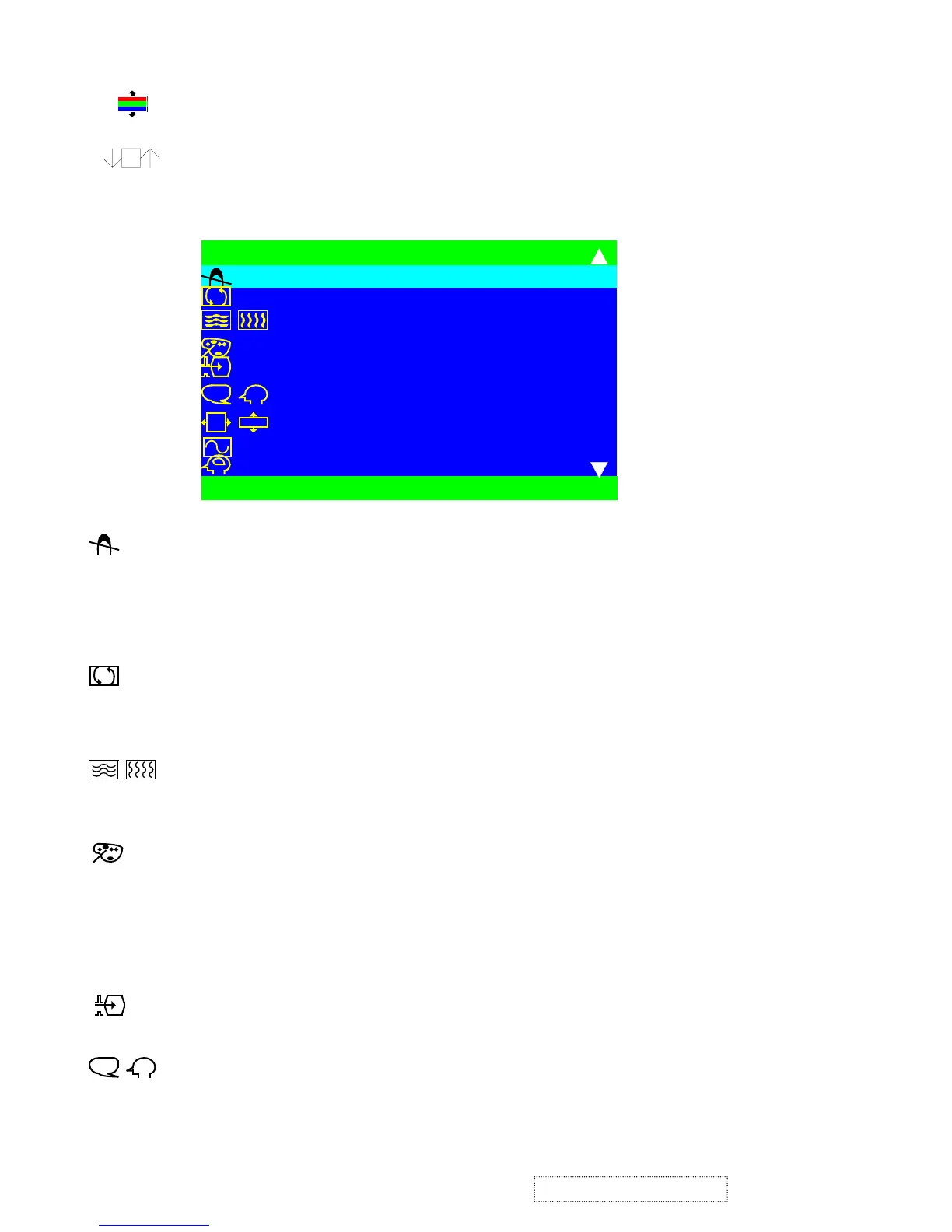
2.2.2Main menu, Part 2.
Degauss removes the build-up of magnetic fields that can cause irregular colors to appear around the edges of
screen images. There are two ways to degauss the display: automatically by turning the monitor on or manually by
selecting the Degauss control from the menu.
With Degauss selected from the menu, press button .2 to degauss the monitor manually.
Important: Do not degauss repeatedly. Doing so can be harmful to the display. Wait at least 20 minutes
(before selecting this control again).
Purity : Osd bar into center,this function not work,move the bar to right to decrease or
waive out the top bad purity,move,caused by monitor face Southern.move the bar to left to
decrease or wavie out the bottom bad purity.caused by monitor faced Northern.
H/V Moiré (horizontal and vertical) reduces interference patterns that appear as ripples, waves, or unwanted
background color textures. Interference patterns of this type are most noticeable when viewing images having
closely spaced lines or finely detailed patterns.
View Match Color provides several color options: several preset color temperatures and User Color which allows
you to adjust red (R), Green (G), and blue (B). The factory setting for this product is 9300°K.
9300K - Adds blue to the screen image for cooler white.
(used in most office settings with fluorescent lighting).
6500K - Adds red to the screen image for warmer white and richer red.
5000K - Adds blue and green to the screen image for a darker color.
User Color - Individual adjustments for red, green, and blue.
Input Level displays the voltage level of the video signal.
Note: the default selection is 0.7V.
Language allows you to choose from among several languages for the menus and control screens:
English, French, German, Italian, and Spanish.
?
S E L E C T : 2
M A I N M E N U 2
E X I T : 0
D E G A U S S
P U R I T Y
H / V M O I R E
V I E W M A T C H C O L O R
I N P U T L E V E L
L A N G U A G E
O S D P O S I T I O N
V I E W M E T E R
M E M O R Y R E C A L L
?
O
DS
ODS
ViewSonic Corporation
48
Confidential – Do Not Copy
G220f-1_G220fB-1


 To Next Page