2.
2.1 User control.
2.1.1 Power switch: Soft power control.
2.1.2 Function key.
Function select button: .1, .2.
Adjustment control button: /, -.
2.2 OSD adjustment function.
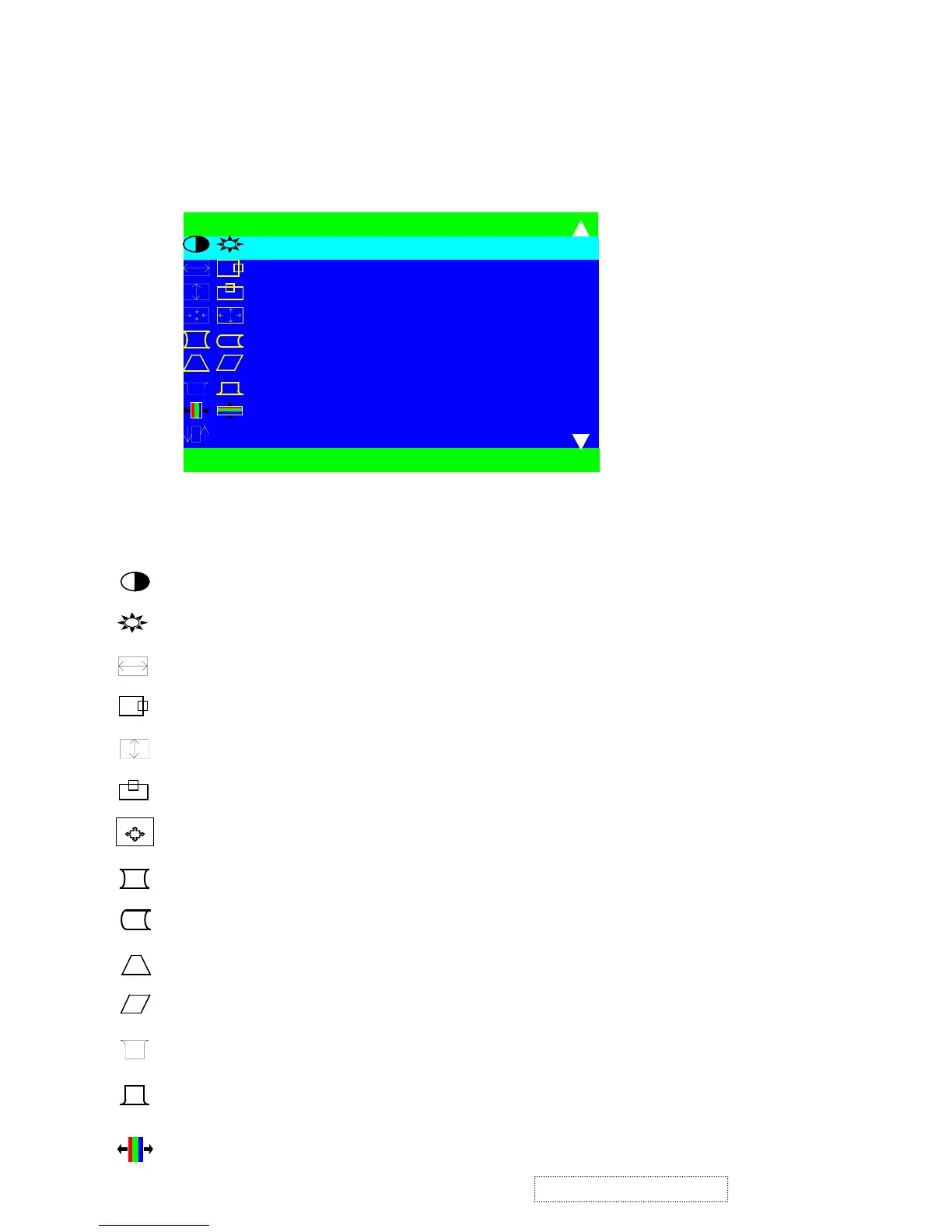
2.2.1Main menu, Part 1.
Note: Press button .
2 to toggle between all Controls that appear in pairs on the Main menu1.
Contrast adjusts the difference between the image background (black level) and the foreground (white
level).
Brightness adjusts the background brightness of the screen image.
Horizontal size adjusts the width of the screen image.
Horizontal position moves the screen image left or right.
Vertical size adjusts the height of the screen image.
Vertical position moves the screen image up and down.
Zoom asjust the width and height of the screen image.
Pincushion curves the vertical side of the screen image.
Balance curves the vertical edges of the screen image to the right or left.
Trapezoid adjust the top and bottom of the screen image until they have equal length.
Parallel slants vertical edges of the screen image until they are parallel.
Top Hook horizontal corner correction at top of picture
Bottom Hook horizontal corner correction at bottom of picture
H. Convergence horizontal convergence of horizontal R.G.B line
S E L E C T : 2
M A I N M E N U 0
E X I T : 0
C O N T R A S T / B R I G H T N E S S
H . S I Z E / P O S I T I O N
V . S I Z E / P O S I T I O N
Z O O M
P I N C U S H I O N / B A L A N C E
T R A P E Z O I D / P A R A L L E L
T O P / B O T T O M H O O K
H / V C O N V E R G E N C E
T I L T
ViewSonic Corporation
47
Confidential – Do Not Copy
G220f-1_G220fB-1



 To Next Page