E
N
G
L
I
S
H
ViewSonic GS815 7
Do the following to adjust the screen image:
1
To display the Main Menu, press button [1].
2
To display a control you want to adjust, press ▲ or ▼ to scroll up or down the
Main Menu.
3
To display the control screen for the selected control, press button [2].
4
To adjust the selected control, press the up ▲ or down ▼ buttons.
5
To save the adjustments and exit the menu, press button [1].
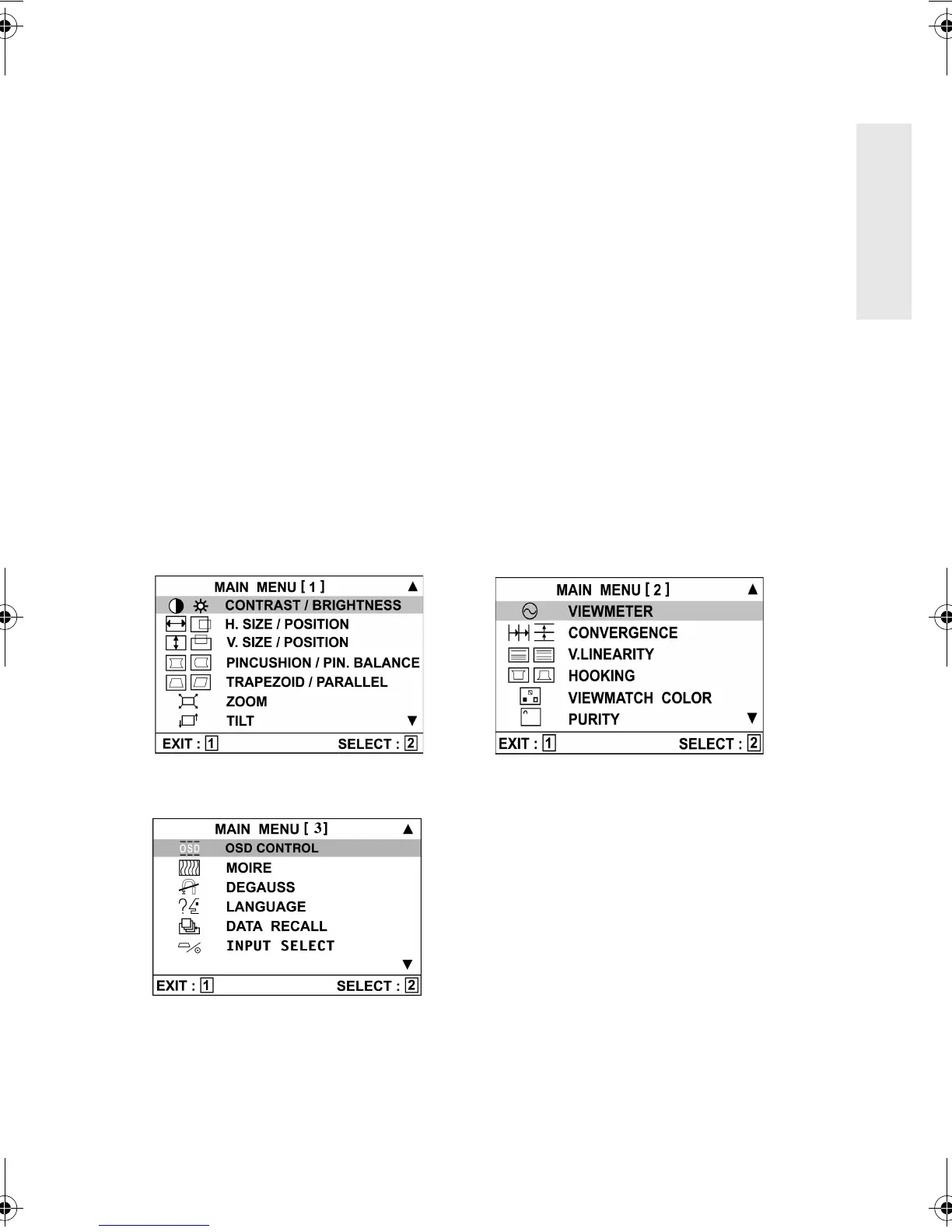
OnView Main Menu
The three menus shown below are parts 1, 2, and 3 of the Main Menu.
NOTE:
Some controls on the Main Menu are listed in pairs, such as Contrast/
Brightness. To toggle between pairs like these after displaying a control screen
(Step 3 above), press button [2].
Shortcut: Before displaying the Main Menu, press button [2] to display the
Contrast/Brightness control screen.
GS815.book Page 7 Wednesday, September 13, 2000 2:49 PM



 To Next Page