EasyManua.ls Logo

ViewSonic V52HD - User Manual

ViewSonic V52HD
73 pages
Print Icon
To Next Page IconTo Next Page
Loading...
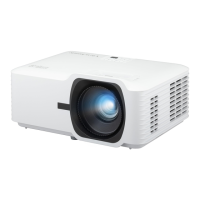
LS740W
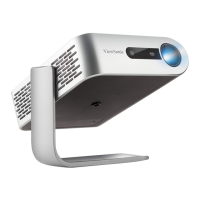
V52HD
Projector
User Guide
Model No. VS19578 | VS19579
P/N: LS740W | V52HD
IMPORTANT: Please read this User Guide to obtain important information on installing and using your product in
a safe manner, as well as registering your product for future service. Warranty information contained in this User
Guide will describe your limited coverage from ViewSonic® Corporation, which is also found on our web site at
http://www.viewsonic.com in English, or in specific languages using the Regional selection box on our website.

Table of Contents

Questions and Answers

  • L
    Lisa WarrenAug 9, 2025
    How to fix a ViewSonic V52HD that does not turn on?
    • M
      Michael BradfordAug 9, 2025
      First, make sure the power cord is properly connected to both the projector and the power outlet. If the projector is still cooling down, wait for the process to complete before attempting to turn it on again. If it still doesn't work, try a different power outlet or test the current outlet with another electrical device.
  • K
    kphillipsAug 12, 2025
    Why is my ViewSonic V52HD Projector remote control not working?
    • K
      Kristin RossAug 12, 2025
      Make sure there are no obstructions between the remote control and the projector, and that you are within the operational range of 8 meters (26 feet). Also, check the batteries in the remote control and replace them if necessary.
  • B
    Brenda WhitakerAug 17, 2025
    How to correct a reversed image on a ViewSonic V52HD Projector?
    • J
      Jennifer MartinAug 17, 2025
      Open the OSD Menu, navigate to Setup > Projection, and adjust the projection option to correct the image orientation.
  • M
    Michelle SmithAug 21, 2025
    What to do if there is no picture on my ViewSonic Projector?
    • N
      Nicole RodriguezAug 21, 2025
      Ensure the video source cable is properly connected and that the video source is turned on. If the input source is not automatically selected, use the 'Source Input' button on either the projector or the remote control to manually select the correct source.
  • M
    Maria MccoyAug 26, 2025
    How to fix a blurred image on a ViewSonic V52HD?
    • K
      Kenneth RasmussenAug 26, 2025
      Adjust the focus using the Focus Switch to correctly focus the projection lens. Also, ensure that the projector and the screen are properly aligned. Adjust the projector's height, projection angle, and direction if needed.
  • R
    Renee HowardAug 30, 2025
    What to do if my ViewSonic Projector stops responding?
    • L
      Lauren GarciaAug 30, 2025
      Turn off the projector and unplug the power cord. Wait for at least 20 seconds, then reconnect the power cord and try again.
  • M
    Michael JonesSep 3, 2025
    Why is the image stretched on my ViewSonic Projector when playing a 16:9 DVD?
    • E
      ellisdebraSep 3, 2025
      When playing an anamorphic or 16:9 DVD, the projector is designed to display the best image in 16:9 format. If you are playing a 4:3 format DVD, change the format to 4:3 in the projector's OSD Menu. Also, ensure that the display format is set to a 16:9 (wide) aspect ratio on the DVD player itself.

ViewSonic V52HD Specifications

General IconGeneral
BrandViewSonic
ModelV52HD
CategoryProjector
LanguageEnglish

Related product manuals