EasyManua.ls Logo

ViewSonic VA2418-sh - User Manual

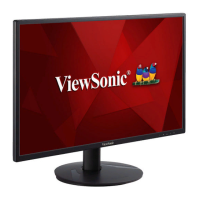
ViewSonic VA2418-sh
45 pages
Print Icon
To Next Page IconTo Next Page
Loading...
VA2418-sh
Display
User Guide
Model No. VS16422
P/N: VA2418-SH
IMPORTANT: Please read this User Guide to obtain important information on installing and using your product in
a safe manner, as well as registering your product for future service. Warranty information contained in this User
Guide will describe your limited coverage from ViewSonic® Corporation, which is also found on our web site at
http://www.viewsonic.com in English, or in specific languages using the Regional selection box in the upper right
corner of our website. “Antes de operar su equipo lea cu idadosamente las instrucciones en este manual”

Other manuals for ViewSonic VA2418-sh

Questions and Answers

  • J
    Justin JohnsonSep 10, 2025
    What to do if my ViewSonic VA2418-sh Monitor has power but no image?
    • P
      Paul SampsonSep 12, 2025
      If your ViewSonic monitor shows no image even when the power is on, ensure the video cable is properly connected to both the monitor and the computer. Also, check and adjust the brightness and contrast settings. Finally, verify that you have selected the correct input source.
  • C
    Carlos GilbertSep 12, 2025
    How to center the screen on a ViewSonic monitor?
    • J
      Jay ThomasSep 12, 2025
      If the screen isn’t centered correctly on your ViewSonic monitor, adjust the horizontal and vertical controls via the OSD Menu. Also, check the Aspect Ratio. If needed, reset the monitor to its factory settings.
  • E
    Edward ReedSep 14, 2025
    Why is there no audio output from my ViewSonic VA2418-sh?
    • J
      jasmineleeSep 14, 2025
      If you are experiencing no audio output from your ViewSonic monitor, and you're using headphones, ensure the mini stereo jack is properly connected. Make sure the volume is not muted and is not set to 0. Also, check the Audio Input setting.
  • J
    John MorrisSep 16, 2025
    Why are USB devices not working when connected to my ViewSonic VA2418-sh Monitor?
    • A
      alexandrianewmanSep 16, 2025
      If USB devices connected to your ViewSonic monitor do not work, ensure the USB cable is properly connected. Try using a different USB port, if available. Note that some USB devices require more power, so try connecting them directly to the computer.

Summary

Safety Precautions

Introduction

Package Contents

Lists items included in the monitor package.

Initial Setup

Installing the Stand

Instructions for attaching the monitor stand.

Wall Mounting

Guide for mounting the monitor on a wall.

Using the Security Slot

How to use a security slot to prevent theft.

Making Connections

Connecting to Power

Steps to connect the monitor to a power source.

Connecting External Devices

Guide for connecting video sources like HDMI and VGA.

Using the Monitor

Adjusting the Viewing Angle

Instructions for tilting the monitor for optimal viewing.

Turning the Device On;Off

How to power the monitor on and off.

Using the Control Panel Keys

Explains the function of the monitor's control buttons.

On-Screen Display (OSD) Menu

OSD Menu Tree

Overview of the monitor's On-Screen Display menu options.

Appendix

Specifications

Detailed technical specifications of the monitor.

Glossary

Definitions of terms used in the user guide.

Troubleshooting

Common issues and their solutions for the monitor.

Maintenance

Guidelines for cleaning and maintaining the monitor.

Regulatory and Service Information

Compliance Information

General compliance information for the device.

FCC Compliance Statement

FCC regulations and compliance for the monitor.

Declaration of RoHS2 Compliance

Information on hazardous substances compliance.

Product Disposal at End of Product Life

Guidance on how to dispose of the product responsibly.

Copyright Information

Copyright notices and trademarks for ViewSonic.

Customer Service

Contact details for technical support and service.

Limited Warranty

Explains the warranty coverage and terms.

Mexico Limited Warranty

Specific warranty terms for Mexico.

ViewSonic VA2418-sh Specifications

General IconGeneral
Color depth8 bit
Pixel pitch0.272 x 0.272 mm
Screen shapeFlat
Display surfaceMatt
Display diagonal23.8 \
Surface hardness3H
Display technologyLED
Native aspect ratio16:9
Maximum refresh rate75 Hz
NTSC coverage (typical)72 %
Viewable size, vertical297 mm
sRGB coverage (typical)104 %
Contrast ratio (dynamic)50000000:1
Display number of colors16.7 million colors
Viewable size, horizontal527 mm
Digital vertical frequency48 - 75 Hz
Digital horizontal frequency24 - 86 kHz
Display brightness (typical)250 cd/m²
HDMIYes
HDMI version1.4
DisplayPorts quantity0
Headphone connectivity3.5 mm
Tilt angle range-5 - 22 °
Cable lock slot typeKensington
Number of OSD languages12
Panel mounting interface100 x 100 mm
AC input voltage100 - 240 V
AC input frequency50 - 60 Hz
Power consumption (standby)0.3 W
Power consumption (typical)26 W
Compatible operating systemsWindows 10, macOS
Operating temperature (T-T)0 - 40 °C
Operating relative humidity (H-H)20 - 90 %
CertificationcTUVus, FCC-B, ICES003, CEC, MX-CoC, Mexico Energy, CE, CE EMC, CB, RoHS, ErP, REACH, WEEE, EAC, UkrSEPRO, BSMI, KC, e-Standby, BIS
Product colorBlack
Country of originChina
Cables includedAC, VGA
Package typeBox
Package depth119 mm
Package width398 mm
Package height615 mm
Package weight4600 g
Harmonized System (HS) code85285210
Weight and Dimensions IconWeight and Dimensions
Depth (with stand)218 mm
Width (with stand)548 mm
Height (with stand)404 mm
Weight (with stand)3600 g
Depth (without stand)38 mm
Height (without stand)322 mm
Weight (without stand)3100 g

Related product manuals