EasyManua.ls Logo

ViewSonic VG1655 - User Manual

ViewSonic VG1655
46 pages
Print Icon
To Next Page IconTo Next Page
Loading...
VG1655
Display
User Guide
Model No. VS18172
P/N: VG1655
IMPORTANT: Please read this User Guide to obtain important information on installing and using your product in
a safe manner, as well as registering your product for future service. Warranty information contained in this User
Guide will describe your limited coverage from ViewSonic® Corporation, which is also found on our web site at
http://www.viewsonic.com in English, or in specific languages using the Regional selection box in the upper right
corner of our website. “Antes de operar su equipo lea cu idadosamente las instrucciones en este manual”

Questions and Answers

  • V
    Vanessa AlvaradoSep 12, 2025
    Why are some menus not selectable in the OSD on my ViewSonic monitor?
    • M
      Mr. Travis MendozaSep 12, 2025
      If some menus aren’t selectable in the OSD on your ViewSonic monitor, try adjusting the ViewMode or the input source. If that doesn't work, reset the monitor to factory settings.
  • J
    Joshua AriasSep 13, 2025
    Why does the screen appear yellow on my ViewSonic VG1655 Monitor?
    • K
      Kelly UnderwoodSep 13, 2025
      If the screen appears yellow on your ViewSonic monitor, make sure the “Blue Light Filter” is turned Off.
  • K
    Kelly WelchSep 15, 2025
    Why are USB devices not working when connected to my ViewSonic monitor?
    • S
      Shawn RichardsSep 15, 2025
      If USB devices connected to your ViewSonic monitor aren't working, ensure the USB cable is properly connected. Try changing to another USB port, if available. Some USB devices require more power, so connect them directly to the computer.

Summary

Safety Precautions

Regulatory and Service Information

Compliance Information

Information regarding compliance with regulations and standards for the VG1655.

FCC Compliance Statement

Statement detailing compliance with FCC rules for the ViewSonic VG1655 display.

Industry Canada Statement

Statement detailing compliance with Industry Canada regulations for the VG1655.

Introduction

Package Contents

List of items included in the VG1655 display package.

Product Overview

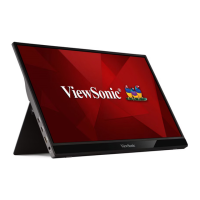
Details the physical layout, ports, and features of the VG1655 display.

I;O Ports

Identifies and describes the input/output ports available on the VG1655 monitor.

Initial Setup

Installing the Cover

Step-by-step guide to installing the protective cover on the VG1655.

Using the Cover and Stand

Instructions on how to use the integrated cover and stand for the VG1655.

Making Connections

Connecting to Power

Methods for powering the VG1655 display using different connection configurations.

Connecting External Devices

How to connect external devices to the VG1655 via Type C and Mini HDMI.

Power Delivery

Explains how the VG1655 charges devices and its power source detection features.

Using the Monitor

Adjusting the Viewing Angle

Instructions for adjusting the monitor's tilt angle using the integrated stand.

Turning the Device On;Off

Steps for powering the VG1655 monitor on and off.

Using the Control Panel Joy Key

How to use the control panel joy key for menu navigation and settings adjustment.

Quick Menu

Hot Keys

Configuring the Settings

General Operations

Basic steps for navigating and operating the VG1655's On-Screen Display (OSD) menu.

On-Screen Display (OSD) Menu Tree

Presents the hierarchical structure and available options within the VG1655's OSD menu.

Appendix

Specifications

Technical specifications for the ViewSonic VG1655 display, including dimensions and power.

Glossary

Definitions of technical terms used in the VG1655 user guide.

Troubleshooting

Common problems and solutions for the ViewSonic VG1655 display.

Maintenance

Guidelines for cleaning and maintaining the ViewSonic VG1655 display.

ViewSonic VG1655 Specifications

General IconGeneral
Colorsilver
Screen Typeled
Tiltableyes
Touch Screenno
Webcamno
OS Compatibilitynot applicable
Screen Size15.6 inches
Panel Typeips
Aspect Ratio16:9
Resolution1920 x 1080
Native Resolution1920 x 1080
Refresh Rate75hz
Horizontal Viewing Angle178 degrees
Vertical Viewing Angle178 degrees
Response Time6.5 milliseconds
Brightness250 candela per square meter
Contrast Ratio50, 000, 000:1
Synchronizationnot applicable
Horizontal Scan Rate82 kilohertz
HDRno
Built-In Speakersyes
Interface Connectors1 x hdmi
HDMI Ports1
Headphones Outputyes
Voice Assistantno
Power Saving Mode0.3 watts
Power Consumption9.6 watts
Depth with Stand0.6 inches
Height with Stand8.8 inches
Width with Stand14 inches
Depth without Stand0.6 inches
Height without Stand8 4/5 inches
Net Weight without Stand1.76 pounds

Related product manuals