110
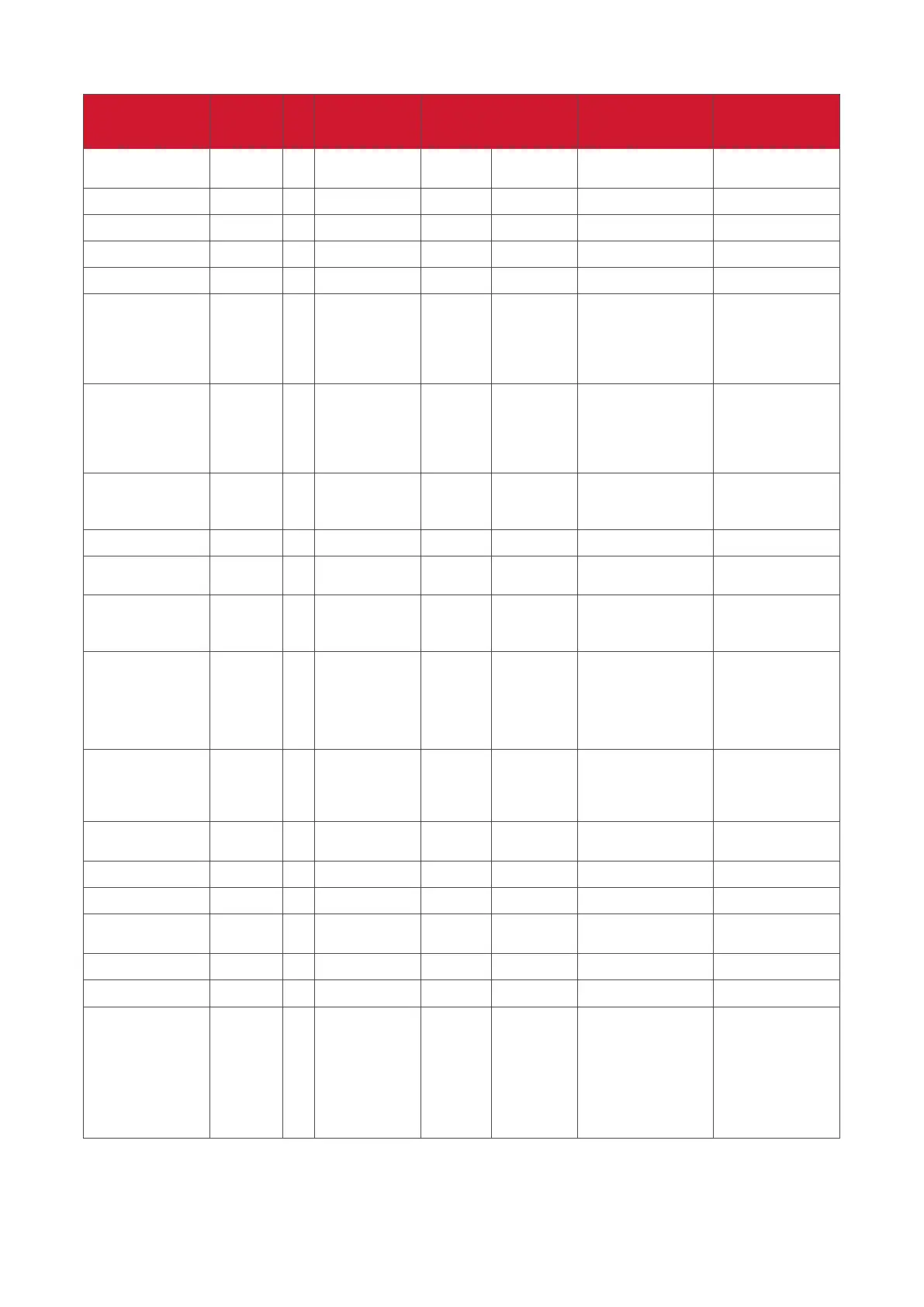
B. Oponal Funcon
Get Funcon Length ID Command Command
Response
Range
Comments
Type (ASCII)
Code
(ASCII)
Code (Hex) (Three ASCII bytes)
Get-Contrast 8 g a 61 000 ~ 100
Get-Sharpness 8 g c 63 000 ~ 100
Get-Color 8 g d 64 000 ~ 100
Get-Tint 8 g e 65 000 ~ 100
Get-Backlight On_
Off *3.2.3
8 g h 68
000: OFF
001: ON
Keep both
“Backlight On_Off”
and “Function On_
Off” for backward
compatibility *3.3.2
Get Freeze On_Off
*3.2.5
8 g i 69
000: OFF
001: ON
Keep both “Freeze
On_Off” and
“Function On_Off”
for backward
compatibility *3.3.2
Get-PIP mode 8 g t 74
000: OFF
001: PIP (POP)
002: PBP
Get-PIP input 8 g u 75 000 ~ See Set-input select
Get-Tiling Mode 8 g v 76
000: OFF
001: ON
(for Video wall)
Get-Tiling
Compensation
8 g w 77
000: OFF
001: ON
(for Video wall)
Bezel width
compensation
Get-Tiling H by V
monitors
8 g x 78
01x~09x: H monitors
0x1~0x9: V monitors
(for Video wall)
1. 2nd digital for H
monitors
2. 3rd digital for V
monitors
Get-Tiling position 8 g y 79
000: OFF
001~025
(for Video wall)
Copy the screen
of Position# to
identified display
Get-Date: Year 8 g 2 32 Y00~Y00
Last 2 digits
(20)17~(20)99
Get-Date: Month 8 g 2 32 M00~M00 2 digits
Get-Date: Day 8 g 2 32 D00~M00 2 digits
Get-Time: Hour 8 g 3 33 H00~H00
24-hr format.
2 digits
Get-Time: Min 8 g 3 33 M00~M00 2 digits
Get-Time: Sec 8 g 3 33 S00~S00 2 digits
Get-Smart hub *3.3.0 8 g : 3A
000: all
00A: Amb_Temp
00B: Amb_Humidity
00C: Amb_Light
00D: Amb_PIR
detection
1. Reply in new 32-
byte format. Each
sub-item length is
fixed 6 bytes. *3.3.0
2. Allow get data
separately or once
for all. *3.3.0



 To Next Page