ViewSonic Pro8200 11
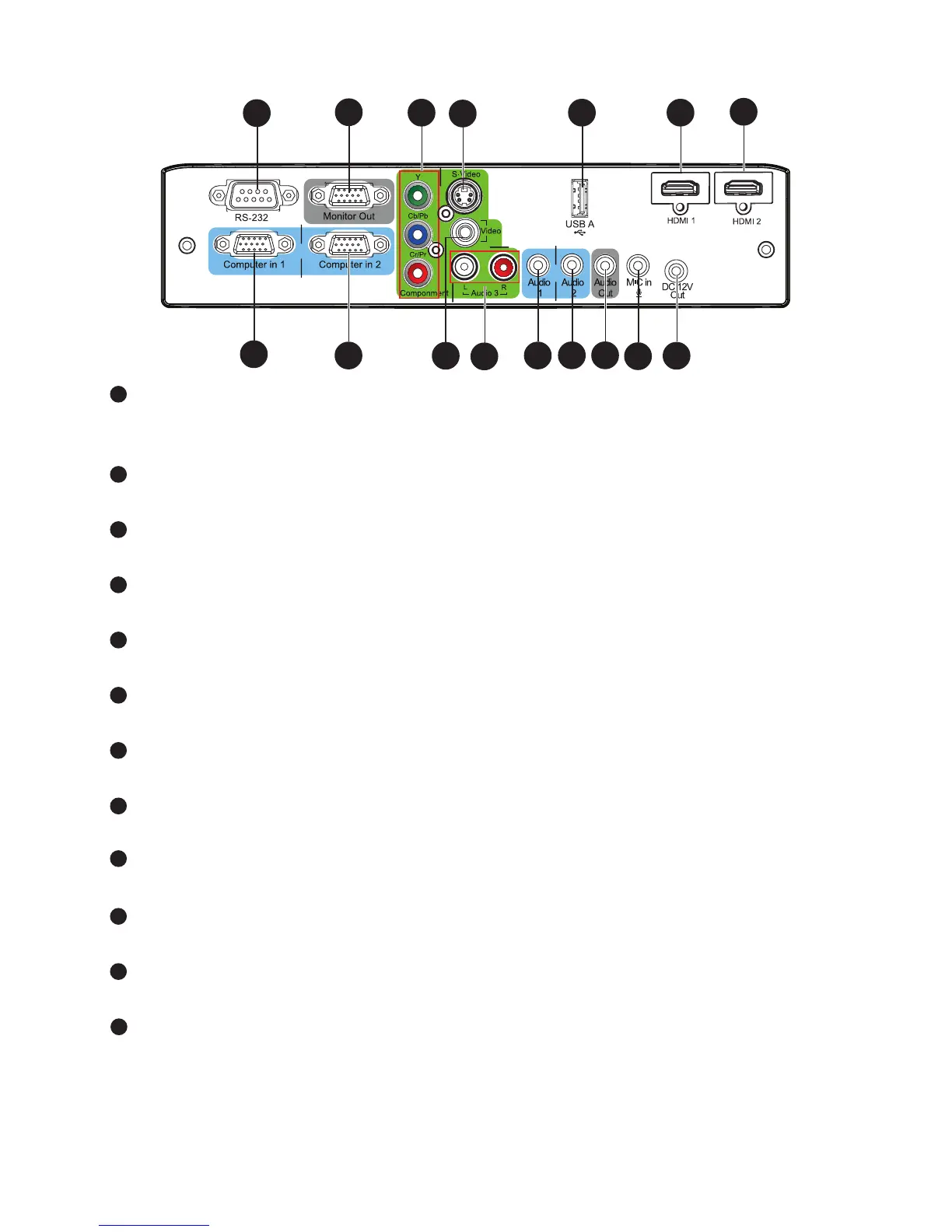
Connection Ports
RS-232
When operating the projector via a computer, connect this to the controlling
computer's RS-232C port.
Monitor Out
Connect to a computer display, etc.
Component (Y Cb/Pb Cr/Pr)
Connect Y Cb/Pb Cr/Pr output from video equipment to this jack.
S-Video
Connect S-Video output from video equipment to this jack.
USB A
This connector supports firmware update.
HDMI 1
Connect HDMI output from video equipment to this jack.
HDMI 2
Connect HDMI output from video equipment to this jack.
DC 12V Out
12V DC out
MIC in
Microphone input jack.
Audio Out
Connect to a speaker or other audio input equipment.
Audio 2
Connect an audio output from video equipment or computer to this jack.
Audio 1
Connect an audio output from video equipment or computer to this jack.




 To Next Page