EasyManua.ls Logo

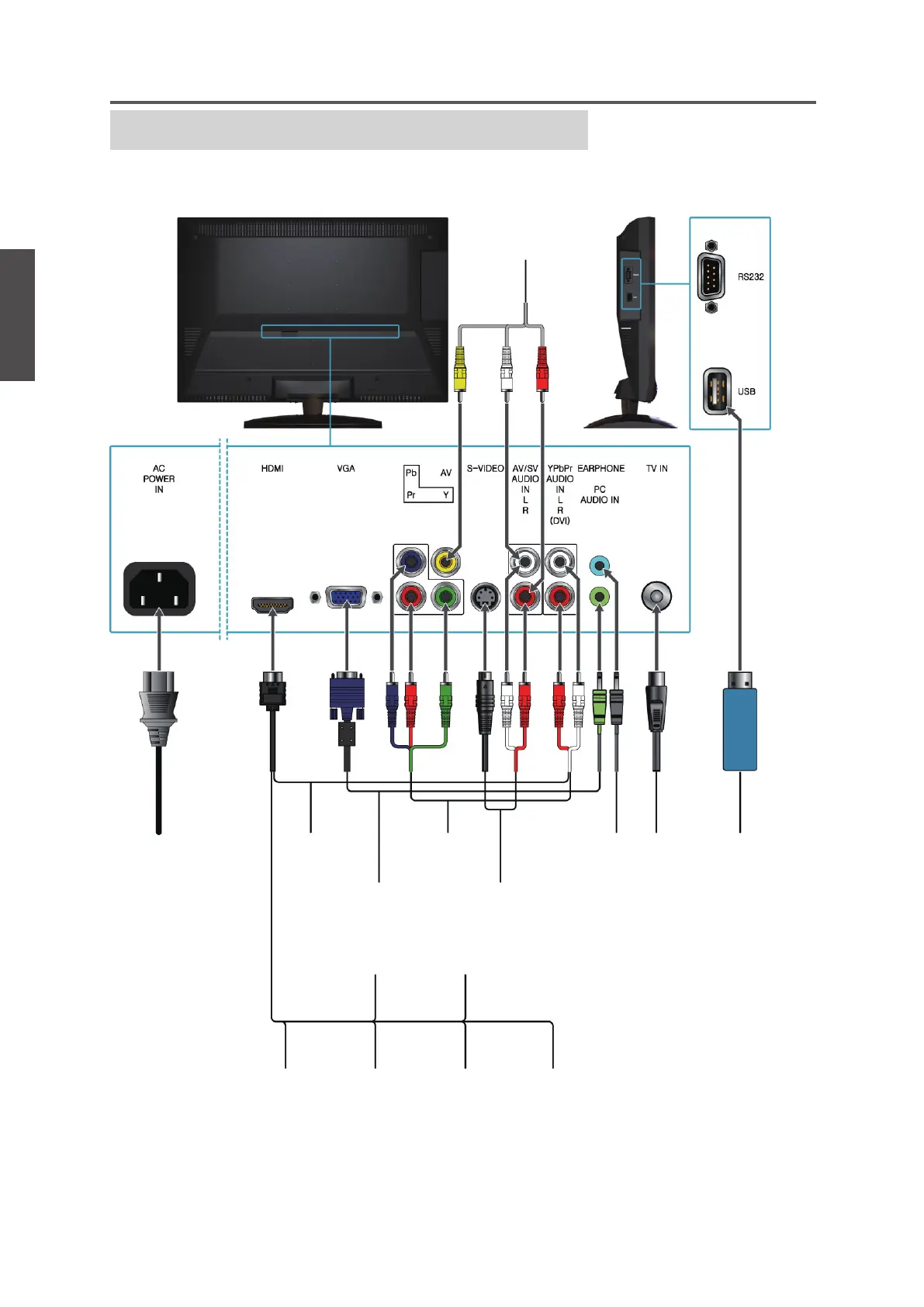
ViewSonic VTMS2431 - Connecting Other External Equipment; General Equipment Connection Diagram

ViewSonic VTMS2431
63 pages
Print Icon
To Next Page IconTo Next Page
To Previous Page IconTo Previous Page
Loading...
20
ENGLISH
Contact ViewSonic service team at: http://www.ViewSonic.com or call our service team: United States 1-800-688-6688, Canada 1-866-463-4775
ViewSonic VTMS2431
Getting Started
Other Equipment
• Please refer to the Quick Start Guide (supplied) when connecting the other equipment to
your LCD TV.
VHF/ UHF
CABLE
Digital
cable box
Digital satellite
receiver
DVD
Player
Audio
system
Blu-ray Disc
Player/ PS3
Personal
Computer
Personal
Computer
HeadphoneDVD Player/
VCD Player/
Game system
DVD Player/
VCD Player/
Game system
DVD Player/
Personal
Computer
AC power
socket
DVD Player/
VCD Player/
Game system
USB Device

Other manuals for ViewSonic VTMS2431

Related product manuals