17
Gasifying boiler VIGAS
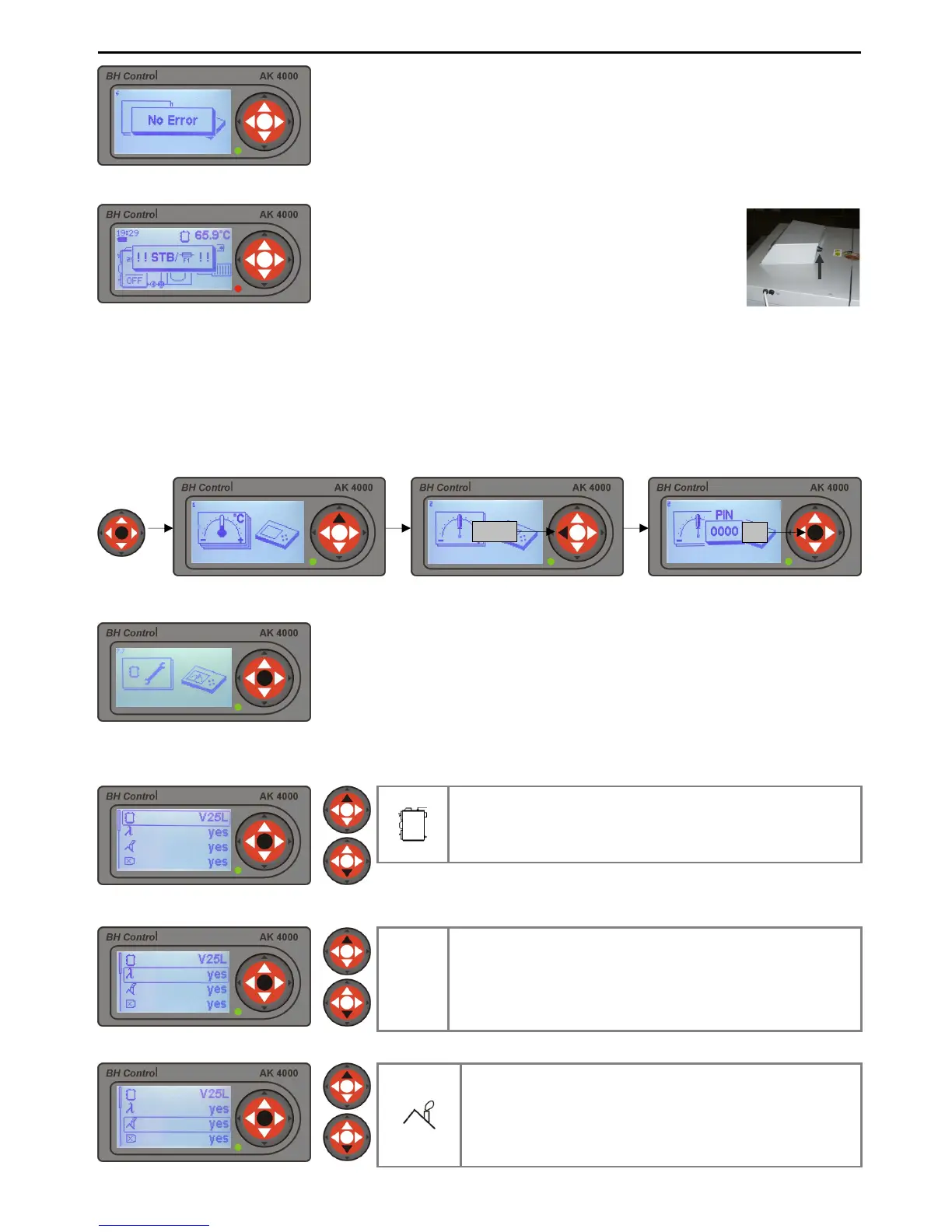
12.1 STB failure
13. SERVICE SETTINGS PIN 0000 PROTECTED
13.1 SERVICE SETTINGS
13.1.1 Boiler type setting
13.1.2 Lambda sensor setting
13.1.3 Exhaust gas thermometer settings
Service settings are passworded. Only a trained service engineer can alter these settings.
used to alter settings in unavoidable instances. In service settings, boiler type can be selected together with
accessories and hydraulic connection schematic, etc. To select service settings using password „PIN 0000“
and hold „ENTER“ button at anytime, press ▲button and then press and hold button ◄ for 4 seconds.
will apear. Press „ENTER“ button 4 times. Service sett
ing symbol will appear on the display. Press „ENTER“
choosing buttons ▲ select service operation.
No errors = Green LED indicator
Errors = Red LED indicator
Error notifications and solutions are described in chapter 18.“
PROBLEMS, CAUSES AND SOLUTIONS“
„STB“ failure is caused by the boiler over-
When this happens, the thermal fuse is activated (
and the fan is disconnected from the power supply.
The boiler is only re- activated if „STB“
only when the boiler temperature is below 60°C.
switch on the boiler press „ENTER“ button.
The control display unit of the boiler AK4000 is used to operate all types of
VIGAS boilers. It is important that the
symbol displayed is the same as the boiler
type. When the boiler is in „OFF“
phase the visual display shows the type of
boiler which is compliant with its nominal output.
For correct boiler operation
the type of the boiler must always be the same as the
production label. Always check, in case the AK4000 display is replaced!!!
Choose boiler type. Type of boiler must be identical
with boiler type indicated on the production label.
Marked: V25 - boiler output TVZ – hotair boiler, UD –
wood-coal, DP – wood-pellets, L – Lambda control.
λ
It is possible to de-activate the lambda sensor from operation
if an error occurs. If this happens, it is possible to run the
boiler in standard version until the lambda sensor is
replaced.
yes = boiler with lambda sensor, no = boiler without lambda
sensor
In case of exhaust gas thermometer error, it is possible to
disconnect the thermometer. The boiler will operate without
the thermometer until it is replaced. Exhaust gas
thermometer will not be used, when the boiler is de-
activated, use boiler thermometer symbol: yes = boiler with
thermometer, no = boiler without thermometer.



 To Next Page