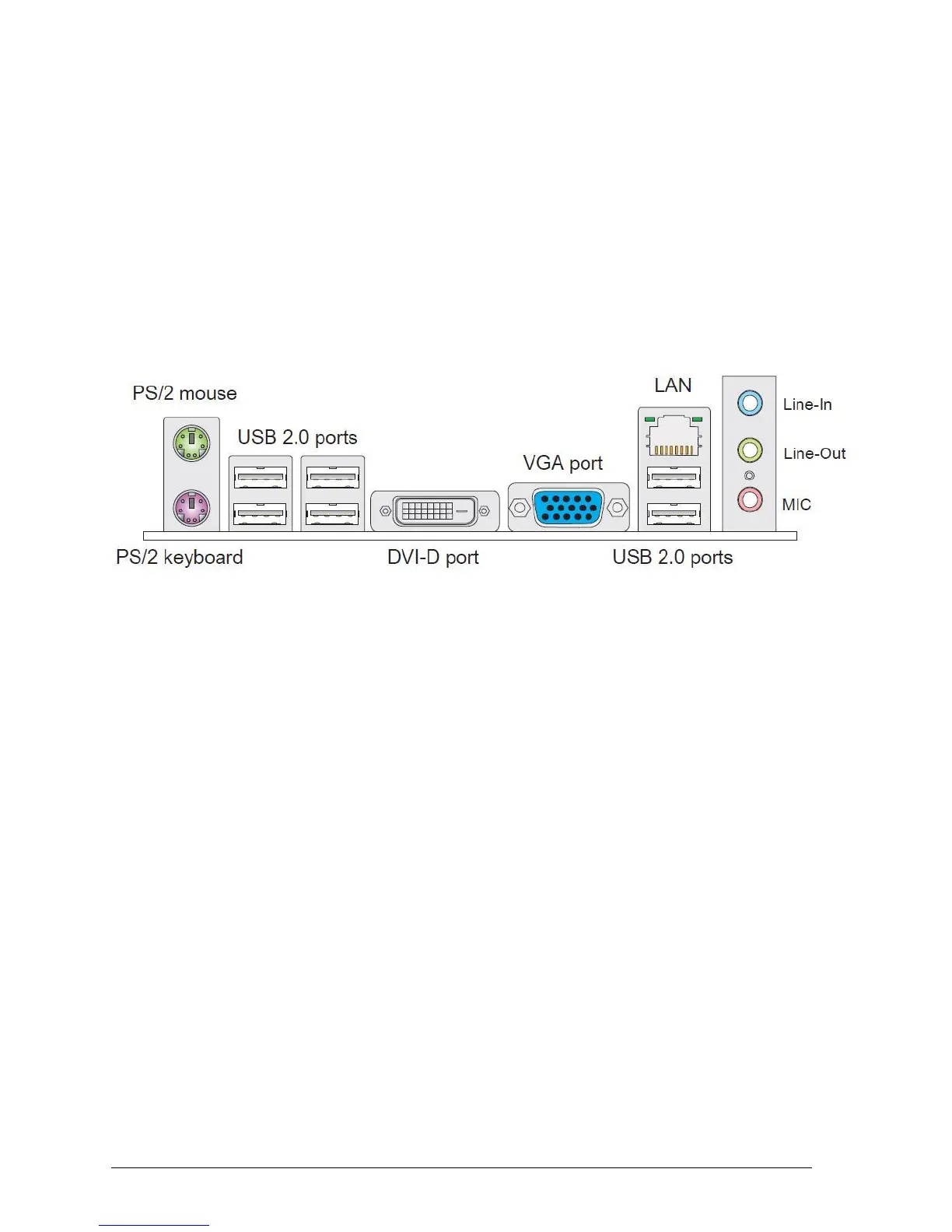
Back Panel Connectors
The motherboard external IO connectors are attached to a metallic I/O shield. This shield
serves several purposes:
It protects the sensitive motherboard from any external EMC interference.
It stops the computer from interfering with other electrical devices.
It allows the motherboard to be easily upgraded in the future without having to resort
to buying a whole new case. Simply change the I/O shield to match the motherboard.
The I/O shield provides external access to PS/2 mouse/keyboard connectors as well as
four USB ports, one LAN Port, audio connectors, VGA and HDMI ports.
Figure 4: Back Panel Connectors
Mouse/Keyboard - The standard PS/2® mouse/keyboard DIN connector is for a
PS/2® mouse/keyboard.
USB 2.0 Port - The USB 2.0 port is for attaching USB devices such as keyboard,
mouse, or other USB compatible devices.
VGA Port - The DB15-pin female connector is provided for monitor.
LAN Port - The standard RJ-45 LAN jack is for connection to the Local Area Network
(LAN). You can connect a network cable to it.
Audio Ports - These audio connectors are used for audio devices.



 To Next Page