Page 9;&(%$*4.8"4,7%<'*#$"&8#=%/7*,#*%4,77%>?@@@?@AA?BCDC1Item 63350
EF;6GHIJ6KFGLIMNFLMG6MFMO6 E6GPJ
I/*(,$"&8
F%EJFKb%M6FK%SFGG6KH%NFH%OFPE6%SFGG6KH%6cJTIELIM1%%
GI%K6UPO6%KLEb%I;%F%EJFKb%M6FK%SFGG6KH%;ITTIQ%GW6E6%LMEGKPOGLIME%6cFOGTH1
GI%JK6!6MG%E6KLIPE%LM`PKH-%
Q*,(%FMEL?,//(&a*9%#/7,#.?(*#"#$,8$%#,2*$Z%3&337*#%,89%.*,aZ?9'$Z%('++*(%)&(_%37&a*#%
).*8*a*(%4&88*4$"83=%9"#4&88*4$"83=%&(%)&(_"83%8*,(%+,$$*(Z1%%%
S,$$*(Z%,4"9%4,8%4,'#*%/*(5,8*8$%+7"898*##1
1. Follow directions on page 8 to connect
Charger to battery, then plug the Power
Cord into a properly grounded outlet.
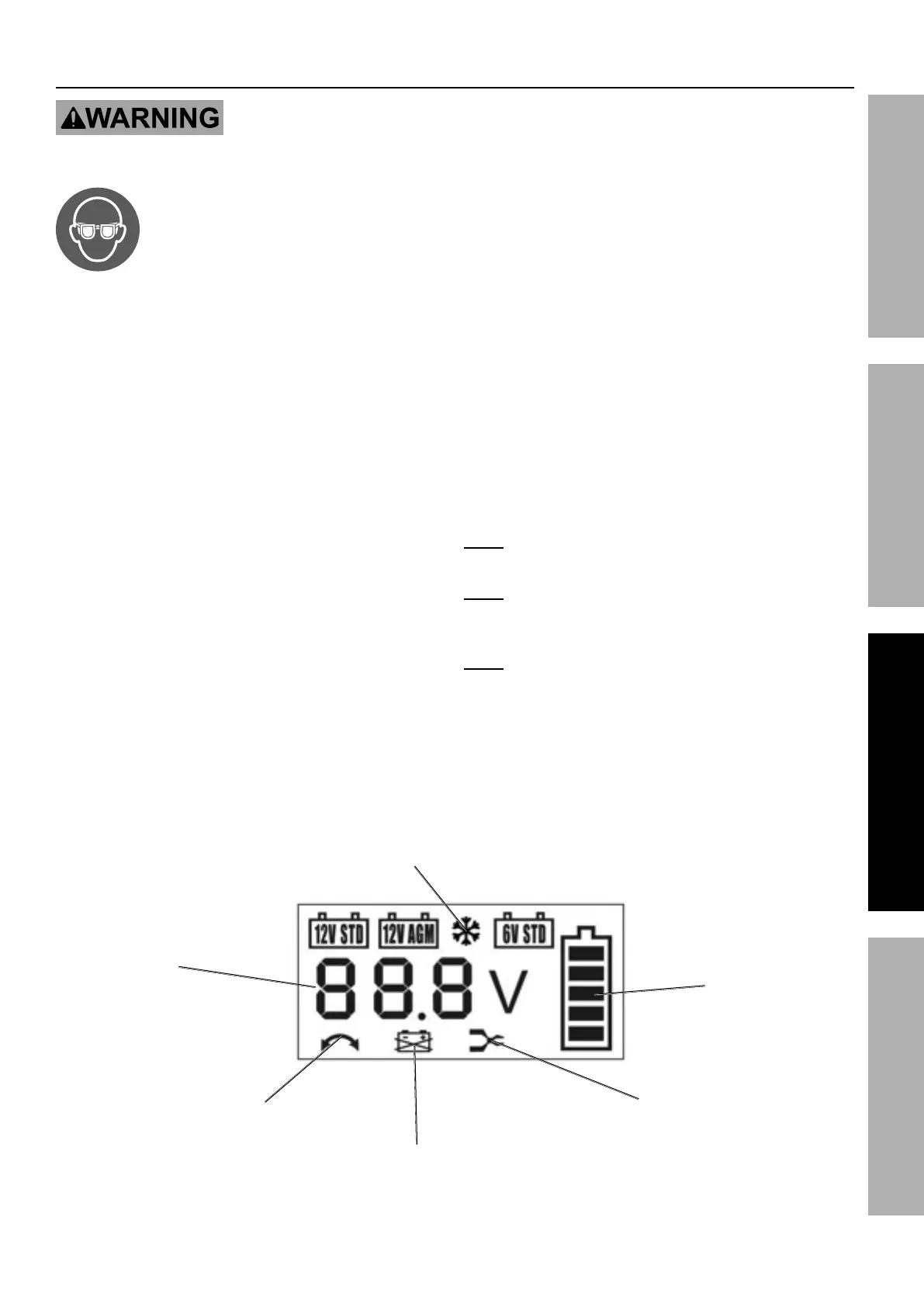
2. If you see the reverse symbol, make sure the
battery is connected in the proper polarity.
3. If 0.0V and Clamp symbol are displayed,
check whether the battery terminal
clips have a reliable connection.
4. When a good connection has been made, the LCD
screen backlight will be green and it will display the
battery capacity and voltage for three seconds.
5. After the battery voltage stops flashing and the
backlight turns red, the battery level symbol will
flash, indicating the charger is working properly.
6. If the battery voltage is lower than 10.5 V (12 V
battery) or 5.2 V (6 V battery), the voltage will
flash on the display and the backlight will turn
red, indicating that the charger will automatically
attempt to repair the battery for 1 hour. After
repair, if the voltage is greater than or equal
to 10.5 V / 5.2 V, the charger will automatically
continue to its normal charging function. If the
battery voltage is still less than 10.5 V / 5.2 V, the
repair failed – the Bad Battery Symbol will show on
the display and the charger will stop charging.
7. The charger will automatically determine
whether it is charging a 12 V or 6 V battery.
Press the MODE button to switch through the
available 12 V modes: 12 V STD (Standard),
12 V AGM, 12 V STD + Snowflake (Winter
Mode for Standard Batteries), 12 V AGM +
Snowflake (Winter Mode for AGM Batteries).
M&$*- If you do not press the Mode key, the charger
will operate according to the last selected settings.
M&$*- Use the 6 V STD or 12 V STD mode to charge
gel cell batteries. Make sure gel cell batteries
are at room temperature before charging.
M&$*- The charger automatically selects the appropriate
charge current based on battery capacity and power.
8. When the battery is fully charged, the battery
symbol will fully display, and the backlight
will turn green. The charger will then
automatically enter maintenance mode.
Battery Voltage
Battery Polarity
Reversal Symbol
Bad Battery
Symbol
Clamp Symbol
Winter Mode
(12V STD/AGM)
Battery Charge
Level


 To Next Page
 Loading...