10
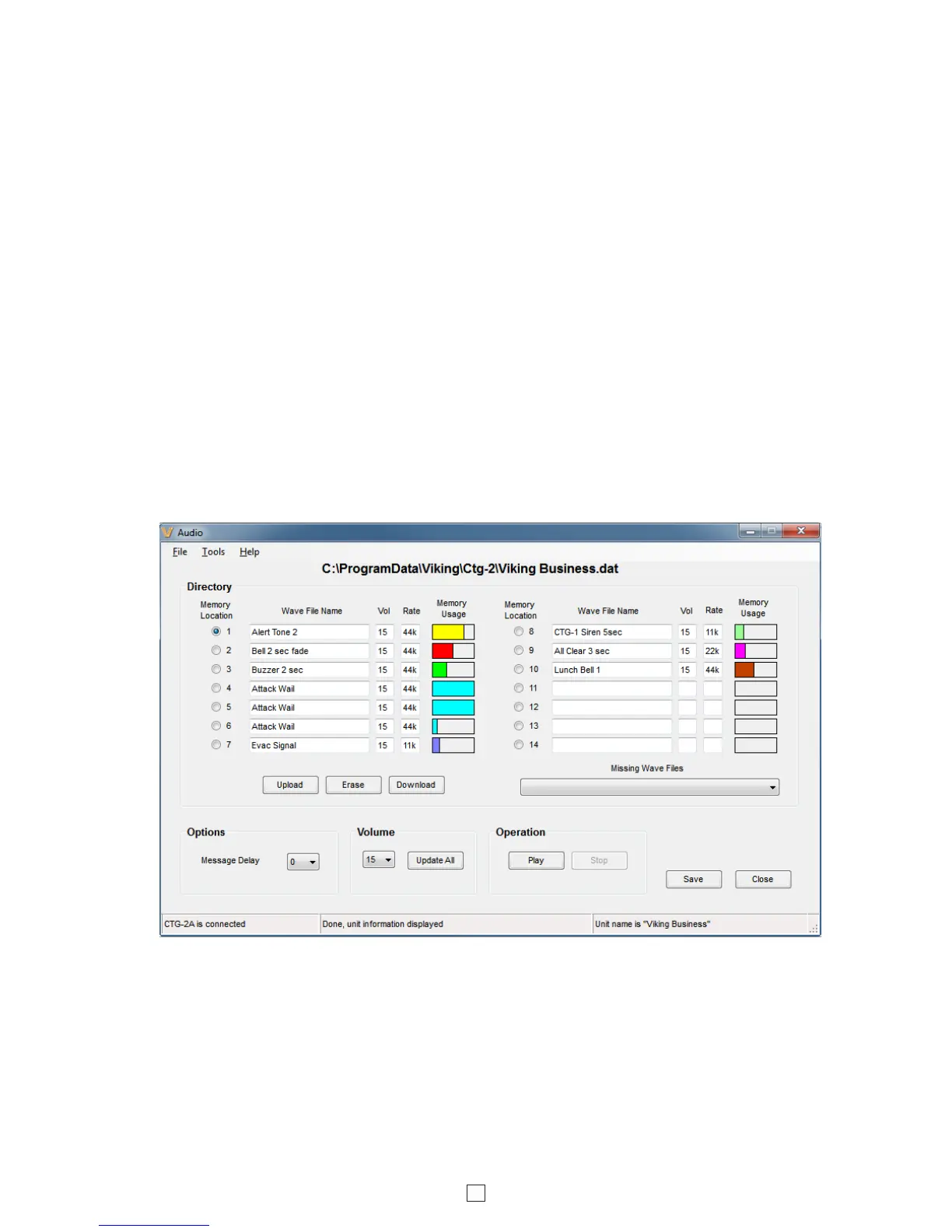
Audio: Clicking the “Audio” button in the “Event Programming” screen will open the “Audio” programming screen where
you can Upload, Download, Erase, Set the volume and message start delay for the wave files stored in the CTG-2A.
B. Uploading WAV Files to the CTG-2A
Message Delay (sec): Adjustable from 0 to 9 seconds in half sec increments. This is the delay from when the page trigger
output is activated until the start of the wave file is played. Adjusting this can eliminate cutting off the first section of the wave
file in applications where certain paging amplifiers require a second or two to power up and/or switch to that audio source.
Memory Usage: The CTG-2A’s wave file memory storage is separated into 14 memory blocks and is displayed after each
wave file name under the column titled “Memory Usage”. The memory blocks will fill with color after uploading a wave file
showing how much memory space was required for that file. Larger wave files will require multiple memory blocks. To conserve
memory storage space you can reduce the sampling rate of the wave file from 44K to 22K or 11K. Note: Reducing the sampling
rate will decrease the sound quality of the message/sound.
Missing Wave Files: If the CTG-2A does not have a wave file in its internal memory that is required by the PC dat file you
have open, “Missing Wave Files” will be highlighted in red. To upload the missing wave file to the CTG-2A, open the drop
down menu and click on the missing wave file. The file will then be automatically uploaded to the CTG-2A.
WAV File Guidelines:
1. For best results, the WAV file should be 16 bit / 44.1K / mono.
2. Resolution down to 8 bits is acceptable but audio quality will not be optimal.
3. Sampling rates of 22k and 11k are also acceptable.
4. The WAV file may be stereo or multi-channel, but only the Left Channel will be loaded.
5. Each of the 14 Memory Locations can hold up to 26 seconds of recorded audio (at 11k sample rate).
6. Total recording time of 6 minutes 15 seconds available (at 11k sample rate).
7. Longer recordings are allowed to spill over into additional memory locations.
Note: If you create custom WAV files and load them in the CTG-2A, keep a backup copy of these custom WAV files.
Burn a copy of your WAV files to a CD or copy them to a USB memory stick. If there is a catastrophic failure of the PC
used to program the CTG-2A, these backup copies of the WAV files can be used to reload the original WAV files back
into the CTG-2A, so all audio features can still be used. See DOD# 899 “Capture All Data from the CTG-2A and Use
the Currently Loaded Wave Files.” Applications such as Sound Forge, Audacity, and Windows Sound Recorder can
be used to generate WAV files out of Audio CD and/or MP3 audio recordings.
A. Downloading WAV Files (optional)
The CTG-2A comes factory loaded with 14 CD quality tones and emergency sounds commonly used in school and
factory applications. The CTG-2A can be uploaded with any user edited WAV file sounds or messages. See “WAV File
Guidelines” below.


 To Next Page
 Loading...

