18
Push Button Programming
The push buttons on the front of the CTG-2A are limited to allow you to program only the following functions: Set time, Set
Schedule, Force a NTP Clock sync, Turn the unit ON (RUN) or OFF. See PC programming for all other functions.
MODE Switch: Press this to cycle through the following modes “RUN”, “SET TIME”, “SET SCHEDULE” and “ TIME SYNC”.
LED’s to the left of the display will light indicating which mode the unit is in.
+/- TIME Switches
RUN Mode: Press the “-” button to place the unit in the OFF mode. Press the “+” button to place the unit in the RUN mode.
Note: When the CTG-2A is in the OFF mode, programmed events will not be transmitted. Unit will display “OFF”, the internal
clock will continue to run and the 4 trigger inputs will remain functional.
SET TIME Mode: Use “+/-” buttons to increment or decrement clock time.
SET SCHEDULE Mode: Use “+/-” buttons to select a fixed schedule or Automatically Switch Schedules (CAL). Note: If you
select a specific schedule through the PC software or push button programming, the CTG-2A will only run that schedule
and will not change schedules until another schedule or Automatically switch Schedules mode is set (any schedule change
events are ignored).
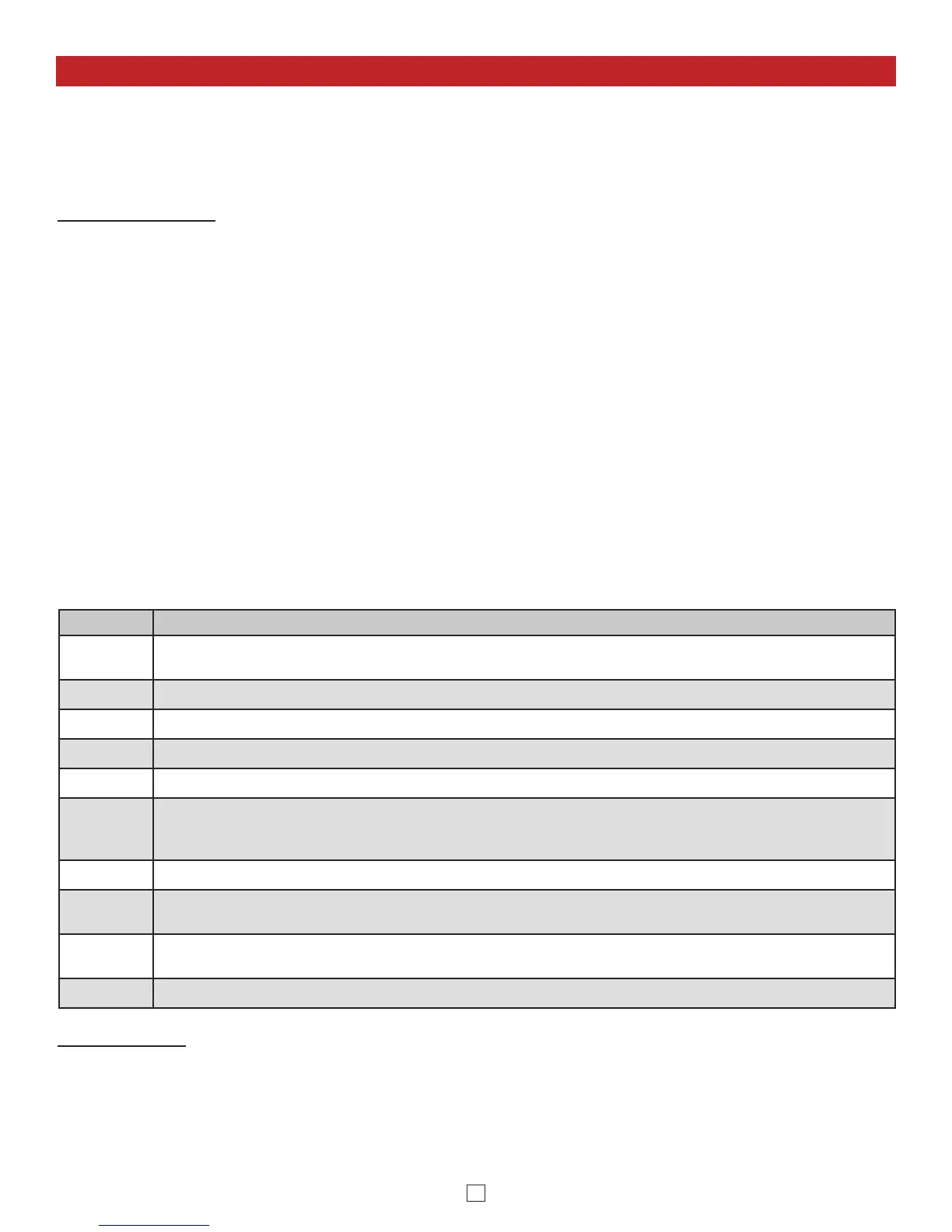
Display Description
CdS
Unit is in Automatically Switch Schedules Mode but is currently in “System Disable” (example: spring break,
summer break, etc.)
C01-C14
Unit is in Automatically Switch Schedules Mode and currently running schedule shown.
01-14
Unit is NOT in Automatically Switch Schedules Mode and will only run the schedule shown.
CAL
Displayed when setting unit in the Automatically Switch Schedules Mode.
Snc Err
Displayed when the CTG-2A is unable to synchronize with NTP server. See Time Sync Mode below.
CAL Err
Displayed when the CTG-2A has lost power for over 4 days and has dates or daylight savings time
programmed. This can be corrected with a “Time Sync” (see below) or enter PC programming and reprogram
the clock in the “Clock” screen (see page 15).
dS
Displayed when the CTG-2A is in the “System Disable” mode (see “System Disable” page 12).
OFF
Displayed when the CTG-2A is in the “Off” mode. In the “Off” mode, the CTG-2A will not play or activate any
programmed events. Note: The 4 trigger inputs will remain functional for emergency signaling, etc.
Pro
Displayed when the CTG-2A is in “PC Programming”. In the “Pro” mode, the CTG-2A will not play or activate
any programmed events. Note: The 4 trigger inputs will remain functional for emergency signaling, etc.
Snc
Displayed when the CTG-2A is in the “Time Sync” mode.
DIP Switches:
Clock Reset (DIP 1): To reset the CTG-2A’s clock, power down the CTG-2A, turn DIP switch 1 off for one second before
turning it back on, then power the CTG-2A back up.
Network Reset (DIP 2): To reset the CTG-2A’s network settings, username and password, turn DIP switch 2 on for five
seconds before turning it back off. Leaving DIP switch 2 on for more than 12 seconds resets the NTP Server and Unit
Name as-well.
TIME SYNC Mode: Press the “+” button to initiate a “Time Sync”and download the current time and date. This process will
take approximately 6 seconds in which time the unit will flash “Snc” on the clock display. The default time server is
“0.viking.pool.ntp.org”. This is programmed on the “Clock” screen. Note: Unit must have an active internet connection or be
programmed for a local time server for time sync to function.
If the CTG-2A was unable to sync, the display will flash “Snc”, the current time, then “Err”. If this happens, check to make
sure the CTG-2A has a network connection and that UDP port 123 is not blocked by your company’s firewall. Then go into
PC programming under “Clock” and verify the correct time server is configured.


 To Next Page
 Loading...

