95
DEFRNLIT EN
0478 131 9920 C - EN
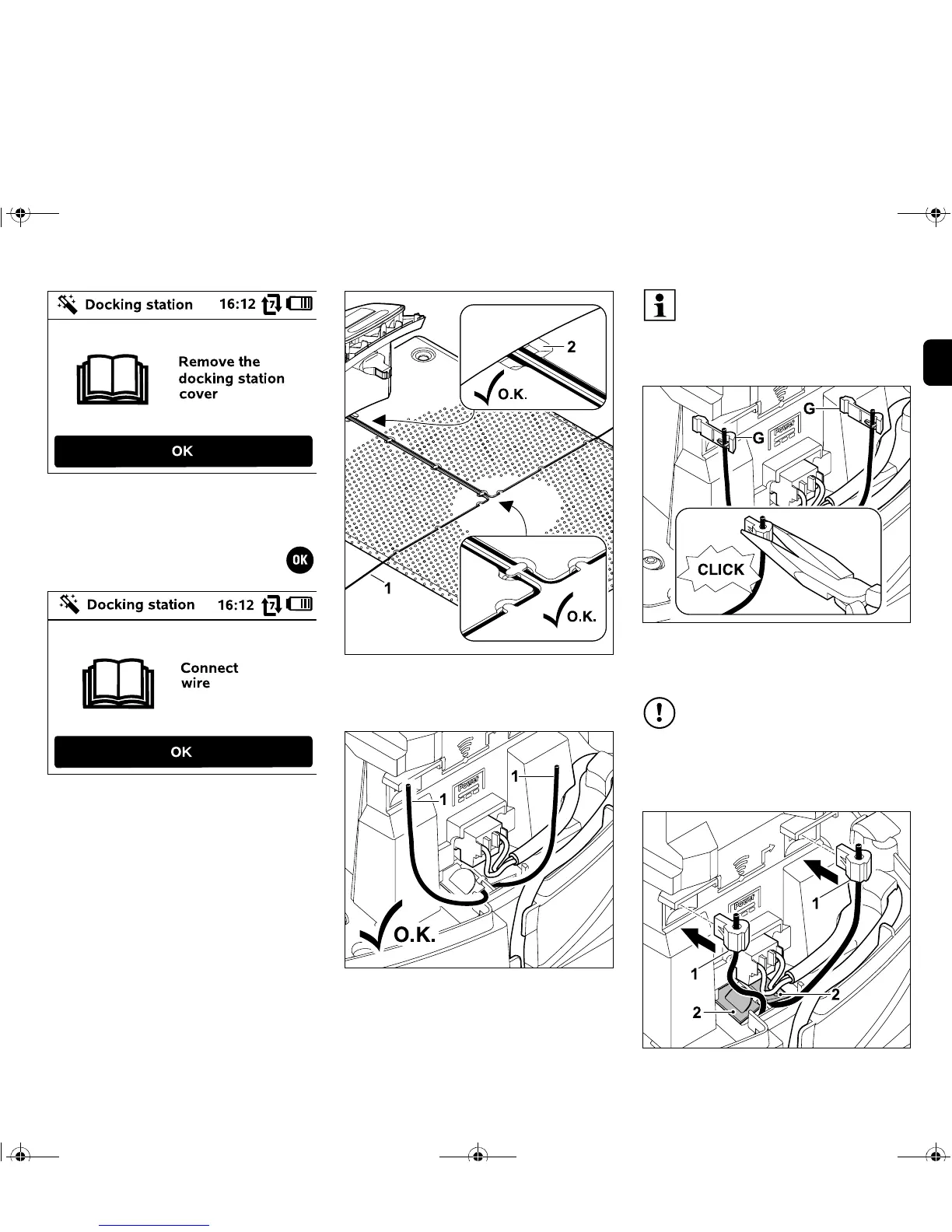
Remove the cover as described in the
"Installing the docking station" section.
(Ö 9.5)
Then press the OK button on the
control panel.
Insert the perimeter wire (1) into the cable
guides in the floor plate and guide it
through the socket (2).
Cut the ends of the perimeter wire (1) to a
free length of approx. 10 cm.
Fasten the press fit connectors (G) onto
the cable ends using suitable pliers –
ensure correct engagement.
Precisely observe the free length
and do not roll up protruding wire
ends. Excessively long free ends
can interfere with correct operation
of the robotic mower.
The press-fit connectors are
intended for one-time use and must
not be reused following removal.
Additional press-fit connectors are
available from a VIKING specialist
dealer. (Ö 16.)


 To Next Page