7
8
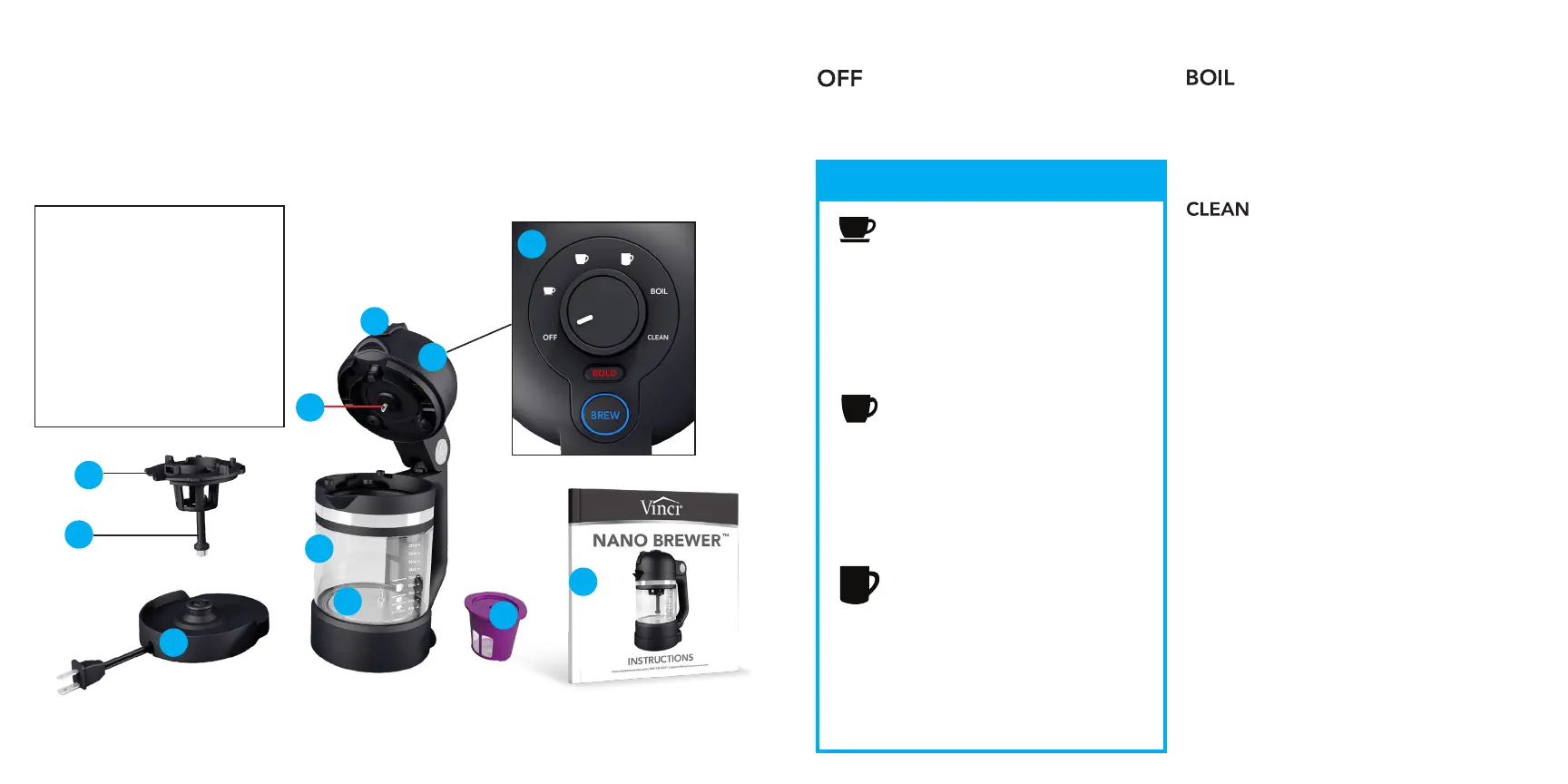
GETTING TO KNOW YOUR NANO BREWER
BREW SETTINGS
CONTROL LID
Bold Button
The Bold button is used to extend the amount
of time the Circle Flow Technology is activated
by 30 seconds thus providing a bolder cup of
coffee. When the Bold function is activated,
the Bold button is illuminated red. Pressing the
button toggles its state between Off and On.
Brew Button
The Brew button starts the brewing process.
It will also stop the brewing process if it is
pressed during a brew cycle. The Brew button
is illuminated blue when the brewer is in
standby mode and it is illuminated red when
in a brew cycle, boil cycle, or clean cycle. If
there is no power to the Power Base(I) or if the
brewer is not placed on the Power Base(I) or
if the Control Knob(A) is set to OFF, the Brew
button will not be illuminated.
Before using your Nano Brewer for the first time, please familiarize yourself with the various parts
of the machine and how it functions.
Before first use, and after subsequent uses, wash all parts with warm soapy water, EXCEPT for the
Control Lid(B) and Power Base(I) , which should never be submerged in water (see full Cleaning
instructions on page 16 ).
Carefully read all the instructions and save this manual for future reference.
When the Control Knob(A) is in the Off position,
there is no power to the Nano Brewer and it will
not operate.
4oz - 20oz of water
When the Boil position is selected, the brewer
will bring the water in the Carafe(E) to a boil
when the Brew button is pressed. The time it
takes to bring water to a boil is depended upon
the amount of liquid in the Carafe(E) .
When the Clean position is selected and the
Brew button is pressed, the brewer will cycle
water from the Carafe(E) through the pump
system then blow air through the system
leaving the Nano Brewer clean and ready for
its next use. See full cleaning instruction on
page 16.
A. Control Knob
B. Control Lid
C. Lid Release
D. Piercing Needle
E. Borosilicate Glass Carafe
F. Heating Plate
G. K-Cup® Holder
H. Water Pickup Tube
I. Power Base
J. Reusable Filter Cup
K. Instruction Manual
B
A
G
F
D
C
E
I
H
K
J
When the Small Cup position is selected
and the Brew button is pressed, the
brewing process will begin. Once the
water reaches the proper temperature, the
Circle Flow Technology will activate and
run for 20 seconds.
SMALL CUP SETTING
4oz - 6oz of water
MEDIUM CUP SETTING
6oz - 8oz of water
When the Medium Cup position is
selected and the Brew button is pressed,
the brewing process will begin. Once the
water reaches the proper temperature, the
Circle Flow Technology will activate and
run for 40 seconds.
LARGE CUP SETTING
8oz - 12oz of water
When the Large Cup position is selected
and the Brew button is pressed, the
brewing process will begin. Once the
water reaches the proper temperature, the
Circle Flow Technology will activate and
run for 60 seconds.


 To Next Page
 Loading...