EasyManua.ls Logo

Vingtor ETB-100 - User Manual

Default Icon
4 pages
Print Icon
To Next Page IconTo Next Page
Loading...
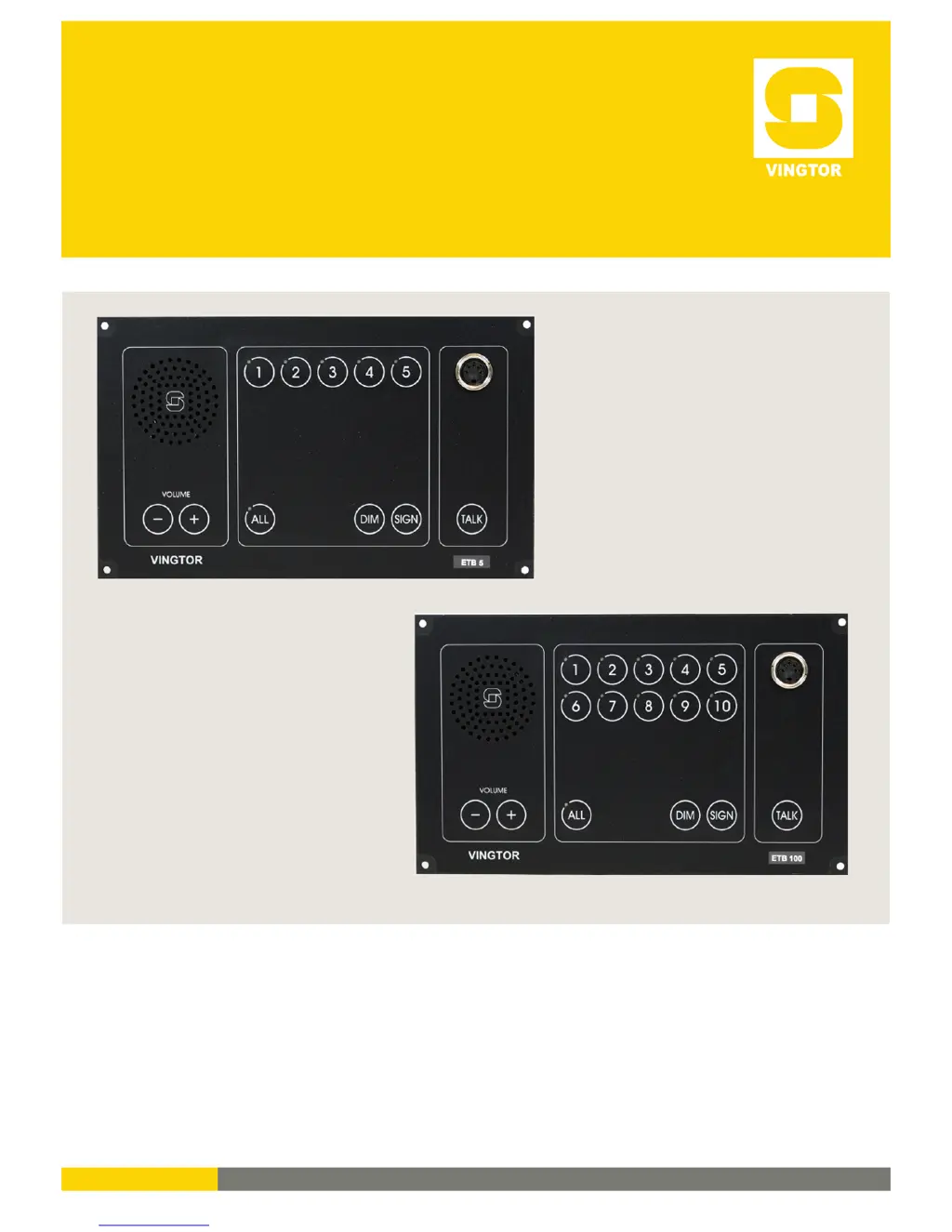
USER GUIDE
Command Talk-Back & Public Address System
ETB-5 / ETB-10 / ETB-10A / ETB-100 / ETB-100A
A100K11163

Other manuals for Vingtor ETB-100

Questions and Answers

  • J
    Jordan FerrellAug 16, 2025
    What to do if the Vingtor Marine Equipment system has shut down?
    • A
      Amy CobbAug 17, 2025
      If the entire Vingtor Marine Equipment system has shut down and there's no light indication on the ETB panel, first check the voltage on terminal block K11 no.1-2. If there's no voltage, inspect the 24V DC mains power supply or the SPS-4 power supply. If the voltage measures correctly between 24-32VDC, check the S1 2AT and S2 1AT fuses.
  • R
    Ryan ChapmanAug 19, 2025
    How to troubleshoot SPS-4 power supply failure in Vingtor Marine Equipment?
    • C
      Cheryl KellerAug 19, 2025
      To troubleshoot an SPS-4 power supply failure in Vingtor Marine Equipment, start by checking the main power supply to ensure 230V AC or 115V AC hasn't failed, switching the system to 24V DC emergency power. Also, check the 5.0AT fuse on terminal 3. If the problem persists, the power supply module may need repair or replacement.
  • S
    Shane WhiteAug 22, 2025
    How to reduce high background sound in Vingtor Marine Equipment?
    • B
      bryanfordAug 22, 2025
      If you are experiencing high background sound in your Vingtor Marine Equipment, and it's due to a nearby substation, consider replacing the current substation with one that uses a headset or an external loudspeaker STB-2. You can also adjust the master volume lines 1-5 in ETB-5 or 6-10 in ETB-10.
  • J
    Jessica RomeroAug 25, 2025
    What to do if there is no signal in the Vingtor Marine Equipment substation?
    • S
      Shawn SalasAug 26, 2025
      If there's no signal in the substation when using the SIGN button in the ETB central unit, first disconnect the substation to check for a 1 KHz tone. If 7V AC is measured on terminals 1-2 in the ETB central unit, the unit is likely OK. If no voltage is measured, the ETB central unit may need repair. If no voltage is measured on terminals 1-2 in the substation after connecting it, the fault might be in the cable, or the substation might require repair.
  • K
    kbrennanAug 27, 2025
    How to fix system generated noise in Vingtor Marine Equipment?
    • G
      Gregory HernandezAug 27, 2025
      To address system-generated noise in Vingtor Marine Equipment, begin by inspecting all cable connections, paying special attention to the screens, ensuring they meet the requirements. If the issue continues, try using a 1uF capacitor between terminals no. 1-2 block K11. If the problem still persists after these steps, it may require professional service.
  • E
    emily71Aug 30, 2025
    Why is there no signal in the additional signal device of Vingtor Marine Equipment?
    • S
      Stacy ShannonAug 30, 2025
      If there's a signal in the substation but none in the additional signal device when using the SIGN button, first disconnect the substation. If no voltage is measured on terminals 3-4 in the ETB central unit, check fuse S2 1A. If fuse S2 1A is OK, check the automatic fuse by waiting 2-3 seconds; if 24V DC is measured, the load is likely too high (exceeding 50 mA).
  • A
    Ashley MorrisSep 2, 2025
    What to do if one Vingtor Marine Equipment substation cannot be operated?
    • W
      whillSep 2, 2025
      If one substation of your Vingtor Marine Equipment cannot be operated, check the cable and terminal block in the ETB panel for the current extension. Also, inspect the cable and terminal block in the substation or plugbox. You can also try moving the terminal block to another extension number; if operation is OK on the new extension, the substation may need repair.
  • S
    starkericaSep 4, 2025
    Why the Vingtor Marine Equipment substation cannot be operated?
    • G
      Gina OrtizSep 5, 2025
      If a Vingtor Marine Equipment substation cannot be operated, and there's no flashing green LED or signal in the ETB monitor loudspeaker for the selected line, first check the cable and terminal block in the substation or plugbox. Try moving this terminal block to another extension number; if the problem persists, the substation may need repair. If substation operation is OK, the ETB central unit may need repair.
  • M
    mcdonaldwilliamSep 7, 2025
    How to fix operation problem from a Vingtor Marine Equipment substation?
    • J
      Jennifer HarrisSep 8, 2025
      To resolve an operation problem from a Vingtor Marine Equipment substation, try changing the polarity in substation terminals no. 1-2.
  • S
    Sherry HenrySep 10, 2025
    How to troubleshoot operation problems from a parallel station in Vingtor Marine Equipment?
    • T
      Tammy SanchezSep 10, 2025
      If operation from a parallel station cannot be done on your Vingtor Marine Equipment, but it is possible from the ETB central unit, check the cable and connections between the parallel station and the ETB central unit. Also, check the microphones. If the problem persists, the parallel station may need to be repaired.

Summary

ETB Central Unit Functions

Making a Call to a Substation

Making a Call to a Group of Substations

Making an All Call

Making a Handsfree Call Using Foot Switch

Receiving Calls from Substations

Audio from External Systems (ETB-10 A)

Emergency PA from Call Station 1 (ETB-100 A)

Emergency PA from Call Station 2 (VMT-603)

Emergency PA from Call Station 3 (VMP-603)

Parallel Communication (STB-6;STB-6 GN on Bridge Wing)

Vingtor ETB-100 Specifications

General IconGeneral
NetworkGSM 900
BatteryLi-Ion
Internal MemoryNo
Expandable MemoryNo
CameraNo
BluetoothNo
USBNo
ColorsBlack

Related product manuals