ETB Central Unit Functions1
The ETB Talk-Back system comprises the ETB central unit and accessory equipment such as
microphones and foot switch.
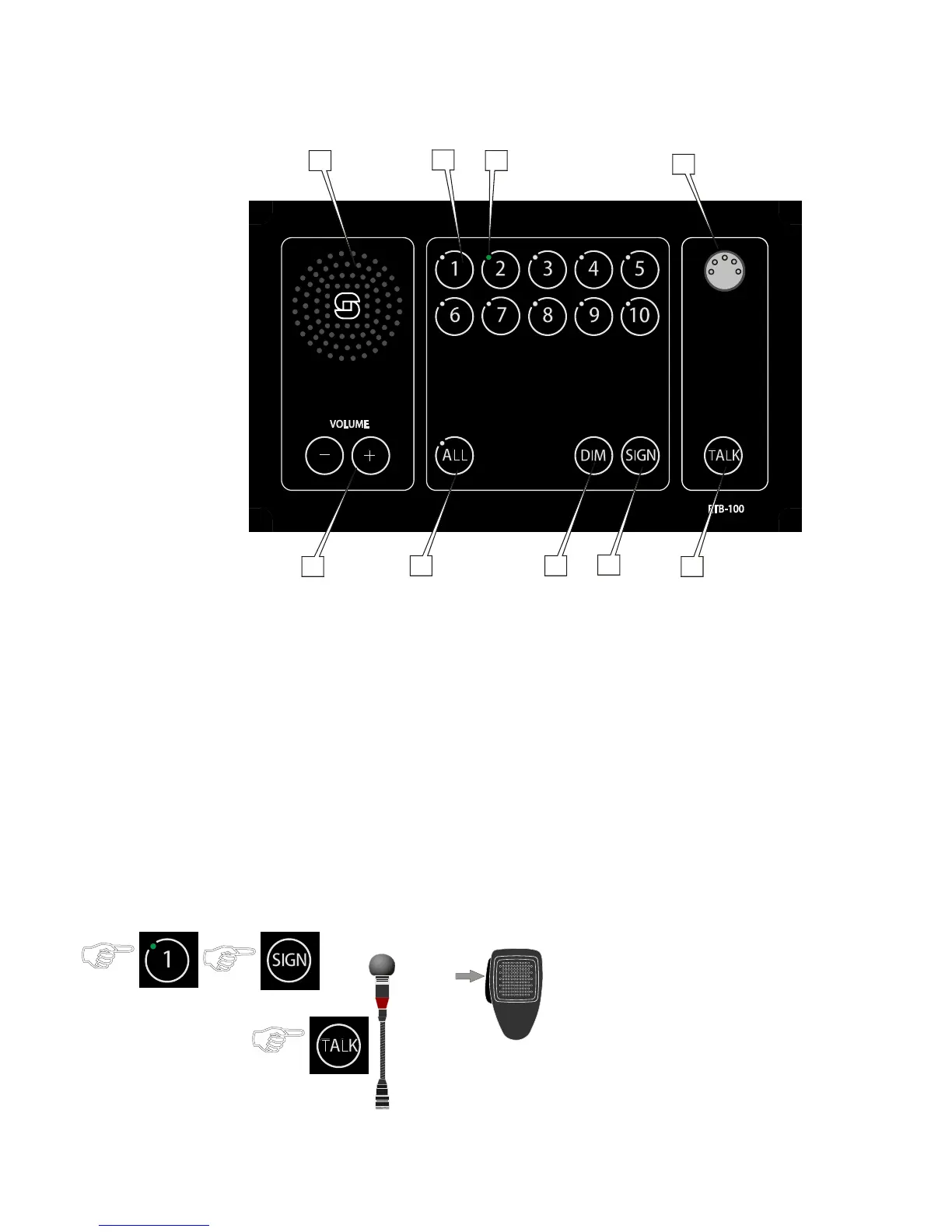
ETB-5/ETB-10/ETB-10A/ETB-100/ETB-100A Central Unit
Loudspeaker: For communication and alarm signals1.
Line Buttons: Lines 1-5 for ETB-5, Lines 1-10 for ETB-10/ETB-10A and ETB-100/ETB-100A2.
Green LED: Indication light for each line button3.
Microphone Connector: For gooseneck or handheld microphone4.
VOLUME - +: Volume control buttons for panel loudspeaker5.
ALL: Button with indication LED for making All Call6.
DIM: Button for adjusting light intensity of indication LEDs7.
SIGN: Button for signal and activating extra signal device on substations8.
TALK: PTT switch for gooseneck microphone MB-30G9.
Making a Call to a Substation2
● Press the line button
the call is set up, indicated by a steady green LED -
● Press the SIGN button
● Press the TALK button or PTT switch on the handheld
microphone
Speak clearly into the microphone ●
When the TALK button or PTT switch on microphone is -
released, the ETB will be in listening mode, and you will
hear the communication from the selected station.
Press the line button once more to terminate the call. ●


 To Next Page