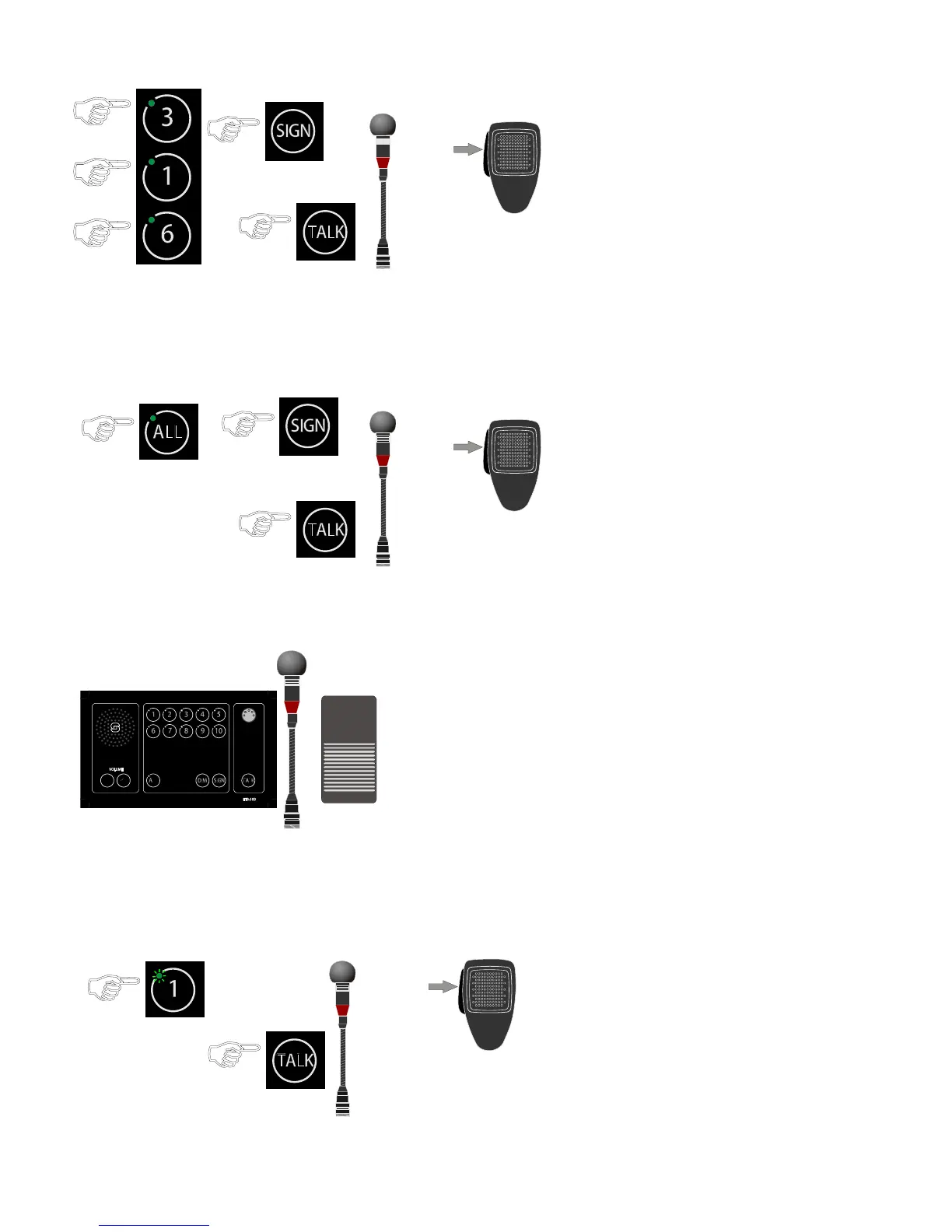
Making a Call to a Group of Substations3
● Press the required line buttons.
The call is set up, indicated by the LEDs lighted a -
steady green in the selected buttons.
● Press the SIGN button
● Press the TALK button or PTT switch on the handheld
microphone
Speak clearly into the microphone ●
When the TALK button or PTT switch on microphone is -
released, the ETB will be in listening mode, and you will
hear the communication from the selected station.
Press the active line buttons once more to terminate ●
the calls.
Making an All Call4
● Press the ALL button, the call is set up.
Indicated by steady green LED in the ALL button. -
● Press the SIGN button
● Press the TALK button or PTT switch on the handheld
microphone
Speak clearly into the microphone ●
When the TALK button or PTT switch on microphone is -
released, the ETB will be in listening mode, and you will
hear the communication from the selected station.
Press the ● ALL button once more to terminate the call
Making a Handsfree Call Using Foot Switch5
The equipment required in making a handsfree call from the ETB central unit are a
gooseneck microphone (MB-30G) and a foot switch (U2410).
Press the foot switch ●
Speak clearly into the microphone ●
When the foot switch is released, the ETB will be in listening mode, and you will
hear the communication from the selected station.
Receiving Calls from Substations6
Incoming calls are indicated by flashing green LEDs in the respective line buttons and a
beeping tone in the panel loudspeaker.
● Press the line buttons with the flashing green LED
the call is set up, indicated by a steady green LED -
● Press the TALK button or PTT switch on the handheld
microphone
Speak clearly into the microphone ●
When the TALK button or PTT switch on microphone is -
released, the ETB will be in listening mode, and you will
hear the communication from the selected station.
Press the active line buttons once more to terminate ●
the calls.


 To Next Page