Operators guide
11
Introduction and description
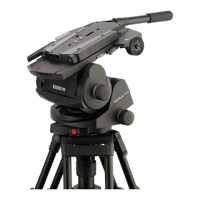
The Vector 750i encoded pantographic pan and tilt head features a unique linkage
counterbalancing (pantograph) mechanism, thin film (TF) drag assemblies for pan and tilt
motions, and a unique slide plate and balance mechanism position measurement for mid-
broadcast camera adjustments. The head is specifically designed for use in VR/AR applications
in both studio and outside broadcast when partnered with the Virtual Reality Interface (VRi) box,
providing the most precise positioning data possible from a pantographic head and ensuring
stable and accurate placement of virtual graphics into the live environment.
Perfect Balance
The balance system is easily adjusted using the Perfect Balance adjustment knob [21] on the
right-hand side of the head. The balance adjustment compensates for differing payload Centre
of Gravity (C of G) heights by varying the mechanical advantage of a bell-crank in the
counterbalance mechanism.
Thin film (TF) drag
Both the pan and tilt mechanisms incorporate TF (thi
n film) drag systems to ensure smooth
movement of the camera about these axes and are fitted with pan and tilt adjustment knobs
([10], [13]) to adjust the drag settings. The drag controls are mounted on the left-hand side of
the head. The whip-pan facility is unaffected by the pan drag setting.
Brakes
Friction brakes on each axis allow the head to be locked at any chosen position. The operating
levers for both brakes ([3], [4]) are fitted at the right-hand rear of the head. A tilt axis centre lock
[22] is located on the right-hand side of the head to secure the camera mount platform [17] in
the horizontal position during transport or payload changing.
Illuminated level bubble
A level bubble [8] is fitted to the rear of the head and is provided with a time-delay illumination
unit operated by a button [7]. The battery for the illumination unit is contained within a battery
compartment located in the base of the head. When the level bubble button is pressed, the level
bubble and drag adjustment knobs illuminate for 15 seconds.
Warning!
Do not use the pan and tilt brakes to increase the amount of drag on the pan
and tilt axes.
Brakes must only be used to secure the payload when the camera system is
not in use.
For transportation and storage of the head, the brakes must be set to the
OFF position.









 To Next Page