1 – 3
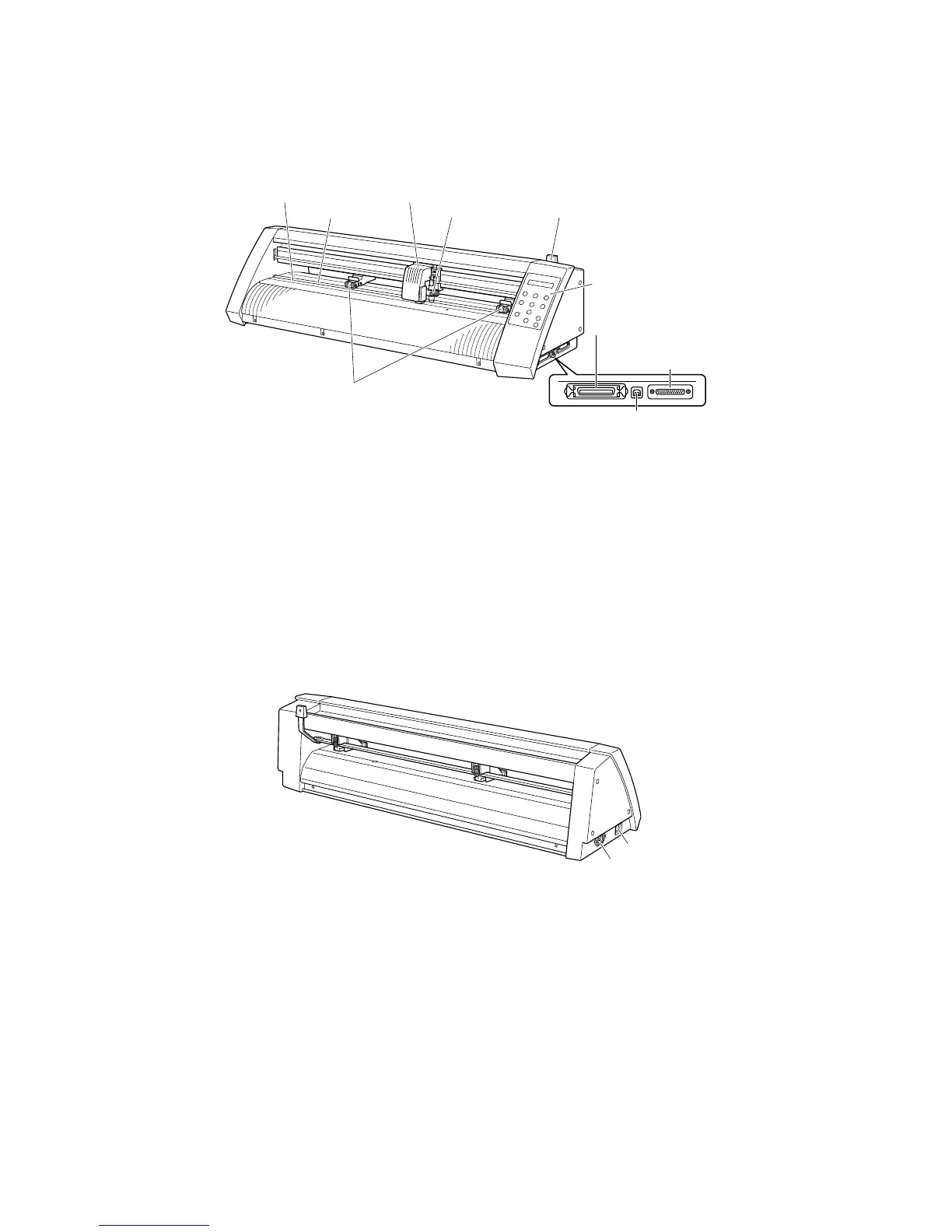
1.2 Parts Names and Functions
■
Front View
Cutting mat
: Cutting or plotting is performed on this mat.
Grit roller
: Feeds the medium backward or forward
Push rollers
: Pushes the medium against the grit rollers
Pen carriage
: Moves the cutter pen to the left and right
Pen holder
: Holds the cutter pen and moves it up and down
Media set lever
: Raises or lowers the push rollers during loading of a medium
Control panel
: Used to operate the cutting plotter and set functions
Parallel (Centronics) interface connector
: Used to connect a Centronics-compatible parallel interface cable
USB interface connector
: Used to connect a USB cable
Serial (RS-232C) interface connector
: Used to connect an RS-232C serial interface cable
■
Rear View
AC power inlet
: Connects the power cord to the cutting plotter
Power switch
: Turns the power supply to the cutting plotter on or off
Cutting mat
Grit roller
Pen carriage
Push rollers
Media set leverPen holder
USB interface
connector
Serial (RS-232C)
interface connector
Control panel
Parallel (Centronics)
interface connector
AC power inlet
Power switch



 To Next Page