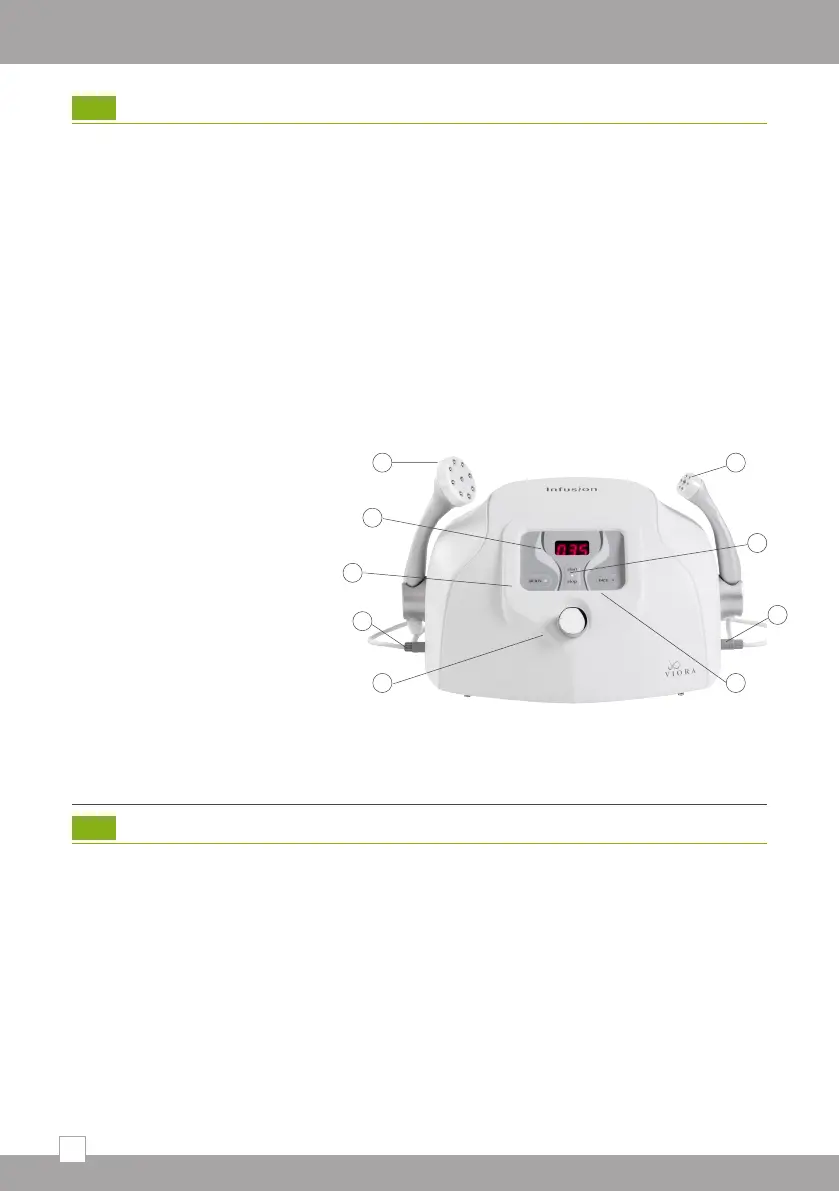
16
5
8
8
6
7
4
3
2
1
1. Treatment intensity control
2. Body treatment selector
3. Treatment intensity display
4. Body treatment hand piece
5. Facial treatment hand piece
6. Start/Stop push button
7. Facial treatment selector
8. Hand piece connectors
4. Clinical Guide
Indications
The Infusion™ Electro-mesotherapy system, along with Viora’s solutions, is designed to
target a wide range of skin conditions including:
• Temporary reduction in the appearance of cellulite
• Temporary reduction of local fat
• Minimizing fine lines and wrinkles
• Skin rejuvenation
• Skin tightening for body and face
4.1
Equipment Setup
1. Plug in the hand piece connectors; when facing the device, the Face hand piece
should be plugged on the right side of the system and the body hand piece on the
left. Secure both hand pieces in place by turning the metal clasp tight.
2. Before turning the system on, ensure that the power voltage of your unit matches
your country’s voltage requirements.
3. Verify that the power cord is connected to the power connection on the system’s
rear panel and to a suitable wall power outlet.
4. Switch on the power button located at the back of the system.
5. Push the start button on the front.
If you experience difficulties with the system after installation, please refer to section 2
“Troubleshooting.”
3.4


 To Next Page