12
Section 9: OSD Setup
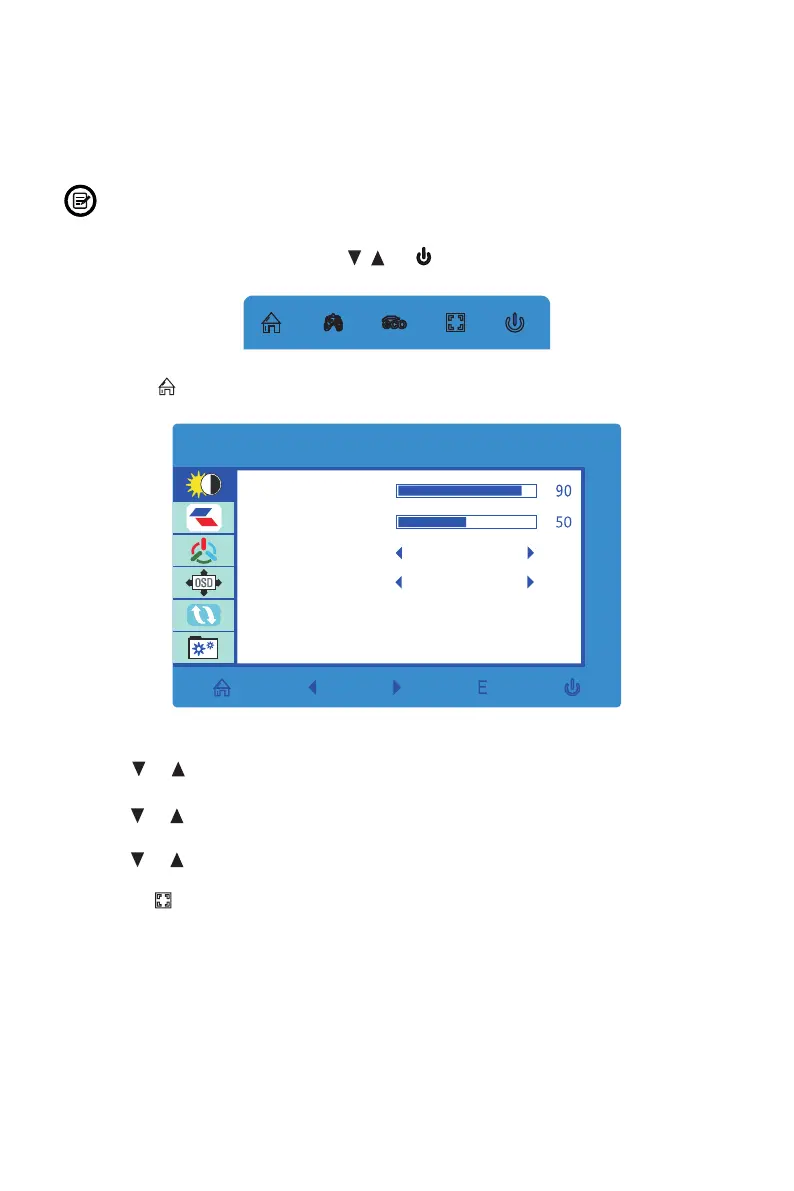
The On-Screen Display (OSD) Menu may be used to adjust your monitor’s settings
and appears on screen after turning on the monitor and pressing the M button.
When using the monitor for the rst time, settings will automatically adjust to
optimal settings according to your computer’s conguration and parts etc.
1. Press any one of the buttons (M, , , E, ) to activate the navigation window.
eco
2. Press M ( ) to enter the OSD menu.
BRIGHTNESS
BRIGHTNESS
CONTRAST
ECO
DCR
STANDARD
OFF
3. Press or to browse functions.
• Highlight the desired function, then press M to enter the sub-menu.
• Press or to browse sub-menus, then press M to highlight the desired
function.
• Press or to highlight an option, then press M to conrm the settings and exit
the current screen.
4. Press E ( ) to exit the current screen.


 To Next Page