A
UX 2
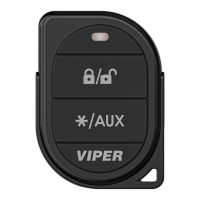
Press LOCK/UNLOCK and STAR/AUX simultaneously. An optional
auxiliary convenience or expansion function that you have added
to your system can be activated by pressing these buttons
simultaneously. The Aux 2 output controls .
Using Your System
Active arming
You can arm the system by pressing LOCK/UNLOCK for 1-second.
When the system arms you will hear a short siren sound or chirp,
and the parking lights flash once. If the vehicle’s power door locks
have been connected to the system, the doors lock.
While the system is armed the status LED flashes once per second,
indicating that the system is active and protecting your vehicle. If
you hear a second chirp after arming and see the status LED
flashing in groups, refer to the ‘Diagnostics’ section of this guide.
This extra chirp is called ‘Bypass Notification’.
Passive arming
The system can be programmed to arm itself automatically, this is
called passive arming. If the system is programmed for passive
arming, it will automatically arm 30-seconds after the ignition is
turned off and the system detects that you have left the vehicle by
opening and closing a door. Whenever the system is in its 30-
second passive arming countdown, the status LED flashes twice as
fast as it does when the system is armed. At the 30-second point
the system is armed.


 To Next Page