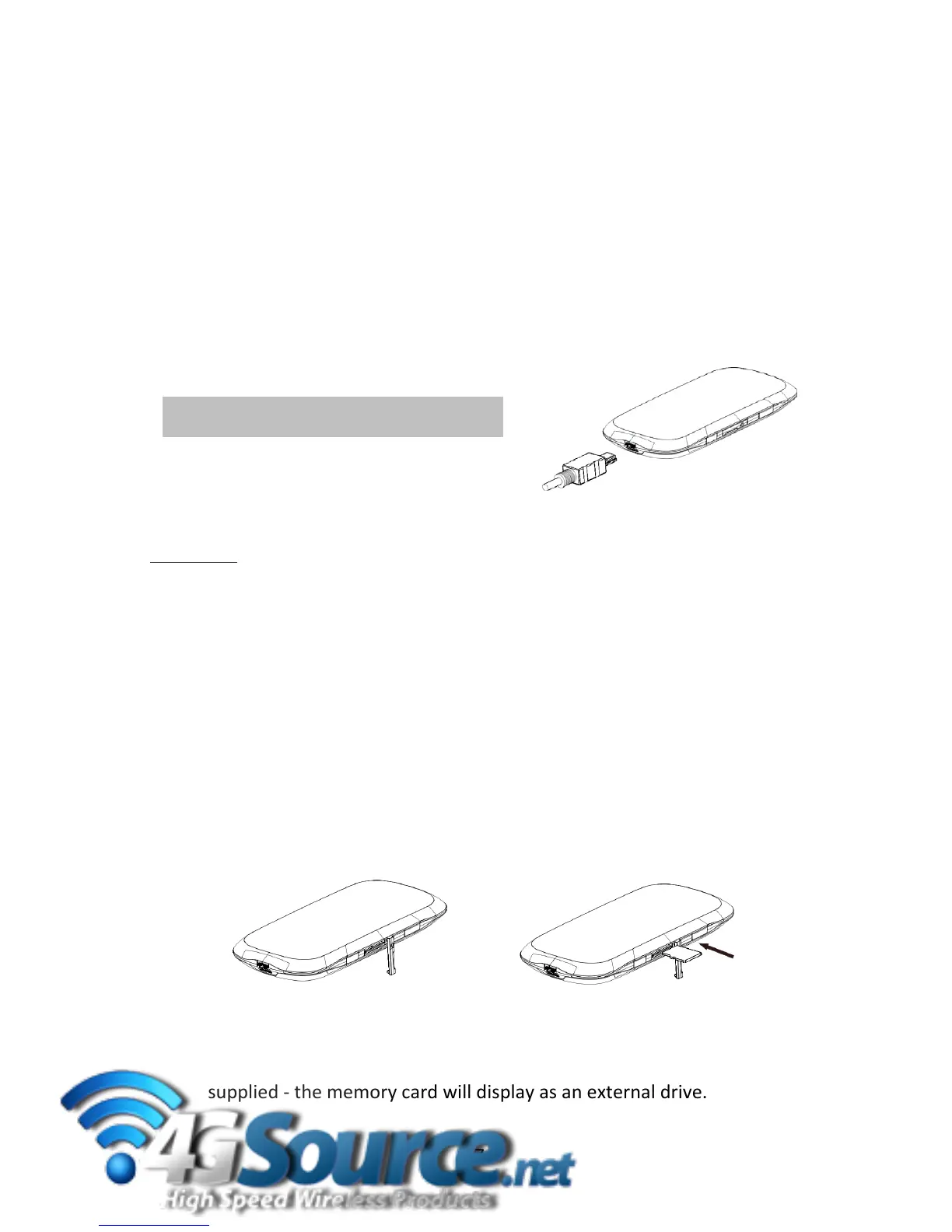
2.2ChargeyourWirelessRouter
1.Insertthechargerleadcarefullyintothesocketatthebaseoftherouter.
2.Theplugonlyfitsoneway.Donotuseexcessiveforcetoinserttheplug.
3.Checktheplugistherightwayroundandinsertitgently.
4.Inser
ttheothe
rendofthechargerlead(StandardUSB)intotheAC
chargeroraUSBsocketonyourcomputer.
Please note: Under conditions of extended use, low coverage, high temperature or maximum data
throughput,thebatterymaynotfullycharge,eventhoughtherouter isconnectedto the AC charger.
Forthesesituationsitisrecommendedthat,inadditiontothechargerbeingconnected,thebatteryis
fullycharge dbeforeextendeddatatransferscommence.
TIP
Becarefultoavoid tripping orpulling
ontheleadwhilstpluggedin.
2.3In
sertamicroSD(HC)™memorycard(OptionalAccessory)
UsethedeviceasportableUSBstoragedrivewithupto32GBmicroSD(HC)™:
Openthememorycardslotcoverontherighthandsideoftherouter.
InsertthemicroSD(HC)™cardandpressgentlytoclickintoplace:
Closetheme
morycardslotcover
ConnectthewirelessroutertoyourcomputerusingtheUSBcable
supplied‐thememorycardwilldisplayasanexternaldrive.
7



 To Next Page