Upgrade the Engine
programming
6
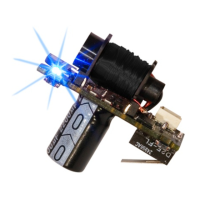
Toggle the tournament lock on and off by pressing the bottom
button on the Virtue Ion Board. The tournament lock status will
toggle from locked (LED flashes green ) to unlocked (LED flashes
red). If you use a membrane adapter (pg 12), you must discon-
nect the membrane plug cable from the board before toggling
the tournament lock on and off.
To program the Virtue Ion Board, hold down the trigger and turn the
marker on. As the multicolor LED begins to cycle through a rain-
bow of colors, release the trigger. The LED will stop on purple, indi-
cating you are now in the first programming setting; Firing mode.
Tapping the trigger will then toggle through the different program-
ming settings:
Firing Mode
(pg 7)
..................................Purple
Debounce
(pg 8)
....................................Green
Ramp Activation Speed
(pg 8)
...................Blue
Ramp Percentage
(pg 9)
.........................White
Dwell
(pg 9)
...............................................Red
Eye Delay
(pg 10)
......................................Teal
Anti-Mechanical Bounce Anti-Mechanical Bounce
(pg 10)
.............Yellow
Anti-Bolt Stick
(pg 11)
..............Flickering Green
Max Rate of Fire
(pg 11)
.............Flickering Red
Virtue Paintball, LLC || http://www.virtuepaintball.com
next


 To Next Page