ASSEMBLY INSTRUCTIONS
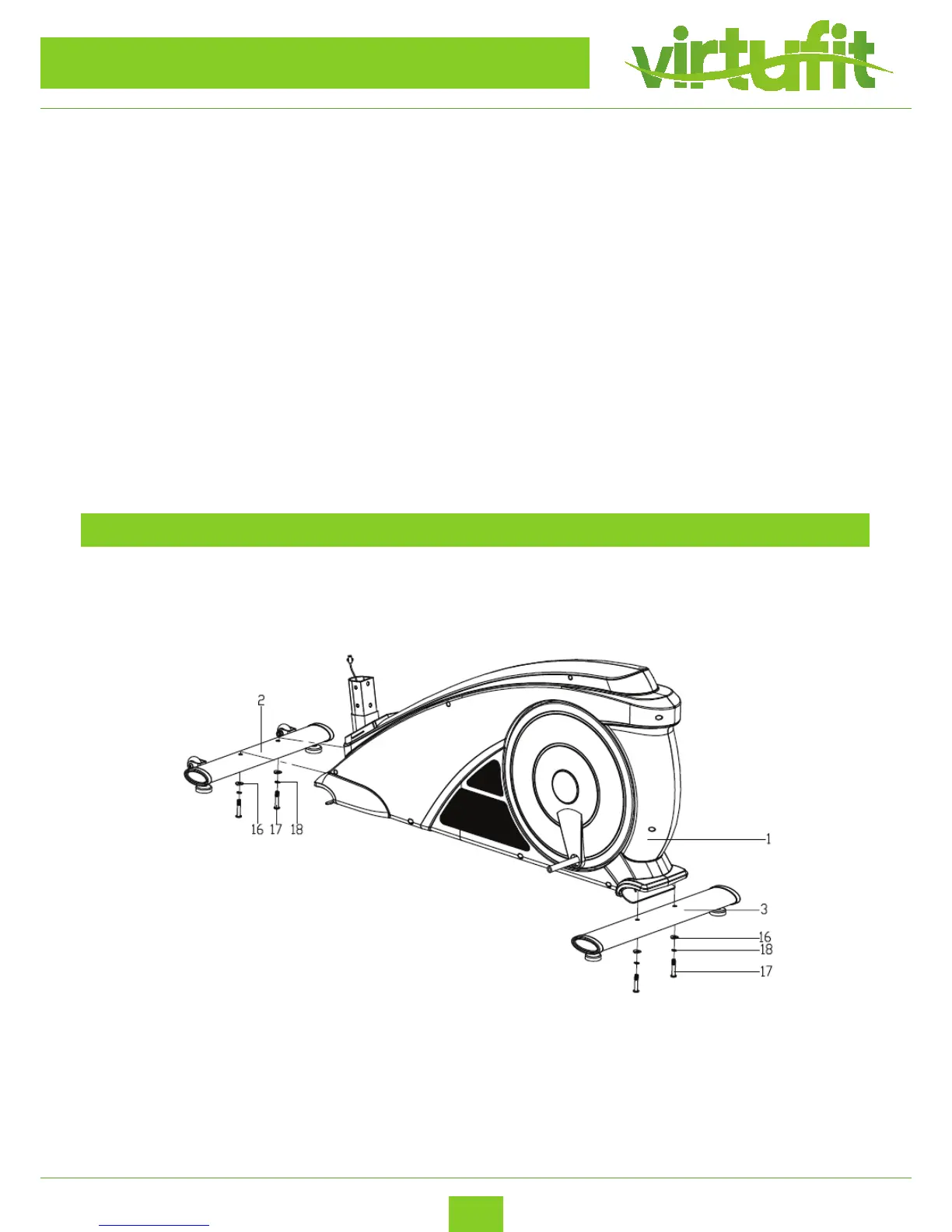
STEP 1
– Install the Front bottom tube (2) and Rear bottom tube (3) to the Main frame (1) with the Hex
socket screws (17), Spring washers (18) and Arc washers (16) as shown.
Before you start to assemble the device, please read the following points carefully:
1. Missing parts: If you think you are missing certain parts in your package, carefully check the styrofoam
and the device yourself. Some parts (bolts, screws, etc.) are already attached to / in the device.
2. Error message: Make sure that all cables are carefully attached. The adjusable feet are very sensitive and
should remain straight. Do you get an error message after the installation of your cross trainer? Then you
should bend these adjustable feet straight again, this may cause the error message to disappear.
3. Transport wheels: Make sure that the transport wheels are attached to the front of the device.
4. Allen screws: In the upright of crossbar are hex bolts, make sure that the Allen key is properly in the bolt
before you apply force to the key. In this way you prevent the head of the socket head from being turned.


 To Next Page