NEDERLANDS
NL
10
fitness app to the device, how the fitness app works and what its
capabilities are.
Fitshow
APP STORE GOOGLE PLAY MANUAL
Kinomap
APP STORE GOOGLE PLAY MANUAL
Zwift
APP STORE GOOGLE PLAY MANUAL
ONDERHOUD
Veilig en effectief gebruik kan alleen worden bereikt als het toestel goed
wordt gemonteerd en onderhouden. Het is uw verantwoordelijkheid
om ervoor te zorgen dat het toestel regelmatig wordt onderhouden.
Onderdelen die al zijn gebruikt en/of beschadigd, moeten worden
vervangen voordat het toestel verder gebruikt wordt. Het toestel mag
alleen binnen worden gebruikt en opgeborgen. Langdurige blootstelling
aan verwering en veranderingen in temperatuur/vochtigheid kunnen een
ernstige impact hebben op de elektrische componenten en bewegende
delen van het toestel. Haal altijd de stroomkabel van het toestel
uit het stopcontact voordat het apparaat wordt schoongemaakt of
onderhouden.
Dagelijks onderhoud
• Reinig en verwijder zweet en vocht na elk gebruik.
AFSTELLEN
Band afstellen
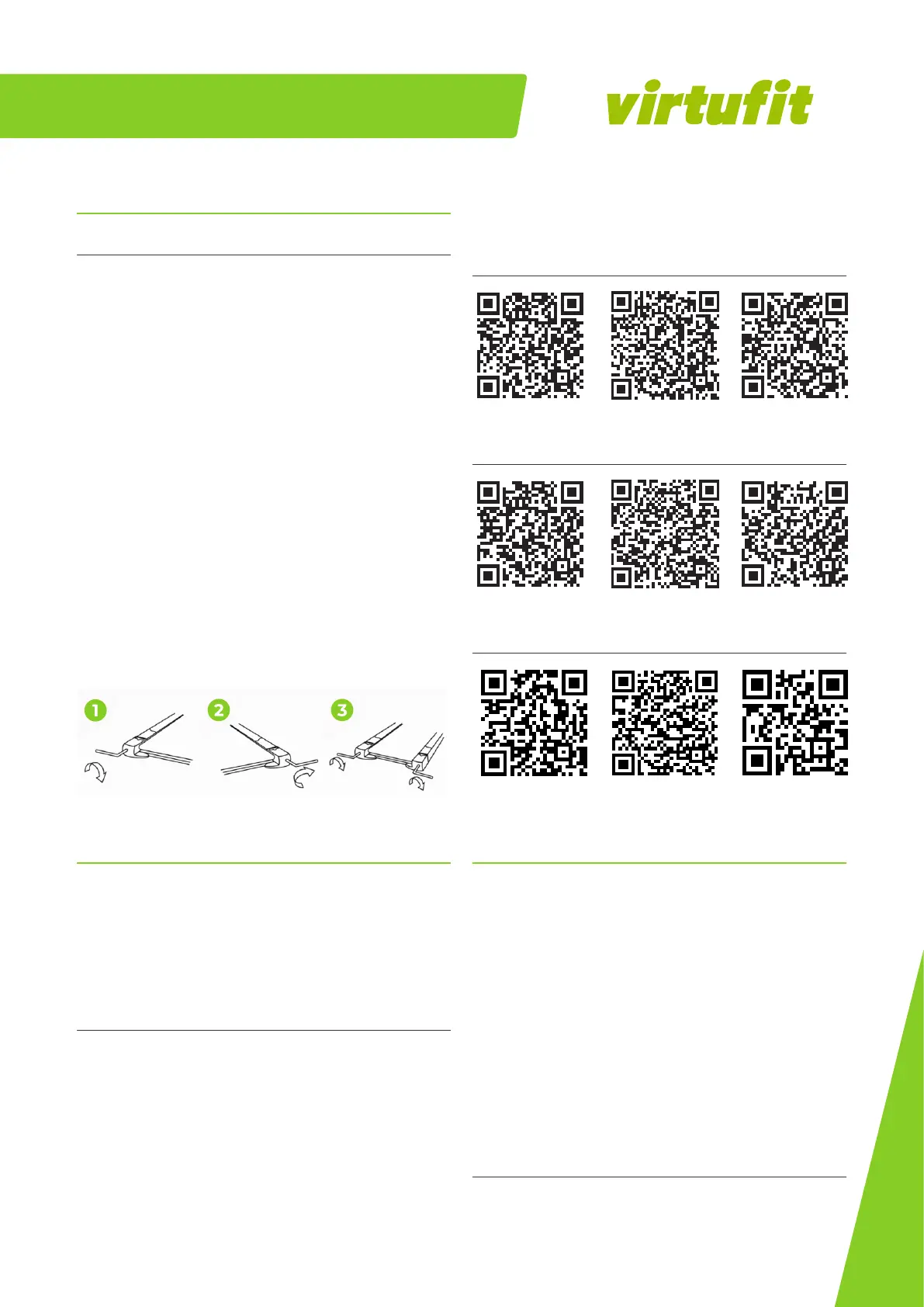
1. Loopband wijkt af naar links: Start de loopband, stel de
snelheid in op 2 tot 3 km/u zonder de loopmat te belasten.
Gebruik de inbussleutel om de schroef aan de linkerkant
van het uiteinde een kwartslag naar rechts te draaien (1).
Laat de loopband gedurende 1 tot 2 minuten zonder
belasting draaien. Herhaal het proces totdat de loopmat
precies in het midden zit.
2. Loopband wijkt af naar rechts: Start de loopband, stel de
snelheid in op 2 tot 3 km/u zonder de loopmat te belasten.
Gebruik de inbussleutel om de schroef aan de rechterkant
van het uiteinde een kwartslag naar rechts te draaien (2).
Laat de loopband gedurende 1 tot 2 minuten zonder
belasting draaien. Herhaal het proces totdat de loopmat
precies in het midden zit.
3. Loopband vastgelopen: Gebruik de inbussleutel om de
schroef aan de rechterkant van het uiteinde een halve slag
naar rechts te draaien en de schroef aan de linkerkant van
het uiteinde ook een halve slag naar rechts te draaien.
Herhaal het proces totdat de blokkering is opgelost (3).
EN
Virtufit Totally Foldable TR-50i Treadmill
11
11
NL
INKLAP INSTRUCTIES
-- Pull the pull-pin on the console handrail to fold the console carefully.
-- Pay attention to the cables and ensure that they are nog pinced.
--unscrew the hand knob on the both sides of the frame respectively and carefully fold the console up
--Place the machine leaning against the wall or place under a bed.
CAUTION: Do not allow children to touch the machine, the treadmill may fall.
FOLDING INSTRUCTIONS
1. Pull the pull-pin on the console handrail to fold the console carefully. Pay attention to the cables and
ensure that they are nog pinced.
2. Unscrew the hand knob on the both sides of the frame respectively and carefully fold the console up.
3. Place the machine leaning against the wall or place under a bed.
NOTE: Store your machine in a dry area away from children and high trac areas as shown in the
illustration. Be sure it is secure and cannot fall onto small animals or children.
RUNNING BELT ADJUSTMENT
01. Running belt deviates to left: Start the machine, set speed at 2-3 km/h without a load on the belt,
use Allen key to turn the screw 1/4 turn (see fig. 1). Then allow the machine to run without a load for 1-2
minutes. Repeat process until the belt becomes central.
02. Running belt deviate to right:
Start the machine, set speed at 2-3 km/h without a load on the belt,
use Allen key to turn the screw 1/4 turn (see fig. 2). Then allow the machine to run without a load for 1-2
minutes. Repeat process until the belt becomes central.
03. Running belt jam: If the running belt is in dead condition, use the Allen key to turn the screw 1/2 a
turn both left and right until the jam solved (see fig 3).
EN
Virtufit Totally Foldable TR-50i Treadmill
11
11
NL
INKLAP INSTRUCTIES
-- Pull the pull-pin on the console handrail to fold the console carefully.
-- Pay attention to the cables and ensure that they are nog pinced.
--unscrew the hand knob on the both sides of the frame respectively and carefully fold the console up
--Place the machine leaning against the wall or place under a bed.
CAUTION: Do not allow children to touch the machine, the treadmill may fall.
FOLDING INSTRUCTIONS
1. Pull the pull-pin on the console handrail to fold the console carefully. Pay attention to the cables and
ensure that they are nog pinced.
2. Unscrew the hand knob on the both sides of the frame respectively and carefully fold the console up.
3. Place the machine leaning against the wall or place under a bed.
NOTE: Store your machine in a dry area away from children and high trac areas as shown in the
illustration. Be sure it is secure and cannot fall onto small animals or children.
RUNNING BELT ADJUSTMENT
01. Running belt deviates to left: Start the machine, set speed at 2-3 km/h without a load on the belt,
use Allen key to turn the screw 1/4 turn (see fig. 1). Then allow the machine to run without a load for 1-2
minutes. Repeat process until the belt becomes central.
02. Running belt deviate to right:
Start the machine, set speed at 2-3 km/h without a load on the belt,
use Allen key to turn the screw 1/4 turn (see fig. 2). Then allow the machine to run without a load for 1-2
minutes. Repeat process until the belt becomes central.
03. Running belt jam: If the running belt is in dead condition, use the Allen key to turn the screw 1/2 a
turn both left and right until the jam solved (see fig 3).
EN
Virtufit Totally Foldable TR-50i Treadmill
11
11
NL
INKLAP INSTRUCTIES
-- Pull the pull-pin on the console handrail to fold the console carefully.
-- Pay attention to the cables and ensure that they are nog pinced.
--unscrew the hand knob on the both sides of the frame respectively and carefully fold the console up
--Place the machine leaning against the wall or place under a bed.
CAUTION: Do not allow children to touch the machine, the treadmill may fall.
FOLDING INSTRUCTIONS
1. Pull the pull-pin on the console handrail to fold the console carefully. Pay attention to the cables and
ensure that they are nog pinced.
2. Unscrew the hand knob on the both sides of the frame respectively and carefully fold the console up.
3. Place the machine leaning against the wall or place under a bed.
NOTE: Store your machine in a dry area away from children and high trac areas as shown in the
illustration. Be sure it is secure and cannot fall onto small animals or children.
RUNNING BELT ADJUSTMENT
01. Running belt deviates to left: Start the machine, set speed at 2-3 km/h without a load on the belt,
use Allen key to turn the screw 1/4 turn (see fig. 1). Then allow the machine to run without a load for 1-2
minutes. Repeat process until the belt becomes central.
02. Running belt deviate to right:
Start the machine, set speed at 2-3 km/h without a load on the belt,
use Allen key to turn the screw 1/4 turn (see fig. 2). Then allow the machine to run without a load for 1-2
minutes. Repeat process until the belt becomes central.
03. Running belt jam: If the running belt is in dead condition, use the Allen key to turn the screw 1/2 a
turn both left and right until the jam solved (see fig 3).
TRAINING WITH FITNESS APPLICATIONS
VirtuFit does not provide service for third party fitness applications
such as Kinomap, iConsole, FitShow etc. If you encounter problems
with a third party fitness application, please contact the developer
of the application in question.
Instruction
• To scan the QR code with an Android or IOS phone or tablet, a
QR code scanner is required. The app for scanning QR codes can
be downloaded from the App Store or Google Play Store.
• Scan one of the QR codes below to go directly to the App Store or
Google Play Store page where the fitness app can be
downloaded.
• Scan the QR code on the right to access the fitness app
manual. The manual describes step by step how to connect the


 To Next Page
 Loading...