EN - 6
viscount
User Manual
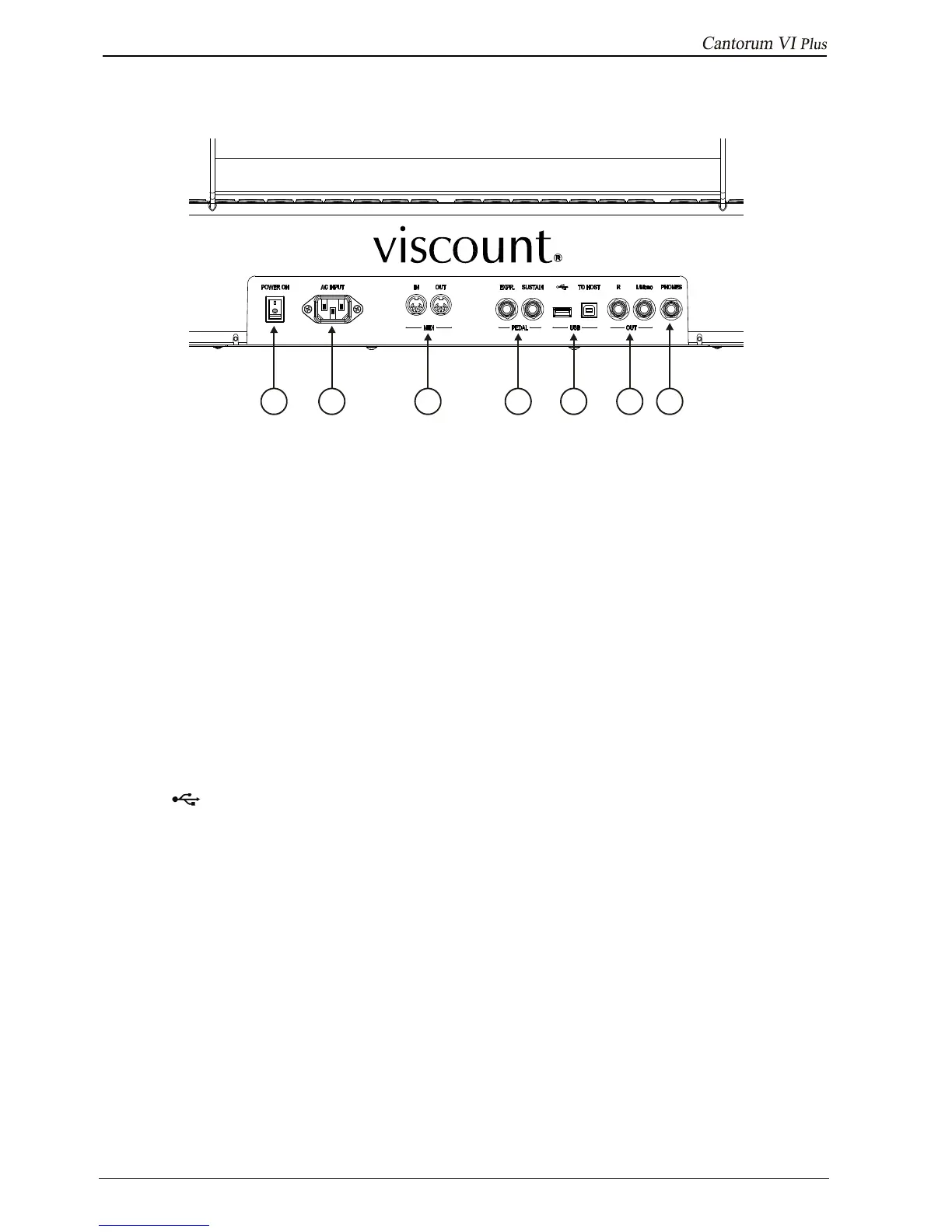
2.2 REAR PANEL
1. [POWER ON] switch: switches the Cantorum VI Plus on and off.
2. [AC INPUT] socket: connector for the power cable supplied with the instrument.
3. [MIDI] connectors: connectors for connecting MIDI devices.
- [IN]: input connector for receiving data from an external MIDI unit to the Cantorum VI Plus.
Connect to the MIDI output of the transmitting device (e. g. a sequencer).
- [OUT]: this connector transmits the MIDI data generated by Cantorum VI Plus. Connect to
the MIDI input of the receiving device (e. g. an expander).
4. [PEDAL] connectors: connectors for connecting pedals.
- [EXPR]: Connector for the expression pedal, to continuously control the instrument volume.
- [SUSTAIN]: Connector for a switch-type pedal to control the Sustain effect for orchestral
voices.
5. [USB] connectors:
- [ ]: insert the USB stick you want to use into this connector.
- [TO HOST]: connector for transmitting and receiving MIDI data with a computer.
6. [OUT] connectors: line outputs for connection to external audio devices (powered speakers, mixers,
amplifiers), in which the instrument's general signal is present.
In case of stereo system, connect the [L/Mono] output to the left channel and the [RIGHT] output to
the right channel. If a monophonic system is used, only connect the[L/Mono] connector.
7. [PHONES] connector: Jack connector for connecting stereo headphones. The internal speakers are
turned off when the headset is connected.
1 2 3 4 5 6 7












 To Next Page