9
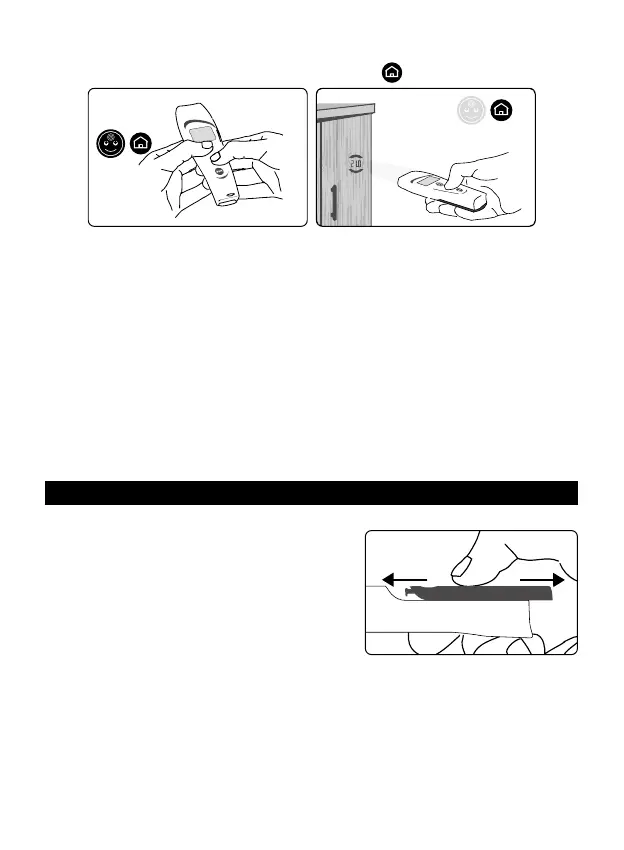
ternal wall) or wardrobe with uniform temperature and at a point approximately 80/150
cm (30 to 60 inches) from the oor. Press the “home”
button (g. 10);
Fig. 10
MQCS
• once the right distance is reached (temperature value between the arches, g. 6), re-
lease the button: the lights ash slowly and the display shows the room temperature.
To ensure a reliable temperature reading, do not focus the thermometer on an outside
wall, window, source of heating or cooling (radiator, air conditioner, lamp, computer,
surface in contact with the human body, etc.).
• The thermometer is now ready to take a reading and will keep the MQCS for 30
minutes.
Manual quick calibration (MQCS) can also be performed without the countdown if, for
example, you are moving between rooms with dierent temperatures.
This system, too, enables the thermometer to take suciently accurate readings.
In this case, “MQCS” appears on the display indicating that manual quick calibration
has been performed.
The MQCS is possible only if the room temperature is in the 10,0-45,0°C (50.0-
113.0°F) temperature range.
9. REPLACING the BATTERIES
• Set your thumb in the oval hollow on the back of the unit, press down and slide the
battery hatch out as shown in g. 11.
• Remove the battery hatch.
• Remove the old batteries and dispose of them
as required in the containers provided for this
purpose.
• Insert 4 new AAA - LR03 batteries, preferably
alkaline, carefully complying with the position in
-
dicated in their housing.
• To close the hatch, slide it in the opposite direction from which it was opened.
• After changing the batteries, let the thermometer stabilize for 20 minutes before
taking a temperature reading, or run a manual quick calibration (MQCS, par. #8).
• Remove the batteries if you do not expect to use the thermometer for a long
time.
Fig. 9
MQCS
Fig. 11
Close Open


 To Next Page