9.Printer settings
The printer settings can modify the printing paper or the related functions of the
machine.
*Long press "ZERO" and click on the numeric keypad "1""1""3".
*Click "X" to go to the next item.
*Click "OVERRIDE" to enter the previous item.
*Click "PRINT" to enter internal modification or save the modified content.
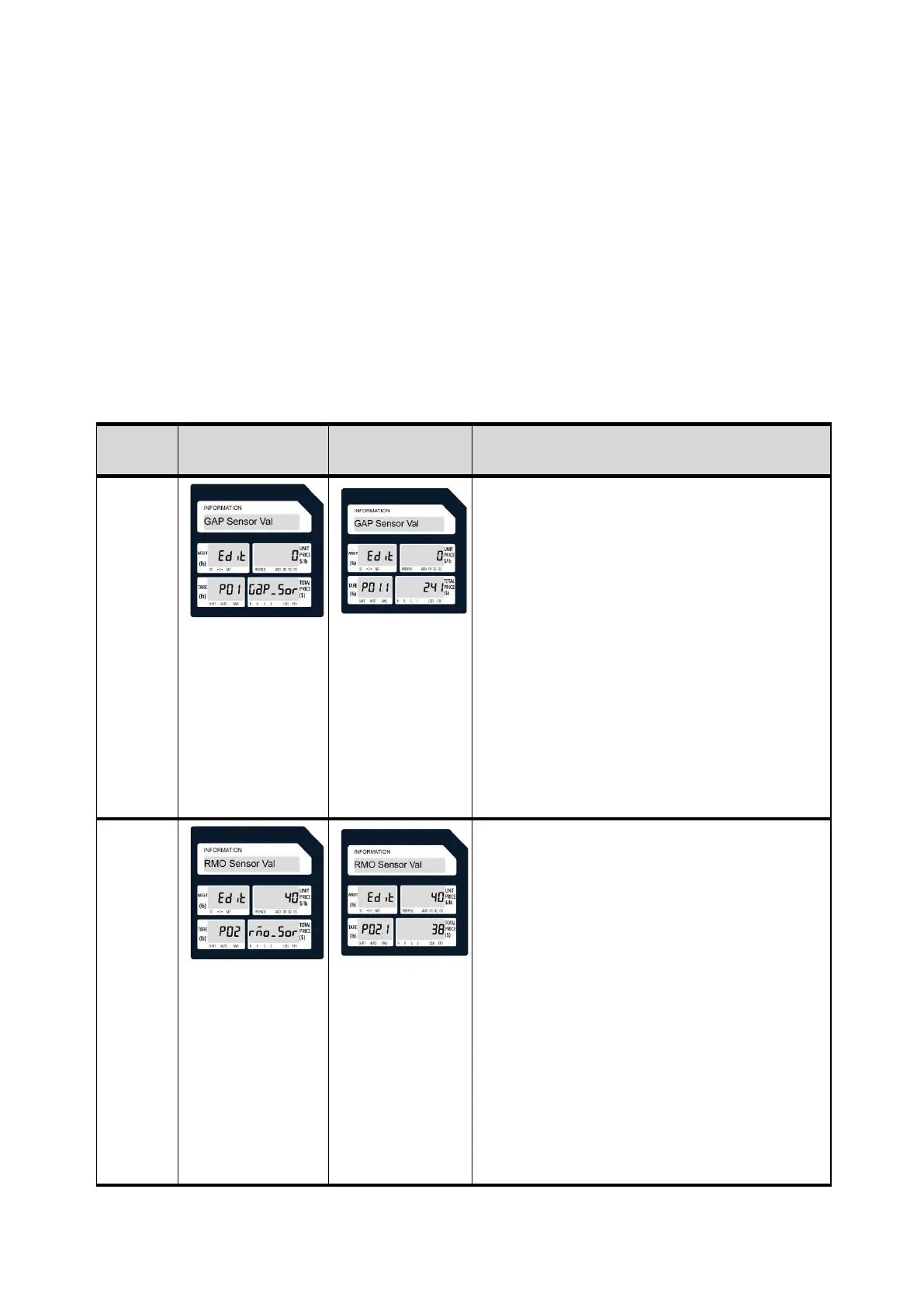
Mode 113
• The default value is 0, which means automatic detection.
• Click the Print button to enter the options to modify.
• If the paper is out of the detection range, you need to enter it
manually. Methods as below:
1. GAP Sensor Val needs to get two measured data: A, label and
backing paper value; B, backing paper value. Put the backing
paper and label paper in the printer to get the A value; test the
backing paper in the printer to get the B value.
2.Edit Enter the calculated value on the right side, the formula is
as follows: (A + B) / 2.
Example: A = 88, B = 236, (A + B) / 2 = (88 + 236) / 2 = 162
That is, enter 48 on the right side of Edit and double-click the Print
key to save all settings.
Done.
• The default value is 0, which means that when printing multiple
sheets of labels, the paper output port must ensure that there is
no paper coming out from the front. Remove one sheet to get the
second sheet.
• Click the Print button to enter the options to modify.
• If continuous paper ejection is required, do not remove the
previous sheet. Methods as below:
1. RMO Sensor Val needs to get two measured data: A, the value
when there is no paper at the paper output port (the default is 17);
B, the value with paper at the paper output port.
2.Edit Enter the calculated value on the right side, the formula is
as follows: (A + B) / 2.
Example: A = 17, B = 79, (A + B) / 2 = (17 + 79) / 2 = 48
That is, enter 48 on the right side of Edit and double-click the Print
key to save all settings.


 To Next Page