VISIONEER
®
ROADWARRIOR 4D LOADING DOCUMENTS TO SCAN
18 SCANNER USER’S GUIDE
Using the Carrier Sheet
WARNING: the plastic bag for the carrier sheet poses a suffocation hazard. Keep the bag away from
children.
1. Take the carrier sheet out of its plastic bag.
We recommend that you keep the bag and place the carrier sheet back in the bag when you are done
scanning. This will help to prevent scratches to the carrier sheet.
2. Remove the tissue paper.
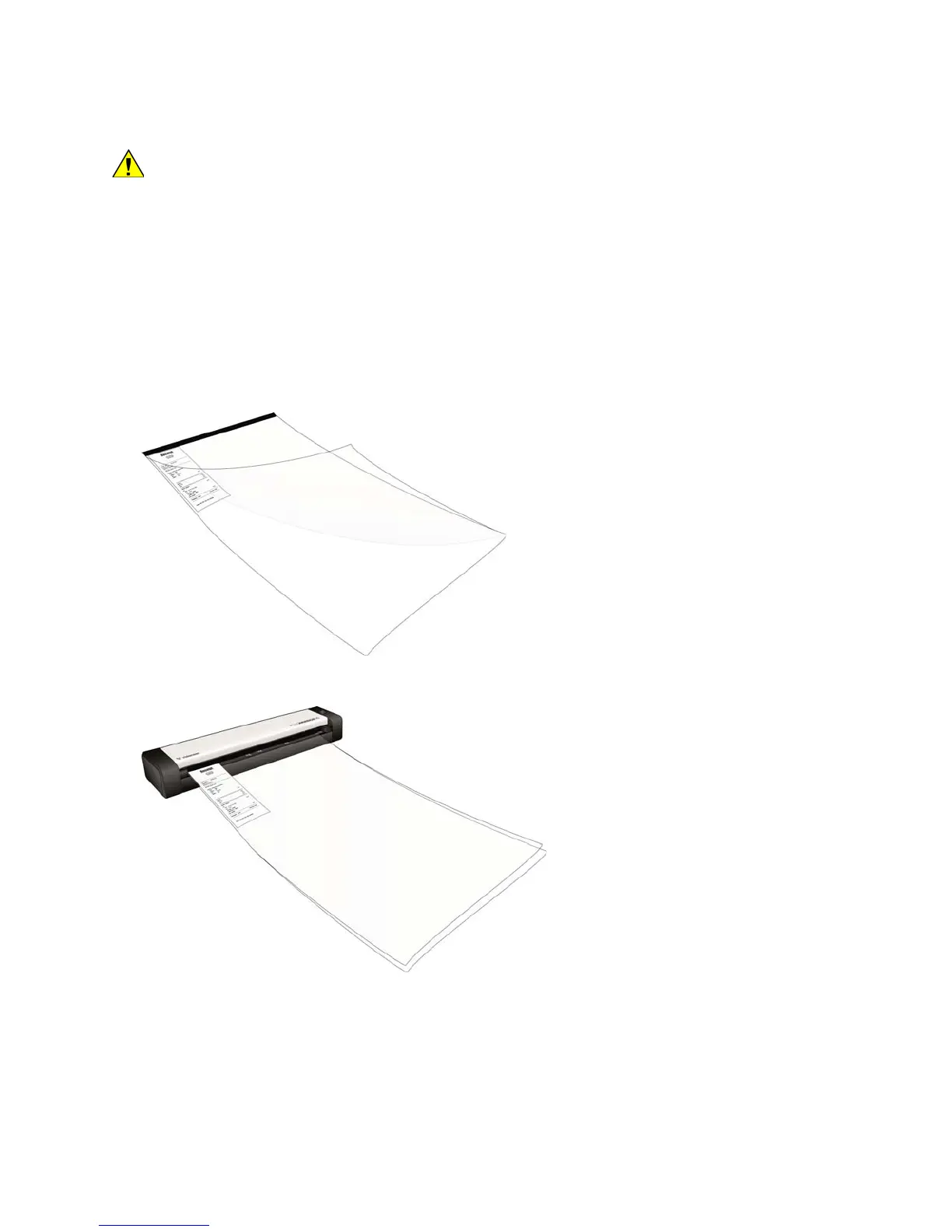
3. Open the carrier sheet and place the item you want to scan in the upper-left corner of the carrier sheet.
If the item you are scanning is not in the upper-left corner of the carrier sheet, you may see inconsistent
results or errors.
4. Place the carrier sheet in the scanner with the black edge in the paper feed slot.
5. When scanning is complete, remove the item from the carrier sheet and place the carrier sheet back in its
plastic bag.
Note: store the carrier sheet in a place where it can remain in a flat like-new condition. Creases in the plastic can
cause unusual light reflections while scanning which may appear as lines in the final image.











 To Next Page